Webmail to IMAP Migration Software
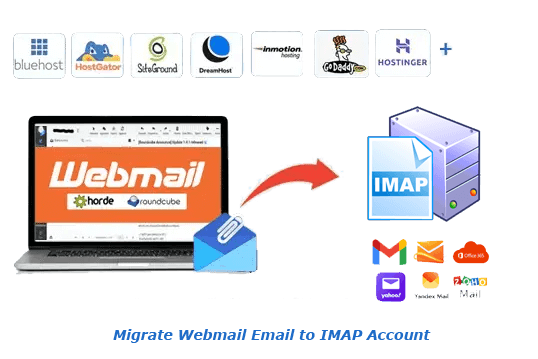
Proficient utility to migrate emails from email account available at any hosting provider to any IMAP based email service. Move email from account you using with Roundcube and Horde Webmail apps. Export emails to Gmail, Yahoo, Office365, Yandex and more with direct process.
- Migrate Webmail email to any email service supporting IMAP.
- Available facility to export emails from only chosen folders.
- Email filtering feature to export email of selected date range.
- Migrate email from webmail with every related property.
- Move email to IMAP account - New Folder or Default Folder.

Webmail to IMAP Migration Software - Features Overview
Instant Fast Software Delivery via Email

- Migrate emails from email account those are accessible from Roundcube and Horde Webmail to Gmail, Office365, Yandex, AOL, and other IMAP based email platform.
- Choose specific email folders (Inbox, Sent, Drafts, etc.) to migrate, reducing unnecessary data transfer.
- Filter and migrate emails based on a specific date range to transfer only relevant data.
- Preserve every email's content, attachments, and metadata exactly as they were in the source account.
- Create new folder or transfer webmail emails to existing folders in IMAP account.
- Additionally, get backup facility to save emails locally in multiple formats, including - PST, EML, EMLX, MSG, HTML, MHTML, MBOX, and PDF.
- From webmail account directly Import emails into Thunderbird configured profiles.
- Compatible with all hosting providers like - Bluehost, HostGator, InMotion, Namecheap, SiteGround, GoDaddy, GreenGeeks, Liquid Web, etc.
- Designed for both beginners and experienced users - requires no technical expertise.
- Works seamlessly on all Windows O/S versions, including 11, 10, 8.1, 8, 7, Vista, and XP.
Free Demo Test by migrating up to 25 emails from each chosen email folder before purchase.
Webmail to IMAP Migration Software - All Features with Details
All-in-One Webmail to IMAP Migration Utility
Powerful migration tool with feature to quickly and securely export emails from webmail platforms like Roundcube and Horde Webmail to any IMAP-supported email service. This tool simplifies entire webmail email migration process without need for technical skills.
Compatible with all major hosting providers, including: Bluehost, Hostgator, InMotion Hosting, Namecheap, SiteGround, GoDaddy, GreenGeeks, Liquid Web, and many others that use cPanel-based webmail systems.
- Migrate to Personal Email Accounts: - Transfer emails from your webmail account to personal accounts: Gmail (@gmail.com), Yahoo Mail, Outlook.com, and more.
- Migrate to Business or Custom Email Accounts: - Migrate email to professional email platforms using IMAP, including: Google Workspace (G Suite), Microsoft 365 (Office 365), Zoho Mail, or any custom domain email (e.g., you@yourcompany.com).
Learn More >> How to Migrate Webmail to IMAP?

Selective Folder Migration
Select only the email folders you want to export. The tool automatically fetches and displays all folders from your webmail account. You can select specific folders, such as Inbox, Sent, or Custom, to migrate only relevant messages, avoiding the massive transfer of unnecessary data.

Filter Emails by Date Range
Precisely export emails from a specific time period. Apply smart date filters by selecting a start and end date. This ensures that only emails sent or received within that range are included while the export process, making your migration more targeted and efficient.

Complete Email Detail Preservation
Secure and accurate transfer of all email data. Each email is exported in its original format, with no changes to the content or structure. All components, including headers (From, To, Cc, Bcc, Subject, Date), message body, and attachments, all are preserved with 100% accuracy.

Migrate to Existing or New Folder
- Migrate to New Folder: - Create a fresh folder in your IMAP account to store imported emails.
- Migrate to Default Folder: - Automatically import emails to existing folders in IMAP account (e.g., Inbox → Inbox, Sent → Sent), maintaining their original folder structure.
Flexible IMAP import options to suit your needs: -

Multiple Option for Email Transfer
Offers separate migration options for webmail email transfer to these platforms: -
- Import to Office365: - Direct import into Microsoft 365 (Outlook 365) account's mailbox.
- Import to Yahoo Mail: - Effortless email migration from webmail to your Yahoo account.
- Import to IMAP Account: - Migrate webmail account emails to Gmail and Google Workspace account.

Download Emails in Local Drive
Save webmail emails locally in over 10 different formats. In addition to direct migration, you can also backup your emails by saving them to your computer. Choose from saving options - PST, MBOX, EML, PDF, MSG, HTML, MHTML, EMLX, and even Thunderbird for local storage.

Works with All Hosting Providers
Compatible with all hosting-based webmail platforms. Whether your email account is hosted on Bluehost, HostGator, InMotion, SiteGround, Namecheap, GoDaddy, GreenGeeks, Liquid Web—or any cPanel-based provider—you can easily migrate data from them with no issues.

User-Friendly Interface for All Levels
Easy navigation with a clean, graphical design. No technical background is required—simply launch the software and follow the migration steps in the software's intuitive interface. Whether you're a beginner or an expert, the migration steps are clear, fast, and simple.

Compatible with Windows O/S
Run the software on any Windows PC. Fully supported on Windows 11, 10, 8.1, 8, 7, Vista, XP, and older systems (both 32-bit and 64-bit). No additional requirements or no other application installation required.

Free Webmail to IMAP Migration
Try the migration tool at no cost. Use the free demo version to migrate up to 25 emails per folder from webmail account to any IMAP supported platform. It's a risk-free way to try the software before you buy.
eSoftTools Webmail to IMAP Migration Software

eSoftTools Webmail to IMAP Migration software

Add webmail account and load mailbox folders

Select needed folders for export
IMAP login in webmail migration software

Migrate Webmail email to IMAP
Software Comparison
| Software Features | Trial Version | Full Version |
|---|---|---|
| Migrate Webmail email to all IMAP accounts | ||
| Email Export from Chosen folders | ||
| Separate Migration options for Office365/ Yahoo Mail/ Gmail | ||
| Email Date-Wise Filter | ||
| Migrate to New or Default IMAP folders | ||
| Migrate Unlimited Emails | Migrate 25 email from each chosen folder | |
| Download Now | Buy Now |
Software Specification
Trial Limitations
Allowing users to try out all the software features free. It lets you migrate up to 25 emails per folder from your webmail to IMAP account.
Software Info
Version
v4.0
All IMAP based Webmail services (including - Roundcube/Horde)
License
Personal, Corporate, Technician
Language Supported
English, German, Italian, French, Spanish
System Requirements
Processor
Intel® Pentium Class
Operating System
Windows
Hard Disk Space
50 MB of free hard disk space
RAM
Minimum 512 MB is required
Software Delivery
Electronic
YES
Mode
Delivery by E-mail
Supported Windows OS
Works with all windows O/S editions 11, 10, 8.1, 8, 7, XP, Vista, & below editions
Frequently Asked Questions (FAQ)
How to migrate emails from Roundcube/Horde webmail to IMAP email account?
- Download and install the Webmail to IMAP Migration Software on your Windows system.
- Launch the application and enter your webmail account details, including email address, password, IMAP host, port, and choose encryption type.
- Click the Login button to connect and load all available folders from your webmail account.
- Choose the folders containing the emails you wish to migrate.
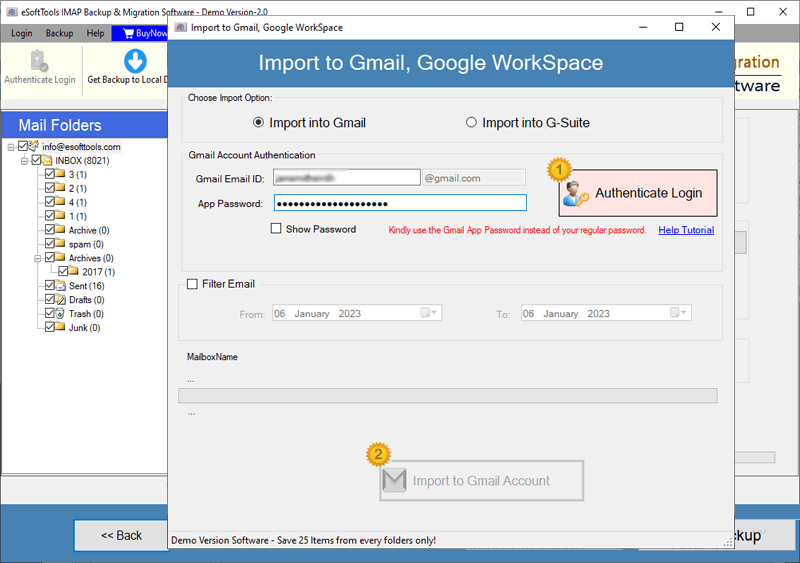
- Click on “Import into Cloud” and select Import to IMAP account as the destination platform.
- Enter the destination IMAP email account credentials (email, app password, port and host).
- Select from migration options like Migrate to default folder, Create new folder, and Date range filter.
- Click Import to IMAP Account button and begin transferring your emails to selected destination IMAP account.
Check complete process, by visiting here: How to Migrate Webmail email to IMAP Account?
Can I use this software to migrate webmail emails to email accounts like - Zoho, Yandex, Mail.com?
Yes. This software supports migration to any email service that supports IMAP, including Zoho Mail, Yandex Mail, Mail.com, AOL Mail, ProtonMail, and many others.
Apart from IMAP, this tool offers dedicated email platform options to transfer emails more easily?
Is there an option to download webmail emails to local storage instead of cloud migration?
How does folder selection work in this software??
Upon logging in, the software automatically loads all mail folders associated with your webmail account. You can manually select specific folders to include in the migration process—ensuring that only essential data will be transferred from your account.
What is Email Filtering Option and How Does It Help??
The email filter feature allows users to set a specific date range (start and end date). Only emails within this time frame will be migrated—ideal for transferring targeted email data or reducing unnecessary bulk migrations.
Will the original structure and content of emails be preserved?
What do the options Migrate to Default Folder and Migrate to New Folder mean?
- Migration to New Folder: - Creates a separate folder under your destination email account to store all migrated emails from the webmail source.
- Migration to Default Folder: - Transfers emails to their respective default folders in the destination account (e.g., Inbox → Inbox, Sent → Sent).
Can I use this software to migrate emails from HostMonster or other hosting providers?
Yes, the software is fully IMAP-compliant, meaning it supports any webmail service or hosting provider that allows IMAP access—such as HostMonster, Bluehost, DreamHost, SiteGround, etc.
Is there a free version of this software, and what are its limitations
Yes, a free demo edition is available. It allows you to migrate 25 emails per folder from your webmail account to your target IMAP account. It's the perfect way to test the tool's capabilities before upgrading to the full version.