Overview
If you have an Outlook PST file and want to access your emails in Yahoo Mail, you might be wondering how to do it. Unfortunately, Yahoo Mail does not provide a direct way to import PST files.
But don’t worry! This guide will walk you through simple and effective methods to import PST to Yahoo Mail, including all mail folders and sub-folders, both manually and with a professional solution.
Why You Cannot Import PST Directly into Yahoo Mail?
A PST file is a proprietary data file used by Microsoft Outlook to store emails, contacts, calendar and other mailbox items.
On the other hand, Yahoo Mail is a web-based email service that supports IMAP/SMTP protocols, and it does not supports to upload PST file directly.
Therefore, you need an intermediate method to read Outlook PST files and import them into your Yahoo Mail account to complete the migration.
Benefits of Importing PST to Yahoo Mail
Migrating Outlook PST data to Yahoo Mail offers several advantages, especially for quick email accessibility by users.
- Access Emails Anytime, Anywhere – With the help of PST to Yahoo Mail migration, you can access your emails from any device with an internet connection.
- No Dependency on Microsoft Outlook – PST files require Outlook to open and manage. However, once you migrate PST files to Yahoo Mail, you eliminate the need for Outlook to view emails, as you can check and respond to emails through a browser.
- Free Email Platform – Yahoo Mail is free to use and gives you good storage space for your emails.
- Centralized Email Management – You can keep all your old PST emails and new Yahoo emails in one place, and it makes managing emails easier in one place.
- Simplified Email Migration – Once your PST data is in Yahoo Mail, it becomes easier to migrate further to other IMAP-supported platforms when needed.
- Safe Backup of Outlook Data – It is a good decision to back up Outlook PST emails to Yahoo Mail cloud, as it reduces the chance of data loss due to system crashes or file corruption.
Methods to Import PST to Yahoo Mail
There are mainly two methods to transfer PST data into Yahoo Mail:
Method 1 – Import PST to Yahoo Mail Using Outlook (Manual Method)
Steps:
- Open Microsoft Outlook on your system
- Go to File → Open & Export → Import/Export
- Select Import from another program or file
- Choose Outlook Data File (.pst)
- Browse and select your PST file
- Import emails into your Outlook account
Now Connect Yahoo Mail:
- Add your Yahoo Mail account in Outlook using IMAP
- Drag and drop emails from PST folders to Yahoo Mail folders
- Wait for syncing to complete
Limitations of the Manual Method:
- Requires Outlook installation
- Time-consuming and complex setting involves to increase data loss
- Not suitable for importing large PST files to Yahoo Mail
- Risk of sync errors
- Manual effort with deep technical knowledge required
Method 2 – Use Professional PST to Yahoo Mail Tool (Recommended)
Indeed, everyone knows that manual methods have very complex steps and always pose a risk of data loss. In that situation, using a professional solution like eSoftTools PST to IMAP Converter is the most reliable approach to import PST files directly into Yahoo Mail. This advanced software is specifically designed to make the migration process easier by connecting their Yahoo Mail account via IMAP protocol and upload PST files to Yahoo account without any data loss.
The software always preserves email properties such as attachments, folder structure, metadata, and email formatting during the conversion. The software supports bulk PST file migration to Yahoo Mail as well.
Benefits of eSoftTools PST to Yahoo Mail Migration
- Direct PST to Yahoo Mail migration – User can either upload a single PST file or Multiple PST files to Yahoo Mail account in one go.
- No Outlook installation required – With our software, no MS Outlook installation is required, thus, you can perform a quick migration.
- Bulk migration supported – The software supports bulk PST file to Yahoo migration.
- Maintains folder structure – The software is specifically designed to maintain every folder structure during conversion.
- Preserves attachments and metadata – Moreover, all email attachments and important details remain safe and unchanged.
Comparison between Manual and Professional Methods
| Feature | Manual Method | Professional Tool (eSoftTools PST to Yahoo Mail Migrator |
| Ease of Use | Complex | Easy |
| Conversion Speed | Slow | Fast |
| Data Safety | Risk | Secure |
| Bulk Migration | Limited | Supported |
| Outlook Required | Yes | No |
How It Works
Step 1) To begin with, download the software from eSoftTools by clicking the Download button.
Step 2) Install the software and open it.
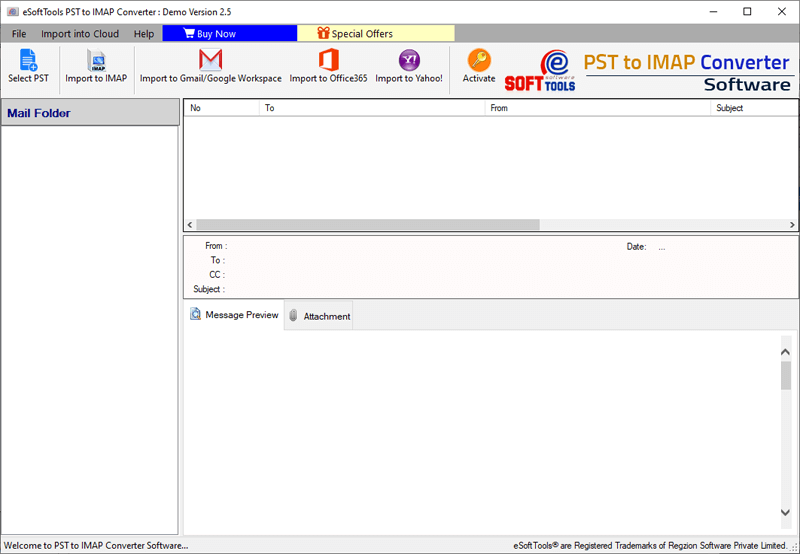
Step 3) Click on the “Select PST” button from the toolbar to select the PST file.
Choose the option (Single PST or Bulk PST) migration according to your needs and proceed with the Next button.

Step 4) In this step, you can check the preview of emails, contacts, calendar, notes, and other data within the software.
Now, choose the required folders from the left folder hierarchy to import them into the IMAP account.

Step 5) Click on the “Import to IMAP” button from the toolbar to go to the import screen.
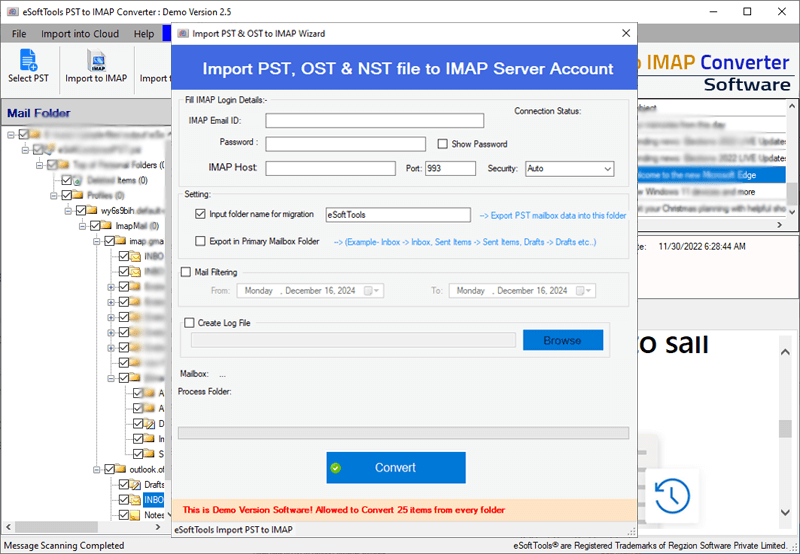
=> Provide your account credentials, such as IMAP email ID, password, server host, port number, and security type.
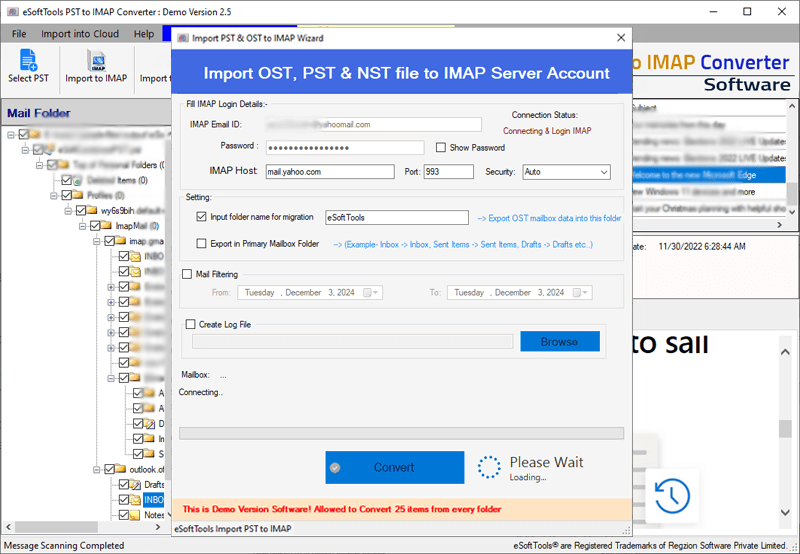
Step 7) Now, click on the Convert button to start the migration process.
Now, you are done… All your PST files are imported into your IMAP account.
Features of eSoftTools PST to Yahoo Account Migration:
- Easy and simple tool to upload Outlook PST files to Yahoo Mail
- Single and Multiple PST file upload to Yahoo account.
- Migrate Selective folders from the PST file to Yahoo Mail
- The software supports uploading PST to any IMAP-enabled web email cloud
- Advanced email filtration available
- Search and Migrate emails date-wise
- Import the configured Outlook PST file to Yahoo Mail account.
- Freeware demo version available to test the features and efficiency of the software.
FAQ (Frequently Asked Questions)
Yes, with eSoftTools PST to Yahoo Mail Migrator, you can import PST to Yahoo Mail without Outlook installation.
No, Yahoo Mail does not support direct PST file uploads.
Yes, migrating PST files to Yahoo Mail using eSoftTools PST to Yahoo Converter is always safe and secure. Additionally, the software is designed to securely transfer emails, attachments, contacts, and other mailbox data without altering the original PST file.
The time depends on the PST file size and your internet speed. However, with a stable and high-speed internet connection, the software performs the migration efficiently.
Yes, in addition, our software supports bulk PST file migration, allowing you to transfer multiple PST files to Yahoo Mail simultaneously.
Yes, our software maintains the original folder hierarchy during migration.
Attachments are always preserved during migration with eSoftTools PST to IMAP Migrator tool.
Yes, you can use the email filter option to filter emails and import into Yahoo Mail.
Conclusion:
In this blog, we discussed both manual and professional methods to import PST to Yahoo Mail. While the manual approach may work for small data, it often involves multiple steps, requires Outlook, and carries risks such as data loss, duplication, and slow performance.
To overcome these challenges, therefore, using a trusted solution like the eSoftTools PST to Yahoo Mail Converter becomes a smarter choice. It simplifies the entire process by offering direct migration, maintaining folder structure, and ensuring complete data safety.
If you are looking for a fast, secure, and hassle-free way to complete PST to Yahoo Mail migration, a professional tool is the most reliable option. It not only saves time but also guarantees accurate results without any data loss.