Web.de Email Backup & Migration Software
Take full control of your Web.de mailbox with this intelligent backup and migration utility. Whether you need to store your emails locally or migrate the entire inbox to a new email service, this tool makes it all simple. Complete all email export operations with a clean and easy process that requires no technical skills.
- Save Web.de emails locally in 10+ formats like - PST, MBOX, etc.
- Migrate Web.de emails to other web or cloud platforms directly.
- Choose specific Web.de email folders for backup or migration.
- Export emails using custom date-range filters for better control.
- Get the power for fast email transfers with zero data loss risks.

Web.de Email Backup and Migration Utility - Main Functions

Instant Fast Software Delivery via Email

- Download emails from Web.de account and store to your system for secure offline storage.
- Save Web.de emails in PST, EML, EMLX, MBOX, PDF, MSG, HTML, MHTML, and Thunderbird.
- Directly migrate emails from Web.de to Gmail, Yahoo Mail, Office365, or any IMAP email service.
- Export and save each email as a separate file in EML, EMLX, PDF, MSG, MHTML, or HTML format.
- Combine selected Web.de email folders into one PST file, compatible with all MS Outlook versions.
- Save emails of multiple folders in a single MBOX or generate separate MBOX files for every folder.
- Automatically detect Thunderbird profiles and direct import selected Web.de email folders.
- Displays full folder structure from Web.de account for customized email folder selection & export.
- Set your preferred location on your drive to store output files during Web.de email backup process.
- Smart file naming options to assign name to new files with subject, sender, and date combinations.
- Emails remain unchanged at both ends—no alterations in original email data or structure.
- Retains complete email details - from, to, bcc, subject, message content, & all metadata.
- Simple graphical interface ensures hassle-free use for both beginners and advanced users.
- Fully supports Windows OS: 11, 10, 8.1, 8, 7, Vista, XP, and other older versions too.
Try before purchase : Free trial allows backup/migrate 25 emails per folder from Web.de account.
Powerful Features of eSoftTools Web.de Mail Export Software
Efficient Email Backup & Migration from Web.de
Versatile Windows-based tool designed to simplify email backup and migration from Web.de mail account.
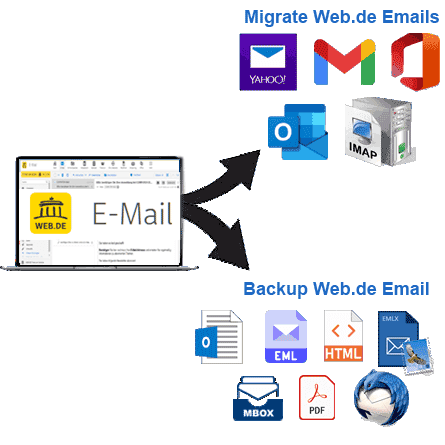
- Web.de Emails Local Backup: - Easily download and save your Web.de emails to your computer in multiple file formats such as PST, EML, MBOX, PDF, MSG, HTML, and more. Choose the format that best suits your needs and access your emails anytime with compatible applications.
- Web.de Email Migration to Cloud or Webmail Services: - Transfer selected Web.de mail folders directly to popular cloud and webmail platforms such as - Gmail, Yahoo Mail, Office 365 and any IMAP-enabled service. Move your emails quickly and securely without losing a single bit of information.
Working Process >> How to Backup/Migrate Web.de Emails?

Export Web.de Emails to Outlook PST
Easily export emails/mail folders from Web.de account to Outlook PST files. Select either specific folders or entire mailboxes and save them in Unicode PST format. Best backup feature for users who want to migrate Web.de emails to any version of Microsoft Outlook.

Save Individual Web.de Emails
Extract emails from your Web.de account and save each email with attachments and relevant information in distinct file. Saving is supported in six formats: EML, EMLX, MSG, HTML, MHTML, and PDF. Choose the desired format to effectively organize your emails for easy access and management.

Export Web.de Mail Folders to MBOX
- Single MBOX: - Import emails from multiple folders into one MBOX archive.
- Separate MBOX: - Export each mail folder and store it as a separate MBOX file.
Archive your Web.de mailbox data/mail folders in MBOX files using two smart options: -

Web.de Mail Import to Thunderbird
Migrate web.de emails to the configured profile of Thunderbird email client. Perform this simple task by taking advantage of the software's automatic detection of Thunderbird profile. This feature imports emails directly into Thunderbird's local storage while accurately preserving folder hierarchy and structure and all internal emails.

Folder Selection for Email Export
Select specific email folders to export from your Web.de account. The software scans and displays all your email folders, giving you the flexibility to export one, several or all folders as you like. This allows precise control over your data export process, making it easy to transfer only the emails you need.
Custom Folder in IMAP Account
When migrating from Web.de to another email service, this feature provides the ability to create new folders within the destination account. Users can name these folders as per their choice. Emails migrated from Web.de, along with their sub-folders, will be systematically stored in these newly created folders.

Date-Range-Based Email Export
Gain full control over the emails you want to export using the date-range selection tool. You can filter emails based on the date they were sent or received, ensuring only relevant emails are included in the backup/migration. This not only saves time but also avoids unnecessary clutter of emails from the export operation.

Customize Your Export File Names
Choose from over 9 different file naming formats to automatically organize your exported emails. The software allows you to set a naming scheme based on sender, subject, and date. This feature applies when saving emails in EML, EMLX, HTML, MHTML, MSG, or PDF formats.

Maintain Original Email Integrity
When exporting emails from Web.de, the software ensures that each email is saved exactly as it appears in your inbox. This includes preserving original email formatting, attachments, metadata, headers, and even embedded images. Stores email with complete integrity, ensuring that no data or formatting is lost during transfer.

Flexible Backup Storage Location
Users have complete control over where your email backups will be stored. Whether you want to save your files to a specific folder, an external drive, this software allows you to choose the path manually. Organize your backup files exactly how and where you want them on your system, giving you complete control over your data storage.

Smart User Interface for All Users
Get a user-friendly experience with the software's intuitive dashboard. The interface is designed for users of all levels, making email backup and migration easy without any technical expertise. The simple layout and clear instructions guide you through every step of the process, ensuring a hassle-free experience.

Compatible Across All Windows O/S
This software is compatible with all modern Windows versions, including Windows XP, Vista, 7, 8, 8.1, 10, 11 and others. Its lightweight design ensures quick installation and smooth performance even on standard system configurations. Use without the need for additional software dependencies.

Free Web.be Backup & Migration
Start your email backup and migration process for free! eSoftTools Web.de Backup and Migration Tool offers a demo version that allows you to export 25 emails from each folder for free. You can backup emails with the free demo and even migrate them to another service. This is a great way to test the software and its features before making any purchases.
eSoftTools Web.be email Backup & Migration Software

Web.be email Backup/ Migration software

Web.be email Account Login

Choose required Web.be email account mail folders

Download Web.be email to different formats

Download Web.be email to Local drive

Import Web.be email to cloud apps

Migrate Web.be email to Office365

Migrate Web.be Emails to Gmail
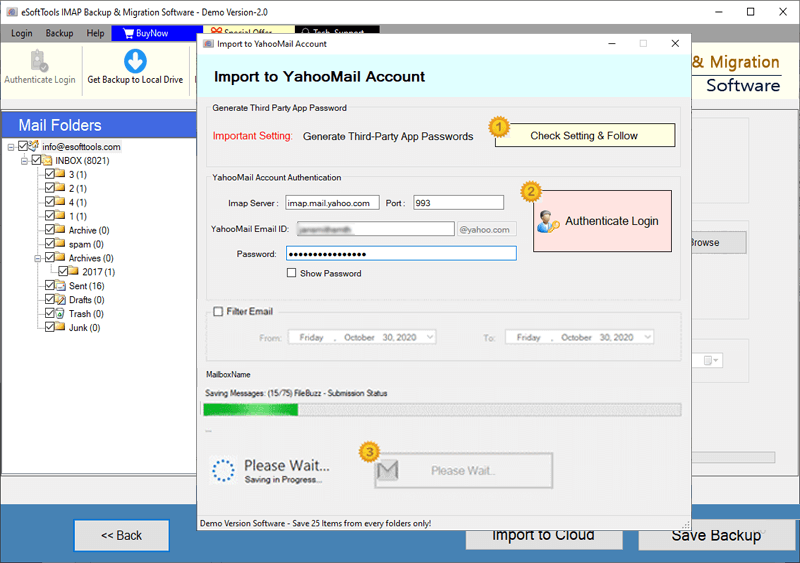
Web.be Emails export to Yahoo account

Export Web.be account emails to Outlook.com/ Hotmail

Migrate emails from Web.be email to other imap mail app
Software Comparison
| Software Features | Trial Version | Full Version |
|---|---|---|
| Backup and Migrate Emails from Web.de email | ||
| Export Web.de email to PST, EML, MSG, PDF, MBOX, and Other Formats | ||
| Migrate Web.de email to Gmail, Office 365, Yahoo & Any IMAP-Compatible Account | ||
| Export Web.de Mail Folders as Separate MBOX Files | ||
| Import Web.de Mail Folders into Single MBOX File | ||
| Import Web.de email Directly into Thunderbird (Auto-Detect Feature) | ||
| Apply Date Range Filters to Export Specific Emails | ||
| File Naming Convention | ||
| Full Web.de email Backup & Migration Support | Limited to 25 emails per folder in free demo | |
| Download Now | Buy Now |
Software Specification
Trial Limitations
Backup/Migrate up to 25 emails per folder from your Web.de account at no cost. Test all software's functionality and performance before committing to a purchase.
Software Info
Version
v6.0
Web.de
License
Personal, Corporate, Technician
Language Supported
English, German, Italian, French, Spanish
System Requirements
Processor
Intel® Pentium Class
Operating System
Windows
Hard Disk Space
50 MB of free hard disk space
RAM
Minimum 512 MB is required
Software Delivery
Electronic
YES
Mode
Delivery by E-mail
Supported Windows OS
Works with all windows O/S editions 11, 10, 8.1, 8, 7, XP, Vista, & below editions
Frequently Asked Questions (FAQ)
How to Save/Backup Web.de Emails to Computer?
- Download and install eSoftTools Web.de Email Backup & Migration Tool on your Windows PC.
- Select IMAP as your email service and enter your Web.de account login details.
- Click on the Login button, and the software will fetch all Web.de mail folders. Choose folders you want to back up or migrate.
- Pick the desired export format for your emails - options include EML, EMLX, MSG, PDF, MBOX, HTML, and more.
- Customize backup settings by selecting - destination folder, date filters, and naming format for the saved files.
- Click on Start Backup button and initiate the process to securely save your Web.de emails to local computer.
For a detailed step-by-step guide with screenshots, visit: How to Backup Web.de Emails to Your Computer?
How to Migrate Web.de Emails to Cloud Email Platform?
- Download setup/exe file of eSoftTools Web.de Email Backup & Migration Tool and install it on Windows PC.
- Select IMAP as the source email platform and enter Web.de account login information (email address, password, port, and server hostname).
- Click on Login button, and the software will retrieve and display all your Web.de email folders.
- Choose the email folders you wish to transfer and click on the Import to Cloud option.
- Select the destination email platform for migration, such as Gmail, Yahoo Mail, Office 365, or IMAP.
- Enter login credentials for the destination email account where you want to import your Web.de emails.
- Authenticate your destination email account, connect to mail server, and start migration of Web.de emails.
Check the compleye guide with images, here: - How to migrate Web.de Emails to Cloud/Webmail?
How does this software handle my Web.de emails during the backup or migration process?
What file formats can I use to save my exported Web.de emails?
What does the Save feature do in Thunderbird?
The Save to Thunderbird feature enables you to transfer your Web.de emails directly to the Thunderbird email client. This feature automatically finds the Thunderbird local storage folder and imports all your Web.de emails, allowing you to easily view and manage them offline from Thunderbird.
To which online email services can I transfer my Web.de emails using this software?
What additional requirements do I need to perform a Web.de email backup?
Is this software compatible with all versions of Windows?
What limitations are there in the demo version of the Web.de Backup/Migration Tool?
The demo version of the software provides users with the ability to backup and migrate up to 25 emails per folder from Web.de mail account. This allows you to test the features and performance of the software before making a purchase.