Runbox Email Backup & Migration Software
Best program for fast, easy and lossless email migration and backup from Runbox webmail account. Safely export emails from entire mailbox or selected folders. Packed with advanced and easy-to-use functions to get the best results for email transferring.
- Download emails and save in 9 distinct local file types.
- Migrate email from Runbox to Another Webmail Platform.
- Folder selection facility to export email from needed folders.
- Email exporting while retaining every relevant property.
- Date-wise email selection and filter for targeted email export.

Advanced Features Available in Runbox Email Exporter Tool

Instant Fast Software Delivery via Email

- Direct email migration from Runbox Webmail to Office365/ Gmail (Google Workspace)/ Yahoo Mail and IMAP supporting other email programs.
- Downloading emails from Runbox Webmail to your local drive as email files - PST/ EML/ EMLX/ MSG/ HTML/ MHTML/ MBOX/ PDF and Import in Thunderbird.
- Extract emails from chosen mail folders of Runbox account mailbox with folder selection facility.
- Imports mail folders from Runbox Webmail to PST files for using with MS Outlook email client.
- Storing singular email in separate file with export options EML/ EMLX/ MSG/ HTML/ MHTML & PDF.
- Supports importing emails from Runbox account to email profiles available in Thunderbird email client.
- Saving Runbox emails/mail folders in MBOX files with options - Single MBOX and Separate MBOX.
- Retains Runbox emails as original in both source (Runbox email profile) & destination file or service.
- Exports all emails with complete properties - TO, BCC, CC, Subject, Message, Attachments, etc.
- Filtering email based on date-range to extract email of specific dates for backup and migration.
- Folder input option to add a custom folder in destination cloud/webmail server while migration.
- Supports saving email backup files to location defined by users (Manual selection of saving path).
- Naming convention feature for providing name to resulting email files based on 9 different formats.
- GUI based interface for working with the software easily and effortlessly using all software functions.
- Software specifically for Windows O/S including - 11, 10, 8.1, 7, XP, Vista and older versions too.
Free Trial Support : Try demo edition to backup/migrate 25 emails from each Runbox mail folder.
Runbox Email Backup and Migrator Software - All Features Details
Most Reliable Runbox Email Transfer Solution
Best utility available for Runbox webmail users to quickly perform 2 different tasks with emails: -
- Runbox Email Download to Computer: - Extract emails from mail folder of Runbox webmail account and save locally in multiple file types. Store emails as local files in available options - PST, EML, EMLX, MSG, HTML, MHTML, MBOX, PDF. Also, get a separate option to import Runbox emails directly into the email profile being used in Thunderbird email client.
- Migrate Runbox Email to Webmail/ Cloud: - Export emails directly from your Runbox Mail account to a other web or cloud-based email platform. Perform a and easy and direct migration from Runbox Webmail to Gmail/ Yahoo Mail/ Office365 and IMAP supporting other email services.
Learn More >> How to Backup & Migrate Runbox Email?


Import Runbox Email to Outlook
Helps users migrate Runbox emails to email profiles existing in Outlook by saving emails to PST files. Export mail folders from Runbox Webmail account to Outlook-compatible PST files. Save all or specific folder in single PST and use on any version of MS Outlook with no issues.

Store Each Email in Single File
Facility to save each email in separate file is available. The software provides 6 different export options that enable users to save each email as a separate file. Preserve each email in a single file with relevant properties while using export options/saving file types - MSG/ EML/ EMLX/ HTML/ MHTML and PDF.

Save Runbox Mail folders in MBOX
- Save in Single MBOX: - Create one MBOX file to store emails from all your selected Runbox account mail folders. (No folder hierarchy, only stores emails)
- Save in Separate MBOX: - Save one mail folder with associated emails in each MBOX file.
Software allows saving email backup in MBOX file format with 2 distinct options: -

Add Runbox Email to Thunderbird
Allows you to add emails from all your selected Runbox account mail folders to the email profile available in Thunderbird email client on your desktop. In one click it detects Thunderbird and email profile storage location and imports emails from selected Runbox mail folders easily.

Email Export from Specific Folders
Most powerful function for fast and targeted email migration is mail folder selection. Get a preview of all mail folders available in Runbox account and be able to select only required mail folders to export emails from them specifically.

Retains Emails Originality & Integrity
Ensures complete preservation of Runbox emails during backup or migration. Maintains all original email attributes of emails such as sender, recipient, subject, timestamp, formatting, embedded images, and attachments.

Transfer Emails of Specific Dates
Users can apply date-range filters to selectively export or migrate emails from their Runbox account. This helps focus on emails sent or received during a specific time frame. This makes it ideal for archiving or transferring only important emails or avoiding unnecessary data transfers.

Smart Settings for Naming New Files
Provides flexible file naming options for exported emails, allowing users to easily organize and identify saved emails. You can name files using various combinations such as subject, date, sender, or recipient to avoid duplicates and simplify file management.
Note: - Supported with saving file options - EML, EMLX, MSG, HTML, MHTML, and PDF.
Migrate to Custom Folder in Webmail
When migrating emails from Runbox to another webmail or cloud service, users can specify a target folder where emails should be delivered. This ensures that emails are not mixed with existing emails and are stored in a structured, user-defined location.

Store Backup to A Chosen Location
This tool allows users to choose any destination path on their computer. You can easily choose a location from local drive, external drive, or network location from your machine to store exported email backup files. This flexibility supports better and easy data management.

Easy Access with Graphical Interface
Designed with a user-friendly graphical interface for easy navigation and accessibility even for non-technical users. All options are clearly presented, and users can complete complex operations such as migration or backup with just a few clicks.

Usable on All Windows O/S Editions
Software supports all popular versions of Windows O/S, including Windows 11, 10, 8.1, 8, 7, XP, Vista, and older versions. It runs smoothly on both 32-bit and 64-bit systems, requiring no special configuration or advanced hardware specifications.

Free Runbox Email Backup & Migration
Try it for free using the free demo version that allows you to get a quick overview by exporting or migrating up to 25 emails per folder. Experience the full functionality and performance of the software with the demo version. Test it and after satisfaction upgrade to the premium version for unlimited exports and advanced features without any restrictions.
eSoftTools Runbox Email Backup & Migration Software

Runbox Backup/ Migration software

Runbox email Account Login

Choose required Runbox email account mail folders

Download Runbox email to different formats

Download Runbox email to Local drive

Import Runbox email to cloud apps

Migrate Runbox email to Office365

Migrate Runbox Emails to Gmail
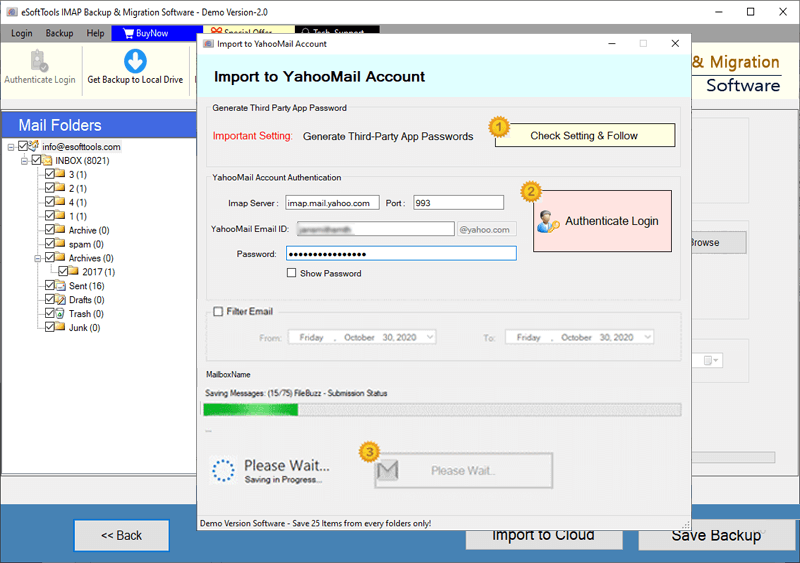
Runbox Emails export to Yahoo account

Export Runbox account emails to Outlook.com/ Hotmail

Migrate emails from Runbox email to other imap mail app
Software Comparison
| Software Features | Trial Version | Full Version |
|---|---|---|
| Export & Transfer Emails from Runbox Webmail | ||
| Save Emails in Various Formats (PST, EML, MSG, PDF, MBOX, etc.) | ||
| Migrate Emails from Runbox Webmail to Gmail, Office 365, Yahoo, & Other IMAP Accounts | ||
| Generate Individual MBOX Files for Each Runbox Webmail Email Folder | ||
| Consolidate All Folders into a Single MBOX File for Runbox Webmail | ||
| Automatically Import Emails into Thunderbird Profile (No Setup Required) | ||
| Filter Emails by Specific Date Range Before Export or Migration | ||
| Customize File Names for Exported Emails | ||
| Unlimited Email Backup & Migration for Runbox Webmail | Exports up to 25 emails from each Runbox email folder with free version | |
| Download Now | Buy Now |
Software Specification
Trial Limitations
The free demo lets you backup and migrate 25 emails from each Runbox Account's mail folder to test all the software features at no cost.
Software Info
Version
v6.0
Runbox Webmail
License
Personal, Corporate, Technician
Language Supported
English, German, Italian, French, Spanish
System Requirements
Processor
Intel® Pentium Class
Operating System
Windows
Hard Disk Space
50 MB of free hard disk space
RAM
Minimum 512 MB is required
Software Delivery
Electronic
YES
Mode
Delivery by E-mail
Supported Windows OS
Works with all windows O/S editions 11, 10, 8.1, 8, 7, XP, Vista, & below editions
Frequently Asked Questions (FAQ)
How to use this Runbox Email Backup Tool to Backup Emails from Runbox Mail to Computer?
- Download the exe file of eSoftTools Runbox Email Backup and Migration software for windows O/S.
- Launch the software and provide the login details of your Runbox Mail account - Email Address/ Password/ Port and Hostname.
- Click on Login button and load mail folder those available in your Runbox webmail account.
- Choose the folder from which you want to download emails and create a backup.
- Select the backup/export option - PST, EML, EMLX, HTML, MHTML, MSG, MBOX, PDF, Thunderbird.
- Choose and apply the settings - mail filer, naming convention, and saving location.
- Lastly, press the Save Backup button and begin the process to backup Runbox email to computer.
See complete method with all steps, here: How to Backup Runbox Emails to Computer
How to Perform Runbox Email Migration to Cloud Mail Services - Gmail/ Yahoo Mail / Office365 & Others?
- Download eSoftTools Runbox Email migration software on your computer with windows O/S.
- Enter Runbox account's login credentials: - Email Address, Password, Port, and Hostname.
- Press Login button and start loading your Runbox account's mail folders.
- Once you have loaded all folders, choose the needed folders those containing your required emails.
- Click on Import to Cloud button and choose the import option - Gmail/ Yahoo/ Office365 or IMAP.
- Enter the login details of the destination email service- Email, Password, Port and Hostname.
- Apply settings of date-wise mail filtering and the destination folder input and naming.
- Lastly, press Convert or Import button and start Runbox Email Migration to Cloud Mail services.
Check complete steps with screenshots: - How to Migrate Emails from Runbox to Cloud Mail Programs?
Is any desktop email client needed to use this software for downloading or migrating Runbox emails?
What are the available file types (export options) in which we can backup Runbox emails?
What is the work of Import to IMAP option and how is it different from other cloud import options?
The Import to IMAP option lets you import emails to any email service that supports IMAP—not just Gmail, Yahoo, or Office365. Unlike the other import options that are limited to one platform, import to IMAP is flexible and supports a wide range of providers (e.g., Yandex, AOL, Rackspace, etc.) by using the correct IMAP server, port, and login details.
Does this tool make any changes to the emails during the export process?
I want to export emails from only some specific folders of my Runbox account, is it possible to do this?
In which version of Windows this software will work perfectly and what other things do I need?
What features will I get in the free demo version of this Runbox email backup and migration tool?
A free demo version of the software is available, allowing you to test all features with some limits. You can back up and migrate up to 25 emails per folder from your Runbox account at no cost.