Mail.com Email Backup & Migration Software
Excellent software solution for email backup and migration from Mail.com email account. Save emails to local drive of computer as well as move emails from Mail.com to different email platforms. Complete all operations in a straight forward manner with easy steps.
- Download Mail.com emails and save as 10 different file types.
- Migrate Emails from Mail.com account to any webmail platform.
- Email backup/migration from chosen Mail.com account's folders.
- Date-wise selection and export of emails from mail.com profiles.
- Instant email export results with full data protection.

Mail.com Email Backup and Migration Utility - Main Functions

Instant Fast Software Delivery via Email

- Downloading emails from Mail.com account to user's local drive. Saves emails inside PST, EML, EMLX, MSG, HTML, MHTML, MBOX, PDF, and Thunderbird.
- Direct transfer of Mail.com emails to Cloud/Web email programs- Gmail, Yahoo Mail, Office365, and others IMAP accounts.
- Export & save each email as separate files in EML/ EMLX/ MSG/ HTML/ MHTML and PDF format.
- Complete or selective Mail.com account's folders save in Single PST for all MS Outlook editions.
- Saving mail.com account emails in MBOX with 2 distinct options: -
- Single MBOX: - extract email from different folders and save into a single MBOX file.
- Separate MBOX: - create individual MBOX file for each mail folder saving separately.
- Auto-detects and select Thunderbird profiles local storage and imports Mail.com email folders.
- Fetches & displays all mail folders from a Mail.com account's mailbox and allows selective export.
- Available function for selecting a file-saving path manually to store resulting email backup files.
- Naming Convention to assign names new files based on email fields - subject, from, and dates.
- Retaining original emails at both source and destination - no alterations to the email.
- Preserve email with all information- From, TO, BCC, CC, Subject, From, Date, Message Body, and other relevant elements.
- Comes with a graphical interface for ease of use for all types of person - technical and non-technical.
- Built to work on all versions of Windows O/S - 11, 10, 8.1, 8, 7, Vista, XP, and other older ones.
Demo Available : Free migration & backup of 25 email from each mail folder of Mail.com account.
Best Features Available in Mail.com Backup/Migration Solution
Reliable Way to Backup & Transfer Mail.com Emails
A great Windows-based utility that makes it possible to perform 2 distinct operations from a Mail.com account.
- Save Mail.com Emails to Local Drive: - Download emails from Mail.com account and store as locally accessible files. Save emails in file types like - PST, EML, EMLX, MSG, HTML, MHTML, MBOX, PDF, and Thunderbird. Store emails in your desired format and use them with any supported program.
- Shift Mail.com Emails to Cloud/Webmail: - Straightforward email transfer from mail folders of Mail.com account to any cloud based email platform. Migrate to email account of Gmail/ Yahoo Mail/ Office365/ and IMAP supported web email programs.
Working Process >> How to Backup/Migrate Mail.com Emails?


Backup Mail.com Emails to Outlook PST
Export and save mail folders from Mail.com account to Outlook compatible PST files. Download emails of specific and entire mail folders of Mail.com account to PST files. Get all emails into new Unicode PST files for easy use in any version of MS Outlook.

Saving Mail.com Emails as Singular files
Allows you to extract emails from Mail.com account's mail folder and save each email as a separate file. Provides 6 different file format options "EML/ EMLX/ MSG/ HTML/ MHTML/ PDF" specifically for performing this task. Choose any one of these formats and save each email as separate file.

Store Mail.com Mail folder in MBOX files
- Single MBOX: - Collect emails from multiple mail folders and save them to one MBOX.
- Separate MBOX: - Store each Mail.com account's mail folders as a separate MBOX file.
Allowing to extract and archive Mail.com emails in MBOX file with different 2 modes: -

Shift Mail.com Emails to Thunderbird
Transferring emails from Mail.com account to email profile configured in Thunderbird email client. The software automatically detects if Thunderbird is available in user's PC and enables users to import Mail.com mail folders directly into Thunderbird local storage path.

Email Folders Exporting Specifically
Allows manual selection of email folders from where you specifically want to export emails. The software fetches and displays the entire mailbox folders from the Mail.com account and allows users to select one, multiple or entire folders for email export operations.
Destination Folder Input for Migration
While migrating emails from a Mail.com account to any other email service, the user gets the option to insert a new folder in the destination account. Users can create a folder by naming it as per their choice. This folder will store all the imported Mail.com account's mail folder with sub-folder and emails.

Specify Emails to Export by Date Range
Available date wise email filtering function gives users the power to select and export only the emails they need. It enables you to specify the period in which you received or sent certain emails. This date selection facilitates faster email migration by helping you exclude unwanted emails from the export operation and include only important emails.

Assigning Name to Resultant Files
Users can choose from 9+ predefined naming formats so that new files are automatically named based on the sender, subject, and date. This feature helps in maintaining consistent and organized file names.
Note: This feature is only available when saving emails in the following formats: EML, EMLX, HTML, MHTML, MSG, or PDF.

Email Preservation in Original Format
Saves emails exactly as they appear in your Mail.com inbox. Ensure complete integrity of your emails by preserving 100% of original formatting. Save emails with all elements including headers, metadata, attachments, HTML formatting, embedded images, and other properties.

Saving Output to Desired Location
You have control over where your backups go. Easily choose a specific folder, external drive, or network location to save your Mail.com emails. The software allows full path customization, so you can organize your backups exactly how and where you want them on your local drive.

Simple Graphics Based Interface
Enjoy a user-friendly experience with an intuitive, graphics-driven interface. The dashboard is designed for users of all experience levels, providing a clean layout and clear instructions for easy email backup and export. Backup and migration tasks are simple and require no technical expertise.

Available to run on Windows OS
Fully compatible with all modern versions of Windows including Windows XP, Vista, 7, 8, 8.1, 10, and Windows 11. The software is lightweight, fast to install, and runs smoothly on standard system configurations without the need for additional tools or services.

Free Mail.com Backup & Migration
Get started at no cost! Mail.com Backup and Migration Tool is available with a demo version feature that is completely free to use - no subscription, no hidden fees. Backup 25 emails from each folder without any money and migrate to another service. Perfect for a person who wants to test the software before buying.
eSoftTools Mail.com email Backup & Migration Software

Mail.com email Backup/ Migration software

Mail.com email Account Login

Choose required Mail.com email account mail folders

Download Mail.com email to different formats

Download Mail.com email to Local drive

Import Mail.com email to cloud apps

Migrate Mail.com email to Office365

Migrate Mail.com Emails to Gmail
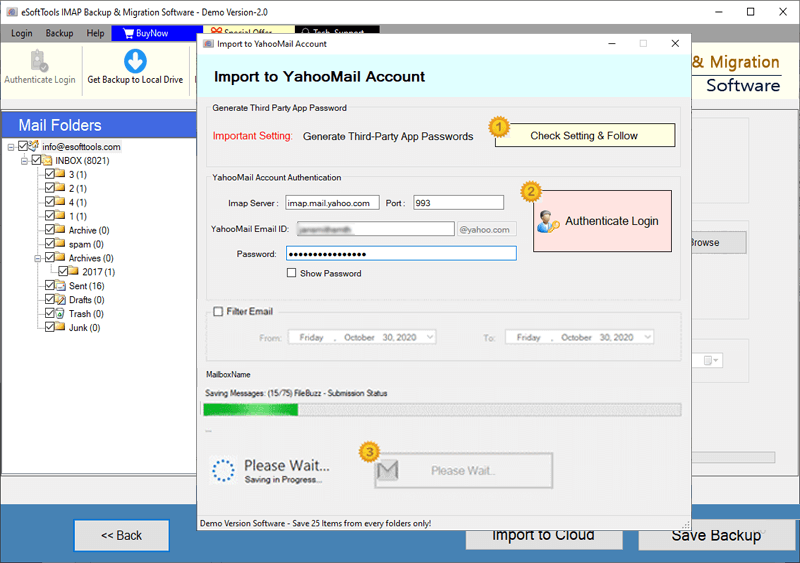
Mail.com Emails export to Yahoo account

Export Mail.com account emails to Outlook.com/ Hotmail

Migrate emails from Mail.com email to other imap mail app
Software Comparison
| Software Features | Trial Version | Full Version |
|---|---|---|
| Backup and Migrate Emails from Mail.com email | ||
| Export Mail.com email to PST, EML, MSG, PDF, MBOX, and Other Formats | ||
| Migrate Mail.com email to Gmail, Office 365, Yahoo & Any IMAP-Compatible Account | ||
| Export Mail.com Mail Folders as Separate MBOX Files | ||
| Import Mail.com Mail Folders into Single MBOX File | ||
| Import Mail.com email Directly into Thunderbird (Auto-Detect Feature) | ||
| Apply Date Range Filters to Export Specific Emails | ||
| File Naming Convention | ||
| Full Mail.com email Backup & Migration Support | Limited to 25 emails per folder in free demo | |
| Download Now | Buy Now |
Software Specification
Trial Limitations
Explore all software features with free demo. Download and Migrate up to 25 emails per folder to evaluate performance before purchase.
Software Info
Version
v6.0
Mail.com
License
Personal, Corporate, Technician
Language Supported
English, German, Italian, French, Spanish
System Requirements
Processor
Intel® Pentium Class
Operating System
Windows
Hard Disk Space
50 MB of free hard disk space
RAM
Minimum 512 MB is required
Software Delivery
Electronic
YES
Mode
Delivery by E-mail
Supported Windows OS
Works with all windows O/S editions 11, 10, 8.1, 8, 7, XP, Vista, & below editions
Frequently Asked Questions (FAQ)
How to Download and Backup Emails from Mail.com Account to Computer?
- Download the setup file of eSoftTools Mail.com Backup & Migration software and perform its installation on Windows PC.
- Choose the source email program - IMAP and add Mail.com account login details.
- Hit on Login button and load all mail folders and choose the required for email export job.
- Select an export option/format - EML, EMLX, MSG, HTML, MHTML, MBOX, PDF and others.
- Apply other settings those needed - saving location selection, mail filter, naming convention.
- In last steps, press Save backup button and save your Mail.com emails to your computer.
Check out the complete guide with screenshot: - How to Download Mail.com Emails to Computer?
How to Move Emails from Mail.com to other Web Email Service?
- Get the eSoftTools Mail.com Backup & Migration software exe and perform its installation in windows computer.
- Select IMAP from source email programs and enter Mail.com account email address, password, port and hostname.
- Click on Login and software will fetch and show you all mail folders from mail.com account.
- Select the folders from those you want to transfer emails and click on Import to Cloud.
- Choose the destination email platform for importing email - Gmail/ Yahoo Mail/ Office365 or IMAP.
- Add login details of your email account in which you want to import Mail.com emails.
- Authenticate your account and connect to mail server and start mail.com email migration easily.
View the step by step guide with visuals: - How to migrate mail.com Emails to Cloud/Webmail?
What changes does this software make to Mail.com account emails for export tasks?
In which file format does this software saves downloaded Mail.com emails?
What is the function of Save in Thunderbird option of this software?
Save to Thunderbird feature of the software makes it possible for users to directly import emails from Mail.com into Thunderbird configured profile. Easily import emails into the local storage folder of an existing Thunderbird profile.
Which web based email service does it support to transfer and import emails from Mail.com?
What else do I need besides this software to perform Mail.com email backup tasks??
On which version of Windows Operating System will this software work?
What can I do with the demo version of Mail.com Email Backup & Migrator?
A free demo is exclusively available for every user to test the software before making a purchase. Any user can use it to easily download and migrate up to 25 emails from each folder of a Mail.com account. After getting satisfactory results with this demo, you can decide to upgrade to paid version of the software.