La Poste Email Backup & Migration Software
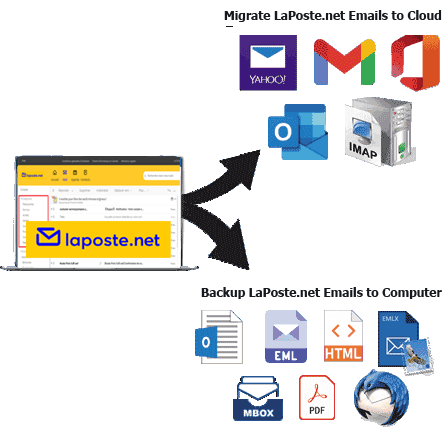
Smartest windows O/S based utility for La Poste webmail users. Tool that allows to smoothly take backup email as well as transfer emails from Laposte.net email accounts. Move emails from La Poste to different email platform with safe and secure process.
- Download emails from La Poste.net account to Computer.
- Extract & store emails locally in the form of 9 distinct file types.
- Swiftly move email from La Poste to different email service.
- Export any number of emails at one time without any issues.
- Run software on computer having any version of Windows O/S.

La Poste Email Backup and Migration Software - Great Features

Instant Fast Software Delivery via Email

- Perform 2 distinct operations with La Poste Webmail account emails using this one software.
- Download emails from La Poste webmail account to local drive. Save emails locally as Outlook PST, EML, EMLX, MSG, HTML, MHTML, MBOX, PDF, & Thunderbird.
- Shift emails from La Poste webmail account to emails services - Gmail, Yahoo Mail, Office365, and other IMAP protocol-based platforms.
- Backup/migrate emails while retaining properties- To, BCC, CC, Subject, From, Message, etc.
- Backup email folders from La Poste account to PST files for using with MS Outlook email client.
- Save one email in one file with backup options - EML/ EMLX/ MSG/ HTML/ MHTML & PDF.
- Backup email folders in MBOX files with 2 different modes - Single MBOX or Separate MBOX.
- Add email folders from La Poste Webmail account into email profiles available in Thunderbird.
- Completes all email export operations with zero changes to email format and attributes.
- Facility for selecting email folders to export only required emails and not the entire mailbox.
- Email filter to export the most relevant emails based on a selection of date ranges.
- Naming convention feature with 9+ formats to assign names to new obtained files.
- Feature for insertion of a new folder with desired name for storing imported emails/mail folder.
- Manual selection of a place from local drive to preserve resulting backup La Poste email files.
- Smart software with graphical interface for easy email backup/migration execution by all users.
- Support for Windows O/S, works on every version - 11, 10, 8.1, 8, 7, XP, Vista, and earlier.
Try Free Demo : Using free demo backup & Migrate 25 emails from per folder of La Poste account.
Best Functions for Smartest La Poste Email Backup and Migration
Efficiently Backup & Migrate La Poste Emails
One software for performing 2 different operations from La Poste Webmail: -
- Save Emails as Local Files: - Download emails from La Poste.net email account to your local drive. Save/backup La Poste webmail emails to popular file formats such as PST, EML, EMLX, MSG, HTML, MHTML, MBOX, and PDF. Additionally, get Thunderbird import option to directly add emails from La Poste webmail to email profile configured in Thunderbird desktop.
- Migrate Email Between Mail Servers: - Makes it easier for users to transfer emails from their La Poste account to different email services. Offers option to Import LaPoste Webmail email to Gmail/ Yahoo Mail / Office365 and IMAP (other email platform).
Learn More >> How to Export & Migrate La Poste Emails?

Save Emails to Outlook PST files
Be able to extract emails from La Poste email account and store them in PST files in your computer. Backup all mailboxes or specific mail folders to Unicode PST files for use with MS Outlook (all versions). There is also a Split feature to make the resulting PST file smaller by dividing it based on different size ranges.
One Email Store in Separate File
For users who prefer to save each email separately, i.e. each email as a separate file, this is also possible. Users can choose the saving option - EML, EMLX, MSG, HTML, MHTML, or PDF and save each email as a separate file in these file types.

2 Ways for Saving Email in MBOX
- Save in Single MBOX: - Merge all chosen mail folders and store their emails in one MBOX file.
- Save in Separate MBOX: - Export mail folders and save emails of each folder in separate MBOX file.
Allows taking email backup in MBOX files with 2 distinct saving options: -

Add Emails to Thunderbird Profile
For users using the Thunderbird desktop email client on their computer, this is a special feature. It will enable users to insert all emails from the La Poste email account directly to the email profile you using in Thunderbird (Gmail, Yahoo Mail, or others). It auto-detects Thunderbird in your machine and during backup, it auto-select the Thunderbird profile store location to import the emails automatically.

Email Export from Specific Folders
Export only necessary emails by selecting mail folders from laPoste.net account. Select folders that contains your important emails you want to download or migrate, and avoid exporting the entire mailbox data. This allows users to avoid exporting unwanted emails and boosts speed of migration.

Retains Every Email as Original
Transfer or backup emails without making a single change to them. When exporting each email, keep all their relevant attributes - To, From, Cc, Bcc, Subject, Date, Message Body, Attachments, etc. Keep emails in their original format in both source and destination.

Email Date Selection & Export
Available functions to select email date range for export operations. Select date range by choosing start and end date. Specify date range containing the most relevant emails you need to backup or migrate. Best for targeted email extraction and speeding up export jobs.

Naming Convention to Assign Name
Provides facility to name new files based on various patterns. Allows you to choose the naming format from 9 available options. These formats are email attributes - date, subject, sender email address and various combinations of these. This feature is available with all individual email saving file options - EML/EMLX/MSG/HTML/MHTML and PDF.

Add Custom Folder & Migrate Email
Ability to add a folder to the destination webmail account during La Poste mail to cloud migration. Insert a custom folder with the desired name in the email profile such as Gmail, Yahoo Mail, Office365 and IMAP accounts. This folder is isolated from other mailbox data and software stores imported La Poste emails in it.

Choose Saving Location by Self
Software allows users to choose any path from their drive to store the backup/local email files. Before starting the backup process, the software asks users to specify the save path and during the backup, it stores all the resulting email files in that selected destination path.

Innovative & Simple to Use Software
Software with advanced functionalities, as well as a smart interface that is easily accessible to all types of people. Both technical and non-technical people can use this software. With just a few clicks, you can backup and migrate emails from La Poste account without any hassle.

Ability to Run on All Windows Versions
Execution is possible on a computer with Windows operating system. Users can run this tool, on a computer running on any version of Windows, be it 11/ 10/ 8.1/ 8/ 7/ XP/ Vista or even older. No difficult installation process, no other software required.

Backup & Migrate La Poste Emails Free
Users can perform email backup or migration with the free demo without spending any money. It allows you to backup and migrates up to 25 email items from each folder of laposte.net at no cost. Test all the capabilities of the software and decide to spend money on the paid version only after you are satisfied.
eSoftTools Laposte.net Email Backup & Migration Software
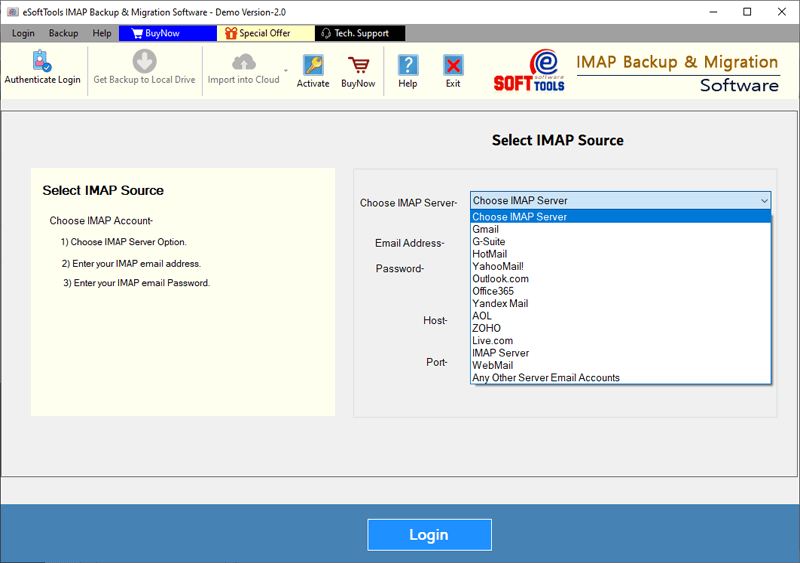
Laposte.net Mail Backup/ Migration software

LaPoste.net Mail Email Account Login

Choose required mail folders for export from La Poste webmail

Download La Poste webmail Email to different formats

Download La Poste webmail Email to Local drive

Import La Poste webmail Email to cloud apps

Migrate La Poste webmail Email to Office365

Migrate La Poste webmail Email to Gmail
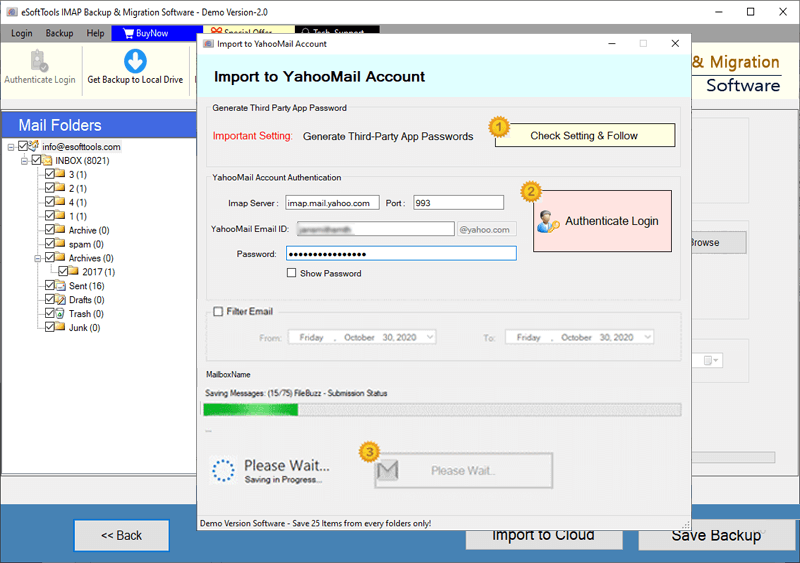
La Poste webmail Email export to Yahoo account

Export La Poste webmail Email to Outlook.com/ Hotmail

Migrate emails from La Poste webmail Email to other imap mail app
Software Comparison
| Software Features | Trial Version | Full Version |
|---|---|---|
| Backup & Archive Emails from La Poste Webmail Accounts | ||
| Export Emails to Multiple File Formats (PST, MBOX, PDF, EML, HTML, etc.) | ||
| Transfer La Poste Webmail email to Gmail, Outlook 365, Yahoo & IMAP Accounts | ||
| Export Each La Poste Folder into a Separate MBOX File | ||
| Merge All La Poste Folders into a Single MBOX File | ||
| Auto-Import Emails to Thunderbird Profiles | ||
| Use Date Filters to Export Specific Emails | ||
| Customize File Names with Smart Naming Patterns | ||
| Unlimited La Poste Webmail Email Backup & Migration | Supports exporting up to 25 emails per folder free | |
| Download Now | Buy Now |
Software Specification
Free Trial Edition Capabilities
Supports exporting up to 25 emails from each folder of an La Poste email account in each backup or migration option.
Software Info
Version
v6.0
La Poste Webmail (Laposte.net)
License
Personal, Corporate, Technician
Language Supported
English, German, Italian, French, Spanish
System Requirements
Processor
Intel® Pentium Class
Operating System
Windows
Hard Disk Space
50 MB of free hard disk space
RAM
Minimum 512 MB is required
Software Delivery
Electronic
YES
Mode
Delivery by E-mail
Supported Windows OS
Works with all windows O/S editions 11, 10, 8.1, 8, 7, XP, Vista, & below editions
Frequently Asked Questions (FAQ)
How to Download Emails from La Poste.net Email Account to Computer?
- Download and Install eSoftTools La Poste.net Mail Backup Tool in your Windows PC.
- Launch the Software and enter La Poste webmail account credentials, including: - Your email address, Password, IMAP server: imap.laposte.net, Port number: 993.
- Click the Login button and connect securely to your La Poste mailbox.
- Once connected, the software will begin syncing your email data.
- The tool will automatically fetch and display all folders from your La Poste mailbox.
- Select the specific email folders you want to export or back up from the list.
- Choose a preferred backup format from options like: PST, MBOX, EML, MSG, EMLX, PDF, HTML, MHTML, or directly to a Thunderbird profile.
- Apply additional filters and settings, such as: Date range filter, Custom file naming convention, Destination folder path to saving the backup.
- Click on the Save Backup button to start email export process and begin saving your La Poste emails as your selected format on your PC.
Need help? Check the complete process here: How to Backup La Poste Emails to Computer?
How to Transfer Emails from La Poste Webmail Account to Other Cloud Services?
- Download and install eSoftTools La Poste Webmail Email Migration Tool on your computer.
- Launch the application and enter your La Poste email credentials, including: - Email address, Password, IMAP server: imap.laposte.net, Port: 993.
- Click on Login and establish a secure connection with your La Poste mailbox.
- After successful login, the software will automatically display all folders from your La Poste account.
- Choose the folders you want to migrate, or select all to transfer your entire mailbox.
- Click the Import to Cloud button, then select your destination email service — such as: Gmail, Office 365, Yahoo Mail, or any other service using IMAP
- Provide the login details and server settings for the target cloud email account.
- Use available options like:
- Date filter to migrate emails within a specific time range.
- Custom folder creation at the destination email service.
- Click the Import button to begin moving La Poste emails to selected cloud email platform.
Need step-by-step instructions? Check out our complete tutorial : - How to Transfer La Poste Emails to Cloud?
To which cloud email platform can I transfer La Poste webmail account emails via this tool?
How does saving La Poste emails locally differ from the cloud email migration function?
What is the Thunderbird import function and how is it different from other email backup options?
The Thunderbird import function is also available in the software as a backup option, but it is slightly different from them. With the Save feature in Thunderbird, you can import emails from a La Poste account directly into the email profile available in Thunderbird, instead of any specific file type.
What is the benefit of using date-range mail filtering function available inside this software?
Will this tool enable users to select mail folders from La Poste account as per their preference for email export?
Which version of Windows O/S will run this software, does it work on older versions as well?
What tasks can I perform through trial version of La Poste email backup/migration software?
Demo version is available so that users can test all the functions of the software before making the purchase. It allows obtaining a quick analysis of functioning of the software by backup or migrating up to 25 emails from each folder of La Poste account.