EML to PDF Converter Tool
New way to convert EML to PDF files in batch mode. Convert unlimited EML or EMLX files to PDF file format in a single process. Quickly export emails with attachments from EML and save them to PDF files. Also, get smart functions to make this conversion more reliable and easier.
- Convert One or Multiple EML Email Files.
- Open EML file & Read Emails in software's preview panel.
- Export Emails to PDF while retaining every linked content.
- Availability for exporting selective EML folders/items.
- Instant EML email conversion with zero faults.
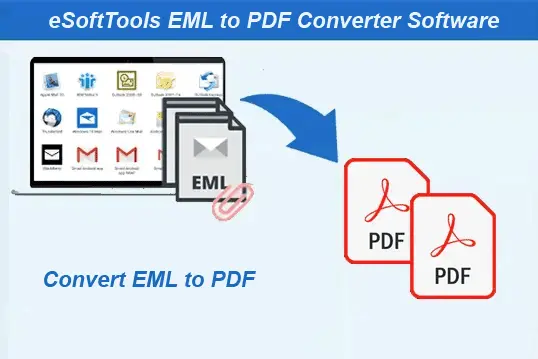
EML to PDF Conversion Software - Smart Features

Instant Fast Software Delivery via Email

- Professional utility for converting EML/EMLX to PDF file format safely (multiple at once).
- Allows adding EML files with 2 options- Select EML Folder or Select EML Files.
- Provides facility for opening EML files, shows emails from EML file in preview panel.
- Item selection facility to select required EML folders and items for export process.
- Export EML emails with relevant components - TO, From, CC, BCC, Message, Subject, etc.
- Convert EML to More Options - PST/ EMLX/ MSG/ HTML/ MHTML/ MBOX/ CSV/ Lotus Notes NSF/ Zimbra TGZ & Thunderbird.
- Supports EML email to Cloud migration to Migrate Emails to Gmail/ Office365 & IMAP.
- Separate option for Extracting Phone Numbers/ Email Address & Attachments from EML files.
- Different options for mail filtering and exporting specific emails- Filter by Date, From and To.
- Naming Convention feature with 9 different naming formats for assigning names to new files.
- Ability to manually select file save location to store new files at the user's desired path.
- Comes with a graphical interface to execute EML to PDF conversion with a few mouse clicks.
- Compatibility for all versions of Windows O/S - 11, 10, 8.1, 8, 7, XP, Vista, or earlier.
Demo Edition:- Converts up to 25 EML files from each selected folder to PDF format for free.
EML Email to PDF Exporter - All Features
Solution to Convert EML to PDF with Attachments
The cutting-edge software offers a fast and secure solution to convert EML files to PDF. Export/save your emails in easy-to-read PDF format with all attachments and other properties.
Convert individual as well as multiple EML files to PDF with a simple process. Maintain the original structure and content of each email including headers, body and attachments in the final PDF. Take advantage of powerful features that guarantee secure and reliable EML to PDF conversion.
Know more>> How to Convert EML to PDF format?

Add EML File Wise or Folder Wise
- Select EML Files: - Manually select and add single or multiple EML files from a specific folder.
- Select EML Folder: - Add an entire folder to automatically load all EML files including all EML files present inside sub-folders.
The software provides two distinct options for adding EML files for conversion: -

Open/Read Emails from EML files
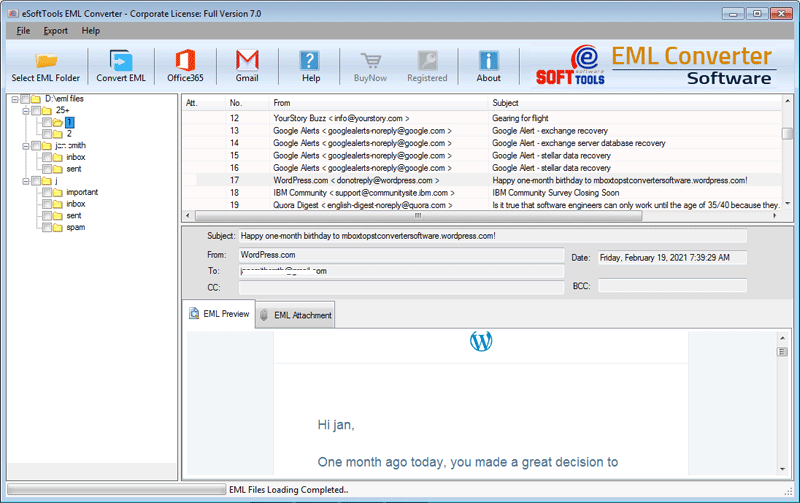
Open and read emails directly from EML files using the software. View emails in their original format, preserving all text, attachments, and formatting. This allows users to inspect their email data before performing the conversion.

Select EML Items for Exporting
Get full control over the conversion process and extract specific emails easily. Allows choosing specific emails or folders from the available list. Select the required items and convert them specifically for accurate conversion.

Retaining All Email Details
Convert EML to PDF and preserve all email details, such as sender, recipient, subject, body and attachments. Maintain the integrity of your original email. The software ensures that no information will be changed or modified during conversion.

Extract/Save Email Attachment
Convert EML emails to PDF format while preserving associated attachments. The software exports emails with attachments and saves them in a folder named after the email subject for easy identification.
Note: - A separate feature is also available to extract and save only the email attachments without converting the emails.

Mail Filtering By Date/ From or To
- Date: - Extract emails of a specific time frame.
- From: - Convert EML with emails sent by a particular sender.
- To: - Select and export emails sent to a specific recipient.
Filter required emails from selected EML files for exporting to PDF. Refine the selection based on three different modes:-

File Naming Convention
Save PDF files using a predefined naming format combining subject, date, or From sender's name. Custom naming conventions help users to provide a name to converted file to easily identify needed email file.
Manually Select Saving Path
Organizing PDFs in custom locations for better file management. Users can specify a destination folder to store resulting PDF files. This eliminates the need to search for files after conversion.

Universal EML Compatibility
Easily convert EML and EMLX files from any email client, regardless of file size or origin. This software supports all EML email files generated from Mozilla Thunderbird, Outlook Express, Windows Live Mail, Apple Mail, and other email applications.

Smart & Clean Graphical Interface
The software has an intuitive interface that simplifies the conversion process, making it accessible to all users. With easy navigation and clear instructions, even non-technical users can operate it without any difficulty.

Windows O/S Compatibility
Fully compatible with all major Windows versions including Windows 11, 10, 8.1, 8, 7, Vista, XP and older. The software runs smoothly without requiring additional configuration or third-party software installation.

Free EML to PDF Converter
A free version of the software is available for users so that they can test its functionality without any purchase. The trial version allows converting up to 25 EML files from each selected folder at a time. This helps users evaluate the efficiency of the tool free of cost.
Available Advanced Features of EML to PDF Converter
Convert EML to 10+ File Formats
Easily convert EML emails to multiple other file formats including PST, MSG, EMLX, HTML, MHTML, MBOX, CSV, Lotus Notes NSF, Zimbra TGZ and Thunderbird. This enable users to shift emails to different email clients and platforms.
Import EML Email to Cloud Mail
Effortlessly import EML emails into cloud-based email services like Gmail, Office365, Yahoo Mail, and IMAP based other email services. This feature helps users to safely migrate emails from local storage to the cloud. Transfer EML emails without data loss while preserving attachments and metadata.
Extract & Save Phone Numbers
The software now includes an advanced feature to extract phone numbers directly from the email body or subject. Users can easily collect contact details from EML files. Extracted phone numbers can be saved in CSV, TXT or PDF formats.

Extract & Save Email Address
Easily extract email addresses from various email properties, including To, From, CC and BCC fields. Users can select specific properties for extracting addresses from required fields. Users can save email addresses in HTML, CSV, PDF or TXT formats.

Extract EML Email Attachment
Extract all attachments from EML emails and save them as separate files on your drive. The software offers the feature to extract all attachments or filter specific file extensions (e.g., PDF, DOCX, JPG) for targeted extraction.
eSoftTools EML to PDF Converter Software

eSoftTools EML to PDF Converter Software

Select EML File or Folder
Open/View Emails from EML
EML to PDF Conversion
Software Comparison
| Software Features | Trial Version | Full Version |
|---|---|---|
| Convert EML to PDF | ||
| Convert EML in Bulk | ||
| EML Conversion from Chosen folders | ||
| Open EML files | ||
| Convert EML to PDF with Attachments | ||
| Convert Single EML on Right-Click | ✕ | |
| Ulimited EML Conversion | Enables Converting 25 EML from each chosen folder | |
| Download Now | BuyNow |
Software Specification
Trial Limitations
Perform a free conversion of up to 25 EML files from each selected folder into PDF or any other supported format.
Software Info
Version
v2.5
EML/EMLX
License
Personal, Corporate, Technician
Language Supported
English, German, Italian, French, Spanish
System Requirements
Processor
Intel® Pentium Class
Operating System
Windows
Hard Disk Space
50 MB of free hard disk space
RAM
Minimum 512 MB is required
Software Delivery
Electronic
YES
Mode
Delivery by E-mail
Supported Windows OS
Works with all windows O/S editions 11, 10, 8.1, 8, 7, XP, Vista, & below editions
Frequently Asked Questions (FAQ)
How to Convert EML to PDF Using EML to PDF Converter?
- Download, Install and launch eSoftTools EML to PDF Converter Software on Windows PC.
- Click on the Select EML File/Folder button and add EML files using any available method.
- Select any one option Select EML File or Select EML Folder to load EML files.
- Load EML files and preview the email content, including attachments.
- Select the required EML folders or specific emails for conversion.
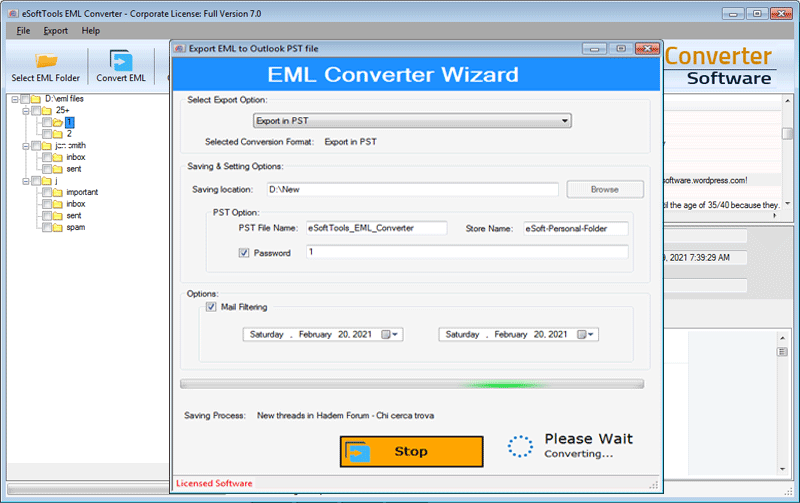
- Click on Convert EML and choose Export to PDF output format.
- Apply other relevant settings- Mail filtering, Naming Convention andsaving location selection.
- Lastly, Click on the Convert button to start the EML to PDF file conversion.
Check the complete process, by visiting here: - How to Convert EML to PDF files?
Can this software convert more than 100 EML files at once?
This software has been tested to convert 10000+ MSG files at the same time. Batch conversion is possible without any doubt.
Can I open and view EML files before conversion?
Can I select specific EML emails or folders for the conversion process?
Does this software support converting EML to formats other than PDF?
Yes, apart from PDF, the tool also supports conversion to EML, MSG, EMLX, HTML, MHTML, MBOX, CSV, and many more formats.
Can I import EML emails to cloud services like Office365 or Gmail?
Will the software modify my original EML files during conversion?
Where can I get my PDF files after conversion?
Is any kind of technical expertise required to use this software?
No, there is no need to apply any special kind of technical skills to run this software. The software is designed with a user-friendly GUI, which requires only a few clicks to complete the conversion process.