Are you thinking about shifting some emails from Hushmail to Gmail, but you have no idea about the process? Don’t worry — migrating your emails is easier than you think. In this quick guide, we’ll show you the easy steps to migrate emails from Hushmail to a Gmail account. So, let’s start reading…
Hushmail is a secure email service provider that focuses on privacy and encryption. It has been available in the online market since 1999. Hushmail has built a reputation for providing a high level of security. For this reason it is a popular choice for users who prioritize privacy in their communications.
Here are some of the key features of Hushmail:
- Industry-Specific Plans: – Hushmail is offering different email plans that users can choose according to their preferences. (Healthcare, Law, Small Business, Personal Use, and Custom).
- Strong Encryption: – Provides end-to-end encryption for secure email access and keeps your emails safe from unauthorized access.
- Email Archiving: – Provides smart functions that help healthcare providers maintain proper records for compliance.
- HIPAA Compliance: Hushmail provides solutions for healthcare professionals. These ensure compliance with the Health Insurance Portability and Accountability Act (HIPAA). They enable secure communication of patient information.
- Custom Domains & Solutions: – Users get the option to create an email ID with their own domain (e.g., @yourbusiness.com), a .hush.com subdomain (e.g., @yourbusiness.hush.com), or a Hushmail domain (e.g., @hushmail.com).
Because of these strong features, Hushmail is a solid choice for many users. Now, let’s take a look at Gmail and see why some Hushmail users prefer to switch or move Hushmail email to it.
Also Read: – How to Import/Migrate email from IMAP to Gmail account?
About Gmail
Gmail is Google’s free, cloud email service, known for its speed, security, and ease of use. It offers 15 GB of free storage, smart organization with tabs, and strong spam protection. Additionally, Gmail supports powerful search, labels, filters, and features like Smart Compose and Smart Reply to enhance productivity.
It works on all devices and integrates with other Google services like Calendar, Drive, and Docs. For businesses, Google Workspace offers Gmail with custom domains, and admin level controls. Gmail’s clean interface, reliability, and integration with Google’s ecosystem make it a top choice for personal and business use.
Why Migrate Hushmail Emails to Gmail?
Hushmail offers strong encryption and privacy, but there are many practical reasons why users choose to move their email to Gmail. Here are some of the most common motivations:
- Creating an Additional Backup: – Transferring Hushmail emails to Gmail provides an additional layer of backup. Storing a copy of your Hushmail emails in another cloud service helps users avoid losing important emails.
- Accessing Hushmail Emails with Gmail Interface: – Moving Hushmail emails to Gmail allows users to read and manage Hushmail emails from within Gmail’s interface. This improves usability and convenience for users.
- Freeing Up Storage on Hushmail: – By moving older or less important emails to Gmail, you can free up storage space in your Hushmail account. This is especially useful if you are running low on storage with your chosen Hushmail plan.
- Complete Switch to Gmail for Cost-Effectiveness: – Gmail offers robust free and low-cost plans, which can significantly reduce email management costs compared to a premium Hushmail subscription.
- Trust in Google’s Infrastructure: – Many users feel confident using Gmail because Google has a reputation for reliability, uptime, and security features. Therefore, they prefer to switch from platforms like Hushmail for this reason as well.
Smart Solution to Shift Hushmail Emails to Gmail
Gmail provides a built-in option to import emails using POP3, but mostly it does not give the result as per the expectation of users. Therefore, the user should use a more flexible and efficient way for Hushmail email migration. The best way out of all the available methods is eSoftTools IMAP Backup & Migration software.
It provides a smart and user-friendly solution to migrate emails from any IMAP email account. Supports secure and instant email migration from Hushmail to Gmail without data loss. Perform bulk migration and preserves folder hierarchy, attachments, and metadata during transfer process.
How to Move Emails from Hushmail to Gmail with IMAP Migration Tool?
Transfer email data from Hushmail to Gmail using eSoftTools IMAP Backup & Migration tool. Just follow these simple steps to complete the migration:
- Start by downloading and installing IMAP Migration Tool on your Windows system.
- Before proceeding, make sure your Hushmail account is active and you have access to your login details.
- Launch the tool and from the first screen, choose IMAP Server as your source platform.

- Enter the following details to connect your Hushmail account:
- Email Address: (Your full Hushmail email, e.g., username@hushmail.com)
- Password: (Your Hushmail login password)
- IMAP Server Address: imap.hushmail.com
- IMAP Port: 993

- Click Login to allow the tool to sync with your Hushmail mailbox. It will now load your email folders such as Inbox, Sent, Drafts, etc.

- Choose folders you want to migrate. You can select all folders or only specific ones.
- Click on the Import to Cloud button and select Import to Gmail as the destination platform.

- Now, enter your Gmail account details:
- Email ID: (Your Gmail address, like yourname@gmail.com)
- App Password: (Not your Gmail password—use a 16-digit App Password made from your Google Account settings)
- Press Authenticate Login button and sign in to Gmail/ Google Workspace account.
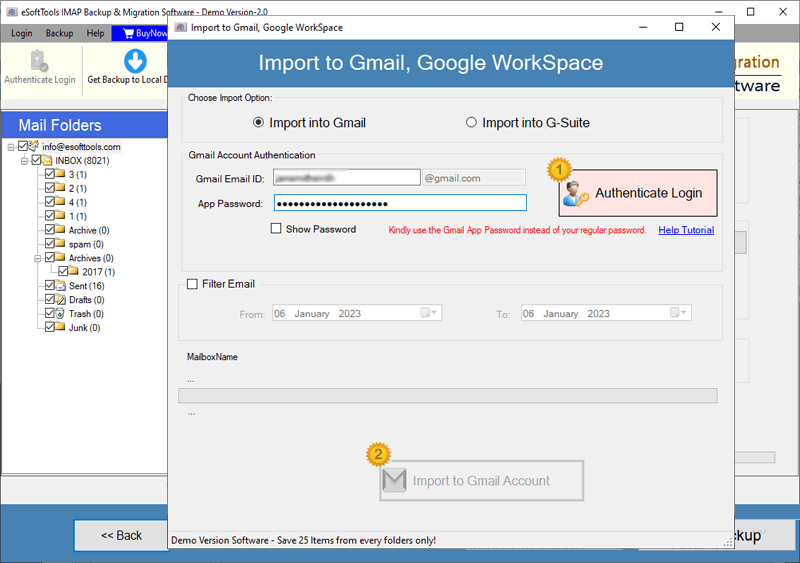
- (Optional) You can use email filter settings to migrate emails from specific dates.
- Once everything is set, click the Import to Gmail button and start transferring Hushmail emails to Gmail profile.

Key Features of eSoftTools Hushmail to Gmail Migration Software: –
- Direct IMAP to Gmail Migration: Move emails from Hushmail to Gmail with minimal steps.
- Selective Email Transfer: Migrate emails from specific folders, and also get the ability to set a date range to export emails from only the required dates.
- Multiple Export Options: In addition to Gmail, export to formats like PST, MBOX, EML, Office 365, Outlook.com, Thunderbird, IMAP, and more.
- Easy-to-Use Interface: Simple design suitable for both technical and non-technical users.
- Secure and Accurate Transfer: Maintains data integrity, including email formatting, read/unread status, and attachments.
Final Words
Migrating emails from Hushmail to Gmail is both possible and straightforward. The process can be simplified by using a trustworthy solution like eSoftTools IMAP Backup & Migration Software, ensuring efficiency and data integrity. By following the steps shown above, you can safely transfer your essential emails and continue accessing them within Gmail without any disruption.
