IONOS Email Backup & Migration Software
Gain control of your IONOS email data with this powerful, hassle-free backup and migration solution. Experience a reliable way to protect and manage your valuable email data. Perfect for both individuals and businesses for secure export of emails. Ensures fast, secure transfer while protecting the integrity of your emails.
- Backup emails in multiple formats: PST, EML, MBOX, PDF, etc.
- Effortlessly migrate to Gmail, Yahoo Mail, and other platforms.
- Auto-import IONOS emails to Thunderbird profile's local folders.
- Selectively backup or migrate emails from chosen folders.
- Guarantee data security with zero loss or alteration during transfers.

IONOS Mail Migration & Backup Tool - Advanced Features

Instant Fast Software Delivery via Email

- Take IONOS Webmail email backup to various formats like PST, EML, MBOX, MSG, HTML, MHTML, EMLX, PDF and Thunderbird.
- Direct IONOS email migration to Gmail, Yahoo Mail, Office 365, or other IMAP email services.
- Automatic IONOS emails to Thunderbird profiles import with secure and simple process.
- Select and export specific mail folders for a customized or targeted email backup/migration.
- Save emails in separate MBOX files for better organization of IONOS mail folders.
- Merge multiple folders into single MBOX file for simple, consolidated email backup.
- Select custom date ranges with advanced date-wise filtering function for exporting required emails.
- Choose anyone from 9 customizable file naming patterns for giving name to resulting files.
- Manually select destination paths to securely store exported files at your preferred location.
- Retain complete email metadata, formatting, and attachments during backup and Migration.
- User-friendly interface for making email export operation easy for both beginners and experts.
- Full compatibility with all Windows O/S versions, including - XP, Vista, 7, 8, 8.1, 10, and 11.
Free Demo : Backup/Migrate up to 25 emails per folder with free demo to check all software works.
Key Features of IONOS Webmail Backup and Migration Software
Best IONOS (1&1) Email Backup & Transfer Tool
Powerful utility for secure, fast and flexible backup or migration of IONOS emails on various platforms.
- Secure Backup to Multiple File Formats: - Effortlessly back up your IONOS emails in formats like PST, MBOX, EML, EMLX, MSG, PDF, HTML, MHTML, or Thunderbird-compatible files. Download email from entire mailbox or specific folders with accuracy and save to local drive.
- Migrate IONOS Mail to Webmail: - Migrate emails from IONOS (1&1) mailbox directly to Gmail, Yahoo Mail, Office 365 or any other IMAP-enabled email provider. Enjoy a fast, secure transition without manual configuration.
Working Process >> How to Backup/Migrate IONOS Webmail?


Backup IONOS Emails to Outlook PST
IONOS Webmail for Email Integration into Microsoft Outlook Easily transfer emails to PST format. Export mail folders to Outlook PST files while maintaining folder structure and email attachments. Import emails from IONOS Webmail to any version of Outlook without any problems.

Preserve Each Email in Individual files
Export each IONOS Webmail email as a separate file in formats such as EML, EMLX, MSG, HTML, MHTML and PDF. This allows users to easily share or archive emails. Preserve each email with original data integrity- retain email formatting, attachments and metadata.

Export IONOS Mail Folders to MBOX
- Single MBOX: - Export emails from multiple folders & store all emails in a single MBOX file.
- Separate MBOX: - Create separate files to save each IONOS mail folder separately.
Download IONOS Webmail emails and backup in MBOX format with two different options:

Migrate IONOS Email to Thunderbird
Import IONOS webmail emails directly into Mozilla Thunderbird's profile. Migrate emails while maintaining the original formatting, attachments and structure. Thunderbird auto-detects the storage path and imports IONOS emails without losing important email details.

Selective Folder Backup/Export
Select specific folders from IONOS webmail for the export process. Extract emails only from the selected folders to save time and storage space. Migrate only the emails you need, whether they are entire folders or selected items.
Create Custom Folders for Migration
Create a custom folder in your destination cloud/webmail account during migration. Create new folder and give unique names to the newly created folders for easy management of imported emails. Save each imported mail folder with sub-folders containing the complete original emails.

Export/ Filter Emails by Date Range
Filter IONOS Webmail emails based on specific date ranges to optimize backup and export. Select the exact time-frame of emails you want to migrate or backup. This ensures that only relevant emails are included in the export process. This feature helps reduce unnecessary email data migration.

Custom File Naming Conventions
Naming convention to give custom names to backup files, based on parameters such as date, subject or from (sender's email address). Choose a naming format from the 9 available formats and name the new files accordingly. Available only for single email saving/backup formats - EML, EMLX, MSG, HTML, MHTML and PDF.

Preserve Original Email Data
Preserve essential email attributes such as sender, recipient, attachments and date during IONOS email backup or migration. Ensure emails remain unchanged and are saved in their original format with all metadata intact.

Choose Custom Storage Path
Choose your preferred storage path to store the backup files, ensuring organization and easy access. Whether a local drive or external storage, the software offers flexibility in storage options. Store the backup files in secure locations that suit your needs.

Simple & Intuitive User Interface
Intuitive, user-friendly interface that simplifies the backup and migration process for all users. Navigate through the software's features with ease, whether you're a beginner or an expert. The clean interface makes the entire user experience very simple and precise.

Complete Windows OS Support
Fully compatible with all versions of Windows including Windows 11, 10, 8.1, 8, 7, XP, Vista and even older versions. Perform IONOS email backup / migration tasks regardless of Windows O/S version available on your computer. Works great on both newer & older Windows versions.

Free IONO Email Backup & Migration
Download free demo version to test main features of the software before making a purchase. Export up to 25 emails per folder with demo version for evaluation. Experience the performance of the software and decide if it meets your needs, then spend money on a paid license.
eSoftTools IONOS Mail Backup & Migration Software

IONOS Mail Backup/ Migration software

IONOS Mail Mail Account Login

Choose required IONOS Mail account mail folders

Download IONOS Mail Emails to different formats

Download IONOS Mail Emails to Local drive

Import IONOS Mail emails to cloud apps

Migrate IONOS Mail Emails to Office365

Migrate IONOS Mail Emails to Gmail
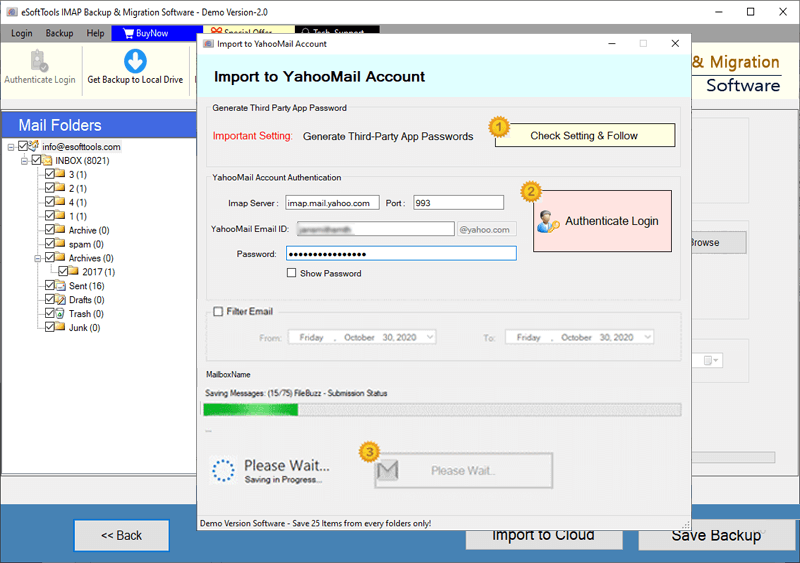
IONOS Mail Account Emails export to Yahoo account

Export IONOS Mail account emails to Outlook.com/ Hotmail

Migrate emails from IONOS Mail account to other imap mail app
Software Comparison
| Software Features | Trial Version | Full Version |
|---|---|---|
| Backup and Migrate Emails from IONOS Mail | ||
| Export IONOS Emails to PST, EML, MSG, PDF, MBOX, and Other Formats | ||
| Migrate IONOS Mail Emails to Gmail, Office 365, Yahoo & Any IMAP-Compatible Account | ||
| Export IONOS Mail Folders as Separate MBOX Files | ||
| Import IONOS Mail Folders into Single MBOX File | ||
| Import IONOS Emails Directly into Thunderbird (Auto-Detect Feature) | ||
| Apply Date Range Filters to Export Specific Emails | ||
| File Naming Convention | ||
| Full IONOS Mail Backup & Migration Support | Limited to 25 emails per folder in free demo | |
| Download Now | Buy Now |
Software Specification
Trial Limitations
Free demo available to explore all software features. Export up to 25 emails per folder to evaluate software performance before purchase.
Software Info
Version
v6.0
IONOS Mail / 1&1 Mail
License
Personal, Corporate, Technician
Language Supported
English, German, Italian, French, Spanish
System Requirements
Processor
Intel® Pentium Class
Operating System
Windows
Hard Disk Space
50 MB of free hard disk space
RAM
Minimum 512 MB is required
Software Delivery
Electronic
YES
Mode
Delivery by E-mail
Supported Windows OS
Works with all windows O/S editions 11, 10, 8.1, 8, 7, XP, Vista, & below editions
Frequently Asked Questions (FAQ)
How to Backup and Download IONOS Mail Emails to Computer?
- Download and install the eSoftTools IONOS Mail Backup & Migration tool on your Windows device.
- Open the software and sign in to your IONOS Mail account to access all your folders.
- Select specific folders you want to back up from your IONOS Mail account. Choose your preferred export format such as PST, MBOX, EML, PDF, etc.
- Customize advanced settings like date filters, file naming preferences, and the folder where the backup will be stored.
- Click Start Backup to initiate the process and save your emails in the desired format to your selected location.
For a full guide with screenshort, checkout: - How to Backup IONOS Mail to Local Drive?
How to Migrate IONOS Emails to Cloud / Web Email Services?
- Download and install the eSoftTools IONOS Mail Migration Tool on your Windows computer.
- Open the software, enter your IONOS Mail login credentials, and access all your email folders.
- Choose required folders you want to migrate for a more focused email transfer.
- Choose your destination platform (e.g., Gmail, Yahoo Mail, Office 365, or any IMAP service).
- Enter the destination account login details, and configure any custom folder names or date filter settings.
- Click the Import/Convert button to begin the migration and securely transfer your emails to the chosen cloud service.
For a detailed visual guide, visit: - How to Migrate IONOS Mail to Other Cloud Platforms?
In what format can I backup and export my IONOS Mail emails?
Can I filter and export only needed emails by date range during the backup process?
Is it possible to merge multiple IONOS mail folders into a single backup file?
Yes, you can merge multiple folders from IONOS Mail into a single backup file, the available file formats for this are PST and single MBOX.
Will the original email properties be preserved during migration?
How do I choose where my backup files are stored?
Can I migrate IONOS Mail emails to Thunderbird email client?
Can I test IONOS Email Backup & Migrate software before purchasing?
Yes, this software offers a free demo version that allows you to export up to 25 emails per folder. This gives you the opportunity to evaluate all software features and performance before making a purchase.