GMX Mail Backup & Migration Software
A reliable tool that provides a streamlined way to transfer and organize your GMX emails. Designed for users who value accuracy and ease. Simplifies complex GMX email export and migration tasks with just a few clicks.
- Save GMX emails in formats - PST, MBOX, PDF, EML, & more.
- Transfer emails directly to Gmail, Yahoo, Office 365, or IMAP.
- Move emails into existing Thunderbird profiles automatically.
- Email filters to back up specific emails based on date ranges.
- Maintain original email layout, attachments, & all properties during export.

GMX Mail Migration and Backup Program - Advanced Features

Instant Fast Software Delivery via Email

- Export GMX Mail to PST, MBOX, EML, PDF, MSG, HTML, MHTML, EMLX, and Thunderbird-supported file formats.
- Move GMX emails directly to Gmail, Yahoo, Office365, or any other platform supporting IMAP access.
- Import GMX emails into an existing Thunderbird profile without needing manual settings.
- Save each GMX folder as a separate MBOX file or merge all folders into one single MBOX.
- Preview your entire GMX mailbox and select only specific folders for backup or email migration.
- Use batch export mode to back up email from multiple folders or complete accounts at one time.
- Apply a date filter to export emails of a particular time period and avoid unwanted data.
- Choose any location on your system to store exported files for better file access and organization.
- Split resulting large PST files during export to avoid size issues and easy import in MS Outlook.
- Preserve email formatting, metadata, attachments, and folder structure during backup and migration.
- Use custom naming patterns to provide names to resulting files with email subject, from, or date fields.
- Simple and user-friendly interface for non-technical users for easy navigation and operation.
- Works with all Windows versions including XP, Vista, 7, 8, 10, and the latest Windows 11.
Free Demo : Try free demo to back up or migrate 25 emails per GMX folder without any cost.
Top Features of GMX Mail Email Export Software
A Trusted GMX Email Backup & Transfer Solution
Easily download your GMX Mail emails or transfer them to another email service with full data integrity.
- Backup GMX Emails to Popular File Formats: - Download GMX Mail emails and convert them into various accessible file types like - PST, EML, MBOX, MSG, EMLX, PDF, HTML, MHTML, or Thunderbird-supported files. Securely archive emails from your entire mailbox or specific folders for offline access and data retention.
- Migrate GMX Mail to Another Email Account: - Instantly transfer your GMX mailbox to Gmail, Yahoo, Office 365 or any other email client that supports IMAP access. Folder hierarchy and email content integrity remain untouched during the transition, ensuring a seamless migration.
Working Process >> How to Backup/Migrate GMX Mail?

GMX Mail Backup to Outlook PST
Create Outlook-compatible PST files using GMX Mail backup and migration software. Download emails from GMX Mail to PST and use the new file to add or shift your emails to MS Outlook. Optionally split large PST files for storage management.
Save Each Email Into Its Own File
For users who want to save emails separately, the tool allows exporting in formats like EML, MSG, PDF, EMLX, HTML, and MHTML. Great for sorting out specific emails, maintaining records, or saving individual email messages with attachments.

Backup GMX Mail Folders as MBOX
- Separate MBOX: - Each GMX mail folder is saved as its own MBOX file.
- Single MBOX: - Merge all chosen email folders into one combined MBOX file.
Choose your preferred MBOX saving option for email backup:

Auto-Import to Thunderbird Profile
Automatically move GMX emails to an existing Thunderbird profile without any manual steps. The software detects Thunderbird's data path and handles the import process automatically. Get quick results of GMX Mail to Thunderbird import with minimal efforts.

Selective Folder Export Facility
Backup what's important and leave the rest. If you don't want to export your entire GMX mailbox, export only the email folders you want. Easily select the required folders from the folder preview panel and export emails only from them to save time and effort.

Filter GMX Emails by Date Range
Set a specific date range and export only email messages whose dates fall between your specific date range. Perfect for targeted email extraction of specific emails by setting a custom date range. Exports only relevant emails and ignores unwanted or irrelevant email data.

Create Custom File Names
Name the output files using a combination of the sender's email address (from), subject and date. Works for supported formats like EML, PDF, MSG, PDF, HTML and MHTML. Helps users organize your exported email data in a meaningful way.

Preserve Original Email Data
All your GMX Mail emails exports exactly as they are. Maintains all essential elements including email formatting, attachments, metadata, and folder hierarchy. Whether exported or migrated, email data remains accurate and unchanged.

Choose Where to Save Email Backup
This tool gives you full control over where to store your exported files. Save the mail backup to any folder to your local drives or external drive. You have full control of file placement for easy access once the backup operation is complete.

Simple and Intuitive Interface
User experience is at the forefront - from login to final export, the steps are intuitive. Even those unfamiliar with email tools can easily perform a full GMX backup or migration without applying any highly advanced technical skills.

Works on All Windows Versions
Designed for universal Windows O/S compatibility. Fully compatible with Windows 11, 10, 8, 7, XP, Vista and older versions. Works on both 32-bit and 64-bit systems, ensuring full access on any Windows machine.

Free GMX Mail Backup & Migration
Download free trial and back up or migrate up to 25 emails per folder. Evaluate all the features in real-time using your real GMX account before upgrading to the full version. Get first-hand experience of the functionality at no cost.
eSoftTools GMX Mail Backup & Migration Software

GMX Mail Backup/ Migration software

GMX Mail Account Login

Choose required GMX Mail account mail folders

Download GMX Mail Emails to different formats

Download GMX Mail Emails to Local drive

Import GMX Mail emails to cloud apps

Migrate GMX Mail Emails to Office365

Migrate GMX Mail Emails to Gmail
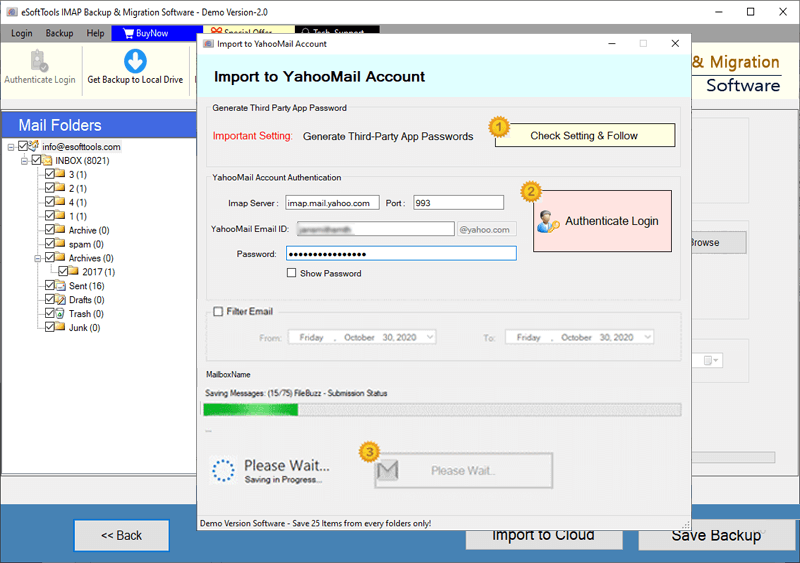
GMX Mail Account Emails export to Yahoo account

Export GMX Mail account emails to Outlook.com/ Hotmail

Migrate emails from GMX Mail account to other imap mail app
Software Comparison
| Software Features | Trial Version | Full Version |
|---|---|---|
| Export GMX Mail to PST, EML, MSG, PDF, MBOX, and More Formats | ||
| Migrate GMX Emails to Gmail, Office 365, Yahoo & Any IMAP-Compatible Mailbox | ||
| Export GMX Folders as Individual MBOX Files | ||
| Combine All Selected Folders into One MBOX File | ||
| Import GMX Emails Directly to Thunderbird (Auto-Detect Feature) | ||
| Filter GMX Emails Using Date Range Selection | ||
| Use File Naming Convention | ||
| Full GMX Mail Backup & Migration Support | Limited to 25 emails per folder | |
| Download Now | Buy Now |
Software Specification
Trial Limitations
Securely export up to 25 emails from each GMX folder for free. Explore the software's performance and options before committing to a paid upgrade.
Software Info
Version
v6.0
GMX Mail
License
Personal, Corporate, Technician
Language Supported
English, German, Italian, French, Spanish
System Requirements
Processor
Intel® Pentium Class
Operating System
Windows
Hard Disk Space
50 MB of free hard disk space
RAM
Minimum 512 MB is required
Software Delivery
Electronic
YES
Mode
Delivery by E-mail
Supported Windows OS
Works with all windows O/S editions 11, 10, 8.1, 8, 7, XP, Vista, & below editions
Frequently Asked Questions (FAQ)
How to Backup GMX Mail Emails to Computer or Local Drive?
- Download, install and launch eSoftTools GMX Mail Backup & Migration Tool on your computer with windows PC.
- Launch the tool and log in using your GMX Mail credentials securely to load your email folders.
- Select the GMX folders for exporting emails and choose your preferred export format—PST, MBOX, EML, PDF, Thunderbird, and others.
- Customize your backup by applying date filters, naming options, and selecting the saving location on your computer for saving files.
- Hit the Start Backup button to begin exporting GMX emails and saving to your chosen local directory.
To view the full guide with screenshots, visit: - How to Backup GMX Mail Emails to Local Drive?
How to Migrate GMX Mail Emails to Other Cloud-Based Email Services?
- Download and install the GMX Mail Migration Tool on your Windows system, then launch the software.
- Sign in with your GMX Mail credentials to securely access and load your email folders within the tool.
- Choose specific folders you wish to migrate and click the Import to Cloud option.
- Select your destination email service—such as Gmail, Office 365, Yahoo Mail, or IMAP platform.
- Provide the login details for the destination account and configure settings like folder mapping and email filters.
- Click the Import/Convert button to begin transferring GMX emails to selected cloud service.
For a full tutorial with step-by-step instructions, visit: - How to Transfer GMX Mail Emails to Cloud Accounts?
Can I export and save GMX emails in multiple file formats using this tool?
Does this tool support downloading and migrating emails with attachments from GMX Mail?
Can I transfer GMX emails to a Gmail Google Workspace business account?
Yes, the tool supports direct migration from GMX Mail to Gmail personal as well as Google Workspace business Gmail account. It also supports all IMAP enabled services including Office 365, Yahoo, and more.
Is it possible to back up specific folders instead of the entire mailbox?
Will email structure and formatting remain intact after backup or migration?
Is there a function to filter GMX emails by date so that I can export emails of specific dates?
Is there a free version available for testing the software?
Yes, a free demo version is available that allows you to backup or migrate up to 25 emails per GMX Mail folder to test the software before purchase.