Overview
Are you using a Mediacom email account and want to transfer your Mediacom emails to a Gmail account? If yes, then you will find the solution to your query in this article. In this guide, we will discuss an automated solution that can effortlessly transfer Mediacom emails to Gmail within just a few clicks.
What is Mediacom:
Mediacom Communication is a US-based telecommunication company that provides internet, cable TV service and telephone services to its residential and business customers.
Mediacom Communication provides Mediacom webmail service to its internet and cable TV customers. It provides email service to its customers with the email address that uses the domain name as @mediacomcc.com or @mediacom.com(i.e. username@mediacom.com).
The user can access the Mediacom webmail service with the help of a web browser or can configure it on an email client like Microsoft Outlook or Mozilla Thunderbird.
What is Gmail?
Gmail is a free email service provided by Google that is used to send and receive emails. It provides 15 GB of storage space and can be accessed by web browser, Android/iOS and by email clients like Microsoft Outlook, Mozilla Thunderbird, and etc. Moreover, with email service, Google provides other applications like Google Sheets, Google Calendar, Google Drive, Google Meet, etc to its subscribers.
Why migrate Mediacom emails to Gmail?
There are many benefits of migrating emails from Medicom to Gmail, and some are explained below.
Closure of Mediacom Account: When a user decides to leave Mediacom services and wants to close their account, and if they are also using Mediacom email services, they need to secure their emails before closing the account. In such a case, the user should transfer emails from their Mediacom email account to Gmail because Gmail is the best option to choose, as it is free to use for both individual and corporate users.
Advanced Features: Mediacom provides only basic features in its webmail service compared to Gmail. Mediacom offers limited storage space and requires additional payment to increase it, while Gmail provides 15 GB of storage space with free accounts. The Gmail server offers high-level security, an intuitive interface, and can be accessed through web browsers, mobile devices, and more.
Cloud Benefits: Gmail is a cloud-based email platform, and users can get the advantages of cloud features like accessing emails anytime and from anywhere with an internet connection. Users can easily open Gmail accounts through smartphones, laptops, tablets, and desktop computers.
Smart Solution to transfer Mediacom emails to Gmail
First, there is no option in the Mediacom webmail to transfer emails outside Mediacom. So, we are providing a direct and straightforward solution that allows you to migrate emails from Mediacom to Gmail directly without losing a single email. This automated solution name is “eSoftTools IMAP Backup and Migration Software”. This professional tool provides a direct option to fetch emails from Mediacom and import them into Gmail (Google Workspace).
The software maintains the folder structure and its emails during the transfer process. Every email’s property, metadata and embedded items are preserved by the software. With its simple interface and step-by-step process, both technical and non-technical users can easily perform the migration in just a few clicks.
How to transfer Mediacom emails to Gmail automatically?
- Download and install the eSoftTools IMAP Backup & Migration software on your Windows PC.
- Choose the IMAP server option from the list of options.
- Enter your Mediacom email address, password and IMAP details like
- User Name- Your full Mediacom email address (e.g, yourmail [@] mediacombb.net)
- Password- Your Mediacom email password
- Host: mail.mediacombb.net
- Port: 993
- Encryption– SSL/TLS
- Click the Login button, and the Mediacom mailbox is loaded into the software.

- Preview all files & folders and select the files & folders that are needed for migration.

- Click on the Import into Cloud button and select the import into Gmail option.

- Click the Next button and enter your Gmail email address and App password.
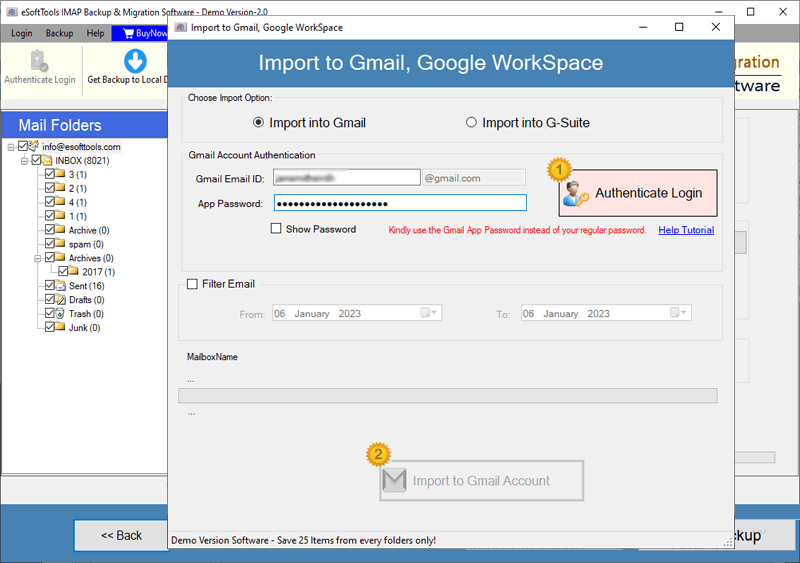
- Apply the Mail filter feature if you want to filter emails according to Date.
- At last, click on the Import to Gmail button, and the migration process will start.

Why Choose eSoftTools IMAP Backup & Migration Software?
eSoftTools IMAP Backup and Migration Software is a complete package to back up any IMAP email mailbox from any mail server. This software simplifies email backup or transfer from one server to another in just a few mouse clicks. It supports a wide range of email providers, including Mediacom, Yandex, GoDaddy and all other hosting mail servers, Gmail (Google Workspace), Yahoo Mail, and Office 365.
Through the software, email formatting, attachments, header information, and folder structure are properly managed. It also offers advanced options like selective folder migration/ backup, email filtrations according to dates, and multiple conversion formats that meet every user’s needs.
Key Features of the Tool-
- Save time with fast, secure, and error-free migration.
- Migrate emails directly from Mediacom to Gmail and other IMAP servers.
- Maintain complete folder hierarchy and email properties.
- Apply date filters to export only selected emails.
- Support multiple output formats like PST, EML, MBOX, PDF, and more.
- Successfully compatible with all IMAP-supported email accounts.
- Simple and easy interface for both technical and non-technical users.
Conclusion
This is a smart decision to switch from Mediacom to Gmail for users who want a secure and feature-rich email platform. With Gmail, users get the freedom to access their emails from any device at any time. I also explained a manual method in the blog, which is suitable for small mailboxes, but for larger mailboxes, the manual method is not suggested and may be highly risky. To save effort and stress, it is strongly recommended to go with the professional’s suggested eSoftTools IMAP Backup and Migration Software and migrate unlimited Mediacom mailboxes to Gmail and other cloud platforms.
FAQs
Ans. Yes, theuser can migrate selective mail folders from Mediacom to Gmail using the eSoftTools IMAP Backup & Migration software.
Ans. Yes, software loads all the files & folders of the Mediacom mailbox into the software and previews them in the tree structure before migration.
Ans. No, this software doesn’t work on Mac OS but works on all editions of the Windows operating system, like Windows 11, 10, 8.1, 8, 7 & below editions.
Ans. The email filter feature is designed to filter emails according to Date by specifying the Date Range (From and To).
Ans. Yes, this software works for all IMAP email accounts and does the backup & migration process easily.
