How to Export Windows Live Mail Emails?
Using Windows Live Mail Converter tool, Export Live Mail to Outlook, Office365, EML, MSG, NSF, MBOX and other formats.
Download and use eSoftTools Windows Live Mail Converter Software, export/convert Live Mail emails. Easily export Live mail emails to PST, EML, EMLX, MSG, HTML, MHTML, MBOX, and Thunderbird Mail files. In addition to conversion formats, directly migrate Windows Live Mail emails to Cloud mail apps like- Office365, Gmail, Yahoo Mail, and other IMAP based mail apps.
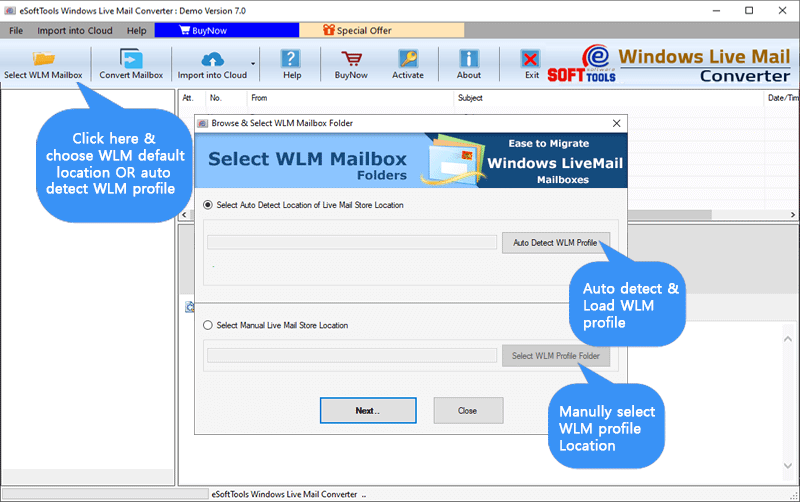
Launch the software and press the Select WLM Mailbox button from first screen.

- Auto-Detect WLM Profile: - In a single click, load all WLM profile mailboxes from its default storage location
- Select WLM Profile Folder: - Select an WLM email files containing folder manually from your local drive.
After adding WLM file/folders, click the Next button.

View all WLM profile emails and choose the required WLM mail folders easily.
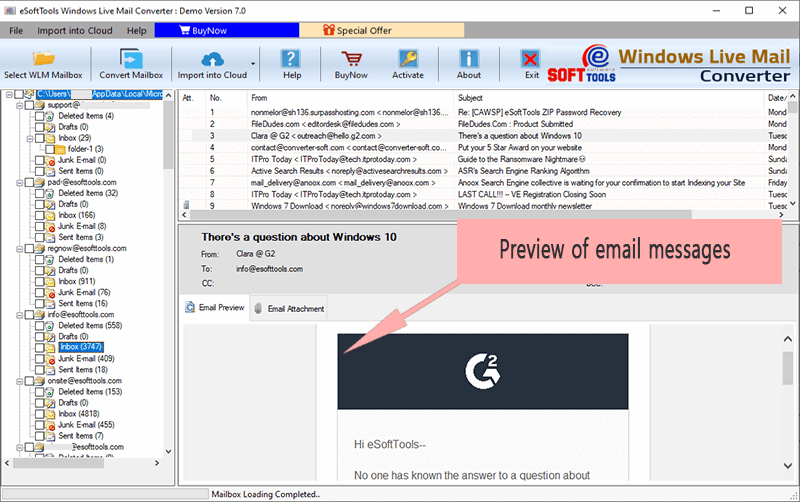
Choose needed WLM profile mail folders and apply the below given steps for WLM email Conversion and Migration: -
After this, choose a conversion format from the options- PST, EML, EMLX, MSG, HTML, MHT, MBOX, & Thunderbird.

- Single PST(for all mailbox) - Create single Outlook PST file for saving all WLM mailboxes selected by users.
- Separate PST file for each mailbox - This option create separate Outlook PST file for every selected user's WLM profile mailbox.
- EML - Generate separate EML file for saving each WLM email separately and open by all EML supported email clients.
- MSG - Create separate MSG file for each WLM email and open by all editions of MS Outlook.
- NSF - Transfer all Windows Live Mail folders to single Lotus Notes NSF file.
- HTML - Save each Live Mail email to separate HTML file and view Live Mail email messages in web-browser.
- EMLX - Convert WLM emails to EMLX files for to open in Apple Mail (MACOSX).
- MBOX (Folder-Wise) - Save each WLM mail folder with their emails to sepatate MBOX files.
- MBOX (Single MBOX) - Get a single MBOX file with all emails of different WLM profile mail folders.
- Thunderbird - Select this option and directly move WLM profile mail folders to Thunderbird mail client.
All Available Conversion options/formats: -
- Mail Filtering: - Apply email filtering function to export emails of only required dates from WLM profile.
- Naming Convention: - Provides custom name to resultant email files by different naming combintaions of email attributes- from, To, subject.
- Saving Location: - Select a location to save resultant files from your local drive.
Finally, press the Convert button and begin the WLM email conversion process.

Next, choose a cloud mail app from the options- Gmail, Office365, Outlook.com, Yahoo and IMAP.

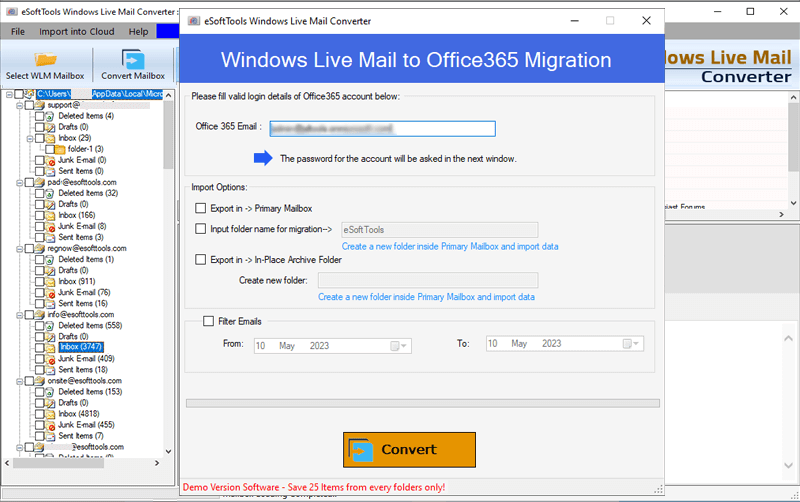
Enter Office365 account email address and apply other required Import options: -
- Export in -> Primary Mailbox: - Migrate emails from WLM profile mail folders to Primary mailbox folders of Office365 account.
- Input Folder Name for migration: - Add a new folder with a custom name to Office365 account to preserve WLM profile mail folders.
- Export in -> In-Place Archive folder: - Move mail folders from WLM profile to Office365's In-place archive folder.

Enter Gmail account "Email Address" and "Google Third-Party App Password" and click the "Athenticate login" button.
Note: - for login process, firstly create Google Third party app password


Provide your Yahoo Mail account email address and third party app password and press the "Athenticate login".
Note: - For login, create Yahoo Third party app password


Now add your IMAP account email address, password, port and Hostname.

Finally, press the "Convert" button and start exporting emails from Windows Live mail to IMAP mail apps.
