- Introduction:
- Understanding cPanel, Roundcube, and IMAP
- Can You Import a PST File Directly into cPanel or Roundcube?
- Recommended Solution
- Why Import Outlook PST Files to cPanel or Roundcube?
- How PST Files Can Be Migrated to an IMAP Email Account
- Method 1: Manually Import PST Files to IMAP Account
- Method 2: Import Outlook PST Files to cPanel, Roundcube & Any IMAP Account Professionally
- FAQ (Frequently Asked Questions)
Introduction:
If you are planning to stop using Microsoft Outlook and switch to a web-based email service, then you first need to understand how to import Outlook PST files into a cPanel email account. For this purpose, Roundcube Webmail is one of the most popular webmail applications provided by cPanel hosting.
However, importing PST files into cPanel or Roundcube is not as simple as uploading regular files. A PST (Personal Storage Table) file is an Outlook data file that stores emails, contacts, calendar entries, and other items on the user’s local computer. In contrast, Roundcube is a webmail application that accesses emails stored on the mail server. Therefore, Roundcube does not provide a built-in option to open or import PST files directly.
With a suitable method, you can easily achieve your PST migration to cPanel (Roundcube) through an IMAP-compatible process. This way, you can preserve the real mail folder structure, message contents, attachments, etc.
In this guide, you will learn what a PST file and IMAP are and how to migrate Outlook PST to cPanel or Roundcube, Webmail or any IMAP-enabled email accounts without losing emails, folders, attachments or metadata.
Understanding cPanel, Roundcube, and IMAP
1. What is cPanel?
cPanel is a web hosting control panel that allows users to create and manage email accounts, configure email settings, and access other hosting-related features.
2. What is Roundcube?
The Roundcube is a browser-based webmail application that allows users to send, receive, read, and manage emails stored in their mailboxes.
3. What is IMAP?
IMAP (Internet Message Access Protocol) is an email protocol that allows email applications to access and synchronize messages stored on a mail server.
Can You Import a PST File Directly into cPanel or Roundcube?
No, you cannot directly import an Outlook PST file into cPanel or Roundcube Webmail using their standard upload or email management options. A PST file is a local Outlook data file, whereas cPanel email accounts and Roundcube work with messages stored on the mail server and require IMAP protocols to access emails.
Uploading a PST file to your hosting account through File Manager will only store it as a file on the server. However, it will not automatically import the emails into your mailbox.
To understand why, let’s look at the main differences between these technologies.
1. Why cPanel Roundcube Cannot Open PST Files
Roundcube is a browser-based email application that allows users to read, send, and manage emails stored in their mailboxes.
A PST file, however, is designed for storing Outlook data on a user’s local computer storage. Roundcube does not include a built-in feature to access or open PST files, read their contents, or import its email folders directly.
Therefore, you need to transfer emails from PST to IMAP using a dedicated method and access emails directly in cPanel.
2. Why Uploading a PST File to cPanel Does Not Work
cPanel allows users to manage email accounts, configure mail settings, and access server files through its available tools. However, its standard File Manager is not an email migration utility.
For example, if you want to upload OutlookBackup.pst to your cPanel account, the file will remain stored in the selected directory on the cPanel account. The emails inside it will not automatically appear in your mailbox inbox, Sent folder, or other mail folders.
Therefore, to access those messages in your webmail account, you need to migrate PST files to the mail account with the help of a professional PST to IMAP migration tool.
Recommended Solution
| Situation | Recommended Solution | Action |
| Need to Import PST file into IMAP Account | Use eSoftTools Import PST to IMAP | |
| Need to Import PST to IMAP Webmail Accounts (Gmail, Yahoo, Domain Emails) | Use eSoftTools Import PST to IMAP Webmail | |
| Open PST Files from Dead or Crashed Computers | Use eSoftTools PST File Recovery |
Why Import Outlook PST Files to cPanel or Roundcube?
There are several reasons and situations when a user wants to move or transfer emails from Outlook to cPanel, Roundcube or any IMAP accounts.
- Switching from Outlook to Webmail – When a user needs to read emails through a web browser and from anywhere on any device.
- Centralised Email Storage – Storing emails only on a local hard drive can increase the risk of data loss. Moving emails to a mail server is an alternative solution to access whenever needed.
- Easier Backup and Management – A mail server-based email database can be easily downloaded on any computer to back up important emails.
- Access Emails on Multiple Devices – With webmail, users can easily access emails through Desktop computers, Laptops, Android Mobile Phones, iPhones, Tablets, and any web browser.
How PST Files Can Be Migrated to an IMAP Email Account
To make this process easier, this section covers both a manual method and a professional automated solution to securely and easily import Outlook PST files into a cPanel Roundcube mailbox.
Method 1: Manually Import PST Files to IMAP Account
Step 1) Configure Your IMAP Email Account in MS Outlook
Step 2) Separately, open your PST file that contains your emails and other items.
Step 3) Now, copy your emails to your configured IMAP mailbox
Step 4) Wait for the IMAP mailbox to synchronize.
Limitations of the Manual Method
- For the manual process, fully functional MS Outlook is required
- A large PST file can be slow to process.
- A stable internet connection is required to synchronize emails with the IMAP server.
- No control over the migration process
- Manual batch PST migration can lead to repetitive and time-consuming tasks.
Method 2: Import Outlook PST Files to cPanel, Roundcube & Any IMAP Account Professionally
This phase covers how a professional migration tool can simplify the entire process and easily import PST to cPanel, Roundcube or any IMAP accounts.
Additionally, eSoftTools PST to IMAP Migration Software allows you to upload single or multiple PST files to cPanel, Webmail, Roundcube, or any IMAP account. The software directly connects to your IMAP account mailbox and transfers PST files while maintaining the complete folder structure and email properties.
Whether your email account is hosted on cPanel, Roundcube, Gmail, Microsoft 365, Yahoo Mail, Zoho Mail, Zimbra, or another IMAP server, the migration steps remain almost identical.
Professional Features for PST to IMAP Migration Tool-
- Migrate Outlook PST files to any IMAP accounts directly without requiring an Outlook installation.
- Transfer multiple PST files and mailbox folders in a single migration process.
- Selectively migrate emails based on folders, subfolders, and specific date ranges.
- Preserve original folder hierarchy during and after the conversion from PST to IMAP.
- Properly maintain the complete email properties, including To, From, CC, BCC, Subject, Date and Time.
- Completely migrate email attachments, embedded images, and HTML formatting.
- PST to IMAP Converter supports all IMAP-supported email services like Gmail, Yahoo Mail, Outlook.com, Zoho Mail, cPanel, Roundcube, etc.
- Configure custom IMAP server settings with flexible port, SSL/TLS, and authentication options.
- Preview PST mailbox contents before migration to ensure accurate selection of emails and folders.
Steps to Import PST Files to Any IMAP Email Account
Step 1) Download and install eSoftTools Outlook PST to IMAP Migrator Software on your Windows computer.
Step 2) Open the software after installation
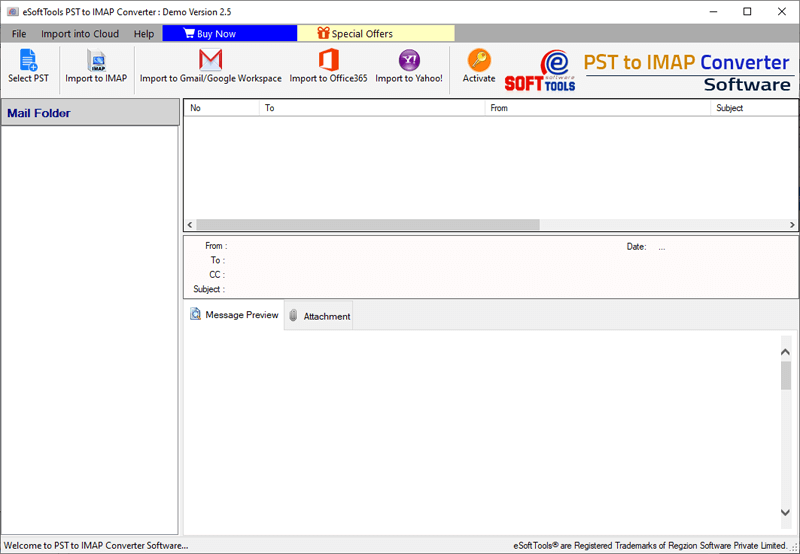
Step 3) Add a single or multiple PST files by clicking on the Select PST File button.

Choose an appropriate option to select the PST file from-
- Single PST File Conversion– This option helps to choose a single PST file for migration
- Batch PST File Conversion– This option enables users to select more than one PST file for conversion.
- Choose Configured Outlook Profile– Through this option, you can directly choose a configured Outlook profile mailbox for conversion.
Step 4) After selecting the PST file, the software scans the Outlook mailbox and displays the available folders, subfolders, and its mail messages.

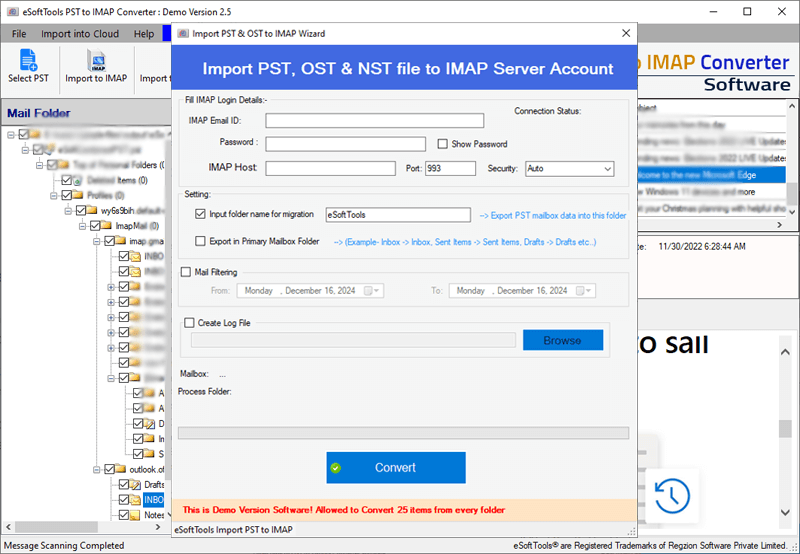
Step 5) Now, click the Import to IMAP button from the toolbar to jump over to the PST to IMAP migration wizard.
FAQ (Frequently Asked Questions)
A – Yes, eSoftTools PST to IMAP Migration Software allows users to load Outlook PST files directly from their computer and migrate mailbox data to cPanel or any other IMAP account without requiring an active Outlook installation.
A – Yes, you can use the email filter option and choose the date (From and To) and migrate only the emails that fall within the given date range.
A – Yes, this PST to IMAP Migration Software supports batch migration of multiple PST files to IMAP account without requiring any additional tools or complicated steps. Users can select multiple PST files during the scanning process and migrate them all at once.
A – Additionally, the original PST file remains stored in the same place on your computer. The software only reads the mailbox data and creates an additional copy in your destination IMAP account. Moreover, it never deletes or modifies the source PST file.
A – To establish a secure connection, you need to provide the destination email address, IMAP server hostname, port number, encryption settings, and valid authentication credentials for your cPanel email account.
A – Furthermore, the software is designed to process large PST files containing extensive mailbox data. However, migration performance may vary depending on the PST file size, available system resources, internet speed, and destination IMAP server limitations.


