Thunderbird Mailbox Splitter Software
The software helps to manage larger Thunderbird mailbox files into smaller ones in just a few mouse clicks. This software has two distinct functionalities: “Split Thunderbird Mailbox” and “Merge Thunderbird Mailbox” folders in a single application. The advanced features of this software is-
- Batch processing of Split Thunderbird Files at once
- Open all configured Thunderbird mailboxes and perform split or merge operation
- Thunderbird splitting through Email Address, Size, Date, and Year
- Additional Thunderbird folder merging through Date, Year, and All items.
- Preview Thunderbird Mailbox before splitting or merging
- Works smoothly on all Windows OS, including Win11.

Thunderbird Mailbox Splitter Software – Key Features

Instant Fast Software Delivery via Email

- Easily open and load single or multiple Thunderbird mailbox files.
- Simple and efficient process to split and merge Thunderbird mailboxes in a single application.
- View emails with attachments from Thunderbird mailbox
- “Auto-Load Thunderbird Profile” feature allows users to load Thunderbird mailboxes with a single click.
- Split Thunderbird Files into multiple parts without altering mailbox data.
- Multiple Thunderbird splitting options such as Email Address, Size, Date, and Year
- Additional Thunderbird merge options such as Date, Year, and All items
- Selectively split specific mailbox folders from Thunderbird mailboxes.
- Split Thunderbird Inbox files into multiple smaller mailbox files based on Email Address, Size, Date, or Year.
- User-friendly and intuitive interface that guides users through the mailbox splitting and merging process.
- Maintains complete email properties, metadata, and folder hierarchy during split Thunderbird files.
- Supports large-sized Thunderbird mailbox files without data loss.
- Keeps maintaining email formatting, attachments, headers and embedded items.
- All Mozilla Thunderbird versions supported.
Demo Edition:- Using demo edition split and merge each MBOX file with 25 emails free of cost.
All Detailed Features of Thunderbird Mailbox Split & Merge
Split Thunderbird Mailbox Folders
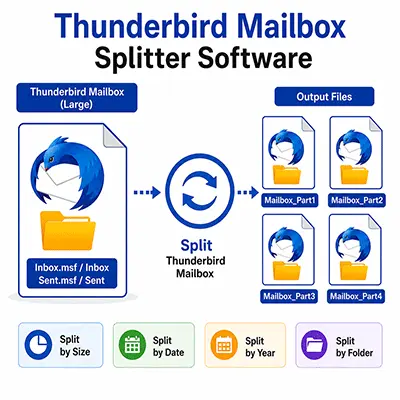
Efficiently split large or oversized Thunderbird mailbox folders into smaller files and improve Thunderbird performance. The software offers multiple advanced splitting options to meet different user requirements:
- Split by Size – Divide Thunderbird mailbox folders into smaller files based on a specified file size.
- Split by Year – Create separate mailbox files according to the year of the emails.
- Split by Date – Split Thunderbird mailbox folders by selecting a custom date range.
- Split by Email Address – Manage emails into separate files based on sender (From), recipient (To), CC, BCC, or Subject.
Check working process >> How to Split Thunderbird/MBOX file to smaller files?
Merge Thunderbird Mailbox Folders
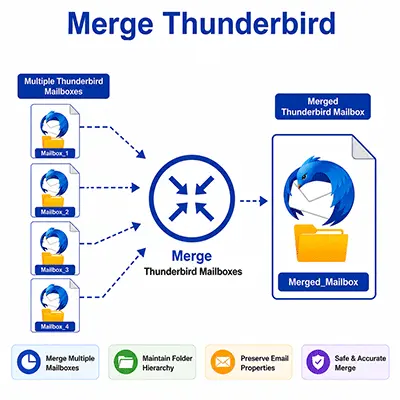
- Merge by Date – Merge Thunderbird mailbox folders based on a specified date range.
- Merge by Year – Merge mailbox folders by providing the year of the emails.
- Merge All Mailbox Folders – Combine multiple Thunderbird mailbox folders into a single mailbox file in one operation.
Auto-Load Thunderbird Mailbox
The software automatically detects and loads Thunderbird mailbox data from the default Thunderbird profile with just one click. This intelligent feature saves time and eliminates manual file searching and adding to the software for scanning.

Batch Thunderbird Mailbox Processing
The batch Thunderbird Mailbox processing feature enables users to process multiple Thunderbird mailboxes in one go. Batch mailbox conversion eliminates the need to handle every mailbox individually.

Preserve Folder Hierarchy
The software maintains the original Thunderbird folder structure during Thunderbird mailbox splitting or merging. All folders and subfolders are recreated exactly as they appear in the original mailbox hierarchy.

4-different options for Thunderbird Splitting
The software provides 4 easy ways to split Thunderbird mailbox folders. Users can split Thunderbird folders by Size, Year, Date, and Email Address. All these splitting modes make the process more convenient and help users manage mailbox data according to their specific requirements.

Selective Folder Processing
If you need to split or merge any specific folder from Thunderbird, then this feature “Selective Folders” is very helpful and saves time. Users only need to select the required folders (single or multiple) and proceed with the splitting or merging process.

Filter Emails from Thunderbird Folders
Thunderbird Splitter tool provides an email filter feature that allows users to filter emails from Thunderbird folders based on a date range. Users can specify the “From” and “To” dates, and the software scans and splits or merges only the emails that fall within the given date range.

Compatibility with All Thunderbird Versions
The software proudly supports all versions (older and latest versions) of Mozilla Thunderbird mailboxes. Without worry, you can download Thunderbird Splitter software and fulfil your mailbox split or merge requirement.

Compatibility with All Windows OS
This software is specially designed for the Windows OS platform and successfully supports all versions of the Windows operating system, including Win 11, 10, 8.1, 8, 7, XP, Vista, and others.
eSoftTools Thunderbird Splitter & Merger Software
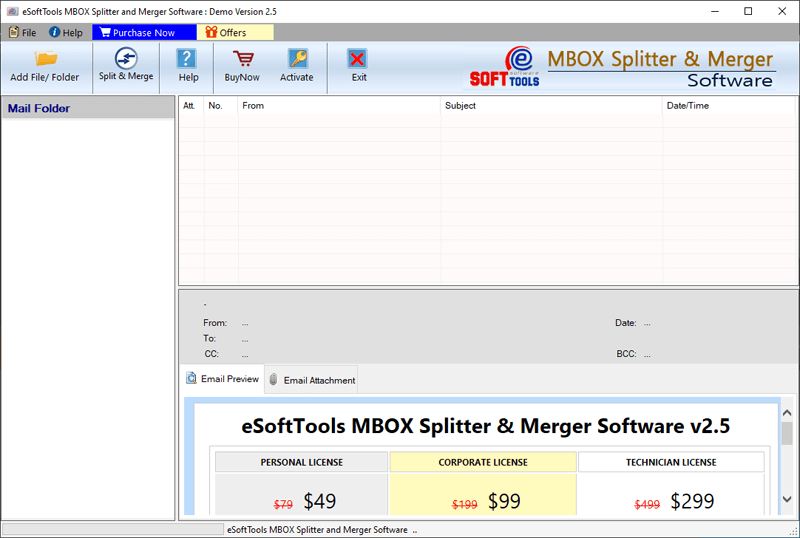
Thunderbird Splitter & Merger Software first screen

Select and add Thunderbird files/folders
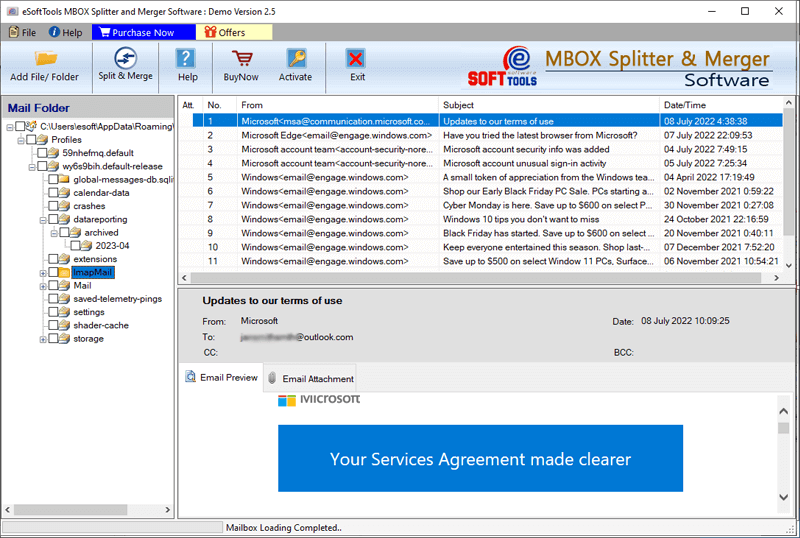
Open/View Thunderbird files

Splitting Thunderbird files

Thunderbird file merging
Software Comparison
| Software Features | Trial Version | Full Version |
|---|---|---|
| Split Thunderbird/MBOX files into smaller files | ||
| Merge Thunderbird files into single file | ||
| Split by size, year, date, & email address | ||
| Merge by date, year | ||
| Open/View Thunderbird/MBOX file emails | ||
| Batch Thunderbird Mailboxes | ||
| Manual Saving Location Selection | ||
| Selective Thunderbird Folder Split/Merge | ||
| Unlimited Thunderbird/MBOX file split and merge | Merge and Split Thunderbird files with 25 emails | |
| Download Now | BuyNow |
Software Specification
Trial Limitations
With the demo edition, you can merge and split Thunderbird/ MBOX files with up to 25 emails for free.
Software Info
Version
v3.0
All Thunderbird version applications
License
Personal, Corporate, Technician
Language Supported
English, German, Italian, French, Spanish
System Requirements
Processor
Intel® Pentium Class
Operating System
Windows
Hard Disk Space
50 MB of free hard disk space
RAM
Minimum 512 MB is required
Software Delivery
Electronic
YES
Mode
Delivery by E-mail
Supported Windows OS
Works with all windows O/S editions 11, 10, 8.1, 8, 7, XP, Vista, & below editions
Frequently Asked Questions (FAQ)
How to split Thunderbird Mailbox folders into smaller files?
- Download eSoftTools Thunderbird Splitter Software from here- >> Download Now
- Open the software and click on the “Add File/Folder” button from the software toolbar.
- From the section “Select Thunderbird Profile”, choose the option “Auto Load Thunderbird Profile” and click the Next button.
- The software displays all configured mailboxes in the left panel of the software.
- Choose the folder(s) from the folder tree hierarchy
- Click on the “Split & Merge” button from the toolbar and choose the option “Split MBOX File” and click the Next button.
- Select a split option from Split by Size, Split by Date, Split by Year, or Split by Email Address.
- After selecting the splitting option and its relevant settings, click on the Next button.
- Now, choose the saving location and click the “Split” button to start the Thunderbird mailbox splitting process.
Check the complete process, by visiting here: - How to Split MBOX file to smaller files?