Office365 Attachment Extractor tool
An easy and straight-forward method to extract attachments from Office365 mailbox. Extract attachments from office365 email, contacts, calendar and others data items. Download all Offie365 attachments to local drive and save them in their original format.
- Bulk download attachments from multiple emails of Office365 account.
- Extract attachments from other mailbox items like- contact and calendar.
- Attachment extract from chosen Office365 account mail folders.
- Download attachments from Office365 mailbox and save to local drive.
- Accessible in all Windows O/S editions- Win11, 10, 8.1, 8, 7, XP, etc.

Office365 Attachment Extractor Software - Smart Features
Instant Fast Software Delivery via Email

- Smartly download/extract attachments from Office365 account mailbox with easy steps.
- Download attachments from Office365 account's email, contact, calendar, and other items.
- Extract attachments from selective single or multiple mail folders of Office365 account.
- Download and save attachments with “Folder Wise” and “Message Wise” saving options.
- Filter extension and extract attachments of specific file types from Office365 account mailbox.
- Extract attachments from Office365 emails of specific dates through mail filter by date option.
- Without facing size restrictions problems complete the Office365 attachment extraction process.
- Specify a saving location manually to preserve all the extracted Office365 attachments.
- Both technical & non-technical users can access the software without prior experience.
- Run Office365 attachment extractor on any Windows O/S editions- 11, 10, 8.1, 8, 7, XP, & others.
Demo Edition:- Extract up to 15 attachments from each selected Office365 account folder for free.
Office365 Attachment Extractor Software - All Features
Download/Extract attachment from Office365 mailbox
Instantly and securely extract attachments from Office365 account mailbox through Office365 attachment extractor tool. With a quick process download attachments from office365 emails, contacts, calendar and other mailbox items.
Download all or specific type attachments from Office365 account's mailbox items. Perform Office365 attachment extraction process effortlessly by using advanced functions of the software.
Know more>> How to Extract Attachments from Office365?

Download specific folder's attachments
Download attachments from items chosen folders of Office365 account mailbox. View all mailbox folder of Office365 account inside the software with same folder hierarchy. Make selection of folder and extract attachments from mailbox items of selected Office365 account's folders.

Save attachments with 2 distinct modes
- Extract attachments Folder wise: - download attachments and Save extracted attachments in folders.
- Extract attachments Message wise: - Save all attachments from related emails in separate folders.
Download attachments from Office365 account mailbox and get the facility to save extracted attachments with two different options: -

Extract attachment of specific extension
Download attachments of all types or extract specific type attachments from Office365 account. Select extension of attachments as well as enter the extensions of attachments and easily download the specified attachments from Office365 account's mailbox items.

Extract email attachments date-wise
Choose the dates of Office365 emails and download attachments from emails of only chosen dates. With mail filter function select a start and an end date of email in “TO” and “From” field. Make selection of dates and download attachments from emails of specified date range.

Attachment extraction with zero loss
Extract attachments from Office365 emails & other mailbox items without losing a single-bit of data. Download attachments from Office365 account's all mail folder items. Extract all attachments and preserve them in their original format on your local drive.

Save attachments to desired location
Extract attachments from your Office365 account mailbox and save extracted attachments to the desired location on your local drive. Manually choose your desired location from your local drive and preserve all extracted attachments to that specified location with ease.

Extract Office365 attachments of all sizes
Extract any attachment from your Office365 account without encountering any issues related to size limitations. Extract multiple attachments of smallest to largest sizes at once using the same technique, without encountering any errors.

Easy-to-use Graphical interface
This program for Office365 Attachment Extraction is simple to use even for non-technical people with no prior knowledge. All types of users may use this tool, and no particular technical abilities are necessary. Users may extract Office365 attachments with the software in a few simple steps.

Compatible with all Windows versions
On any Windows-based PC, you may run this Office365 attachment extractor to extract attachments from Office365 mailbox items. Run the software without any difficulty on all editions of Windows O/S, including Windows- 11, 10, 8.1, 8, 7, XP, Vista, and others.

Free Office365 Attachment Extraction
The demo edition of Office365 attachment extractor tool is available. Before purchasing paid licenses, this sample edition enables customers to test out all the features of the software. Users of the demo version can freely download up to 15 attachments from each chosen Office365 account mail folder.
eSoftTools Office365 Attachment Extractor Software

Office365 Attachment Extractor software

Office365 Account Login

Choose required Office365 account mail folders

Extract attachments from Office365 options

Download Office365 attachments to Local drive
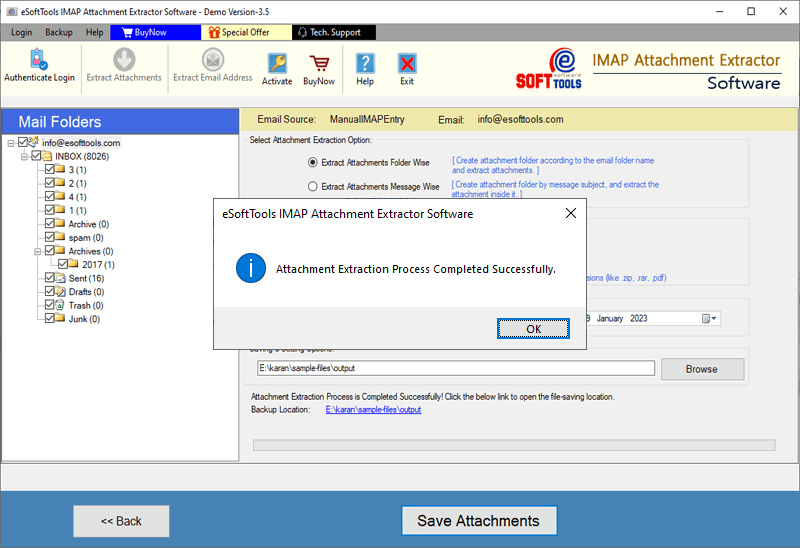
Export and save Office365 attachments process completion
Software Comparison
| Software Features | Trial Version | Full Version |
|---|---|---|
| Extract Attachments from Office365 | ||
| Extract attachments from specific folders | ||
| Save Attachments Folder-wise or Message-Wise | ||
| Extract attachments from emails of specific dates | ||
| Download unlimited Email Attachments | Extract upto 15 attachments from each Office365 account mail folder | |
| Download Now | BuyNow |
Software Specification
Trial Limitations
Freely extract up to 10 attachments from each specified Office365 account's mail folder.
Software Info
Version
v2.0
all IMAP based mail apps
License
Personal, Corporate, Technician
Language Supported
English, German, Italian, French, Spanish
System Requirements
Processor
Intel® Pentium Class
Operating System
Windows
Hard Disk Space
50 MB of free hard disk space
RAM
Minimum 512 MB is required
Software Delivery
Electronic
YES
Mode
Delivery by E-mail
Supported Windows OS
Works with all windows O/S editions 11, 10, 8.1, 8, 7, XP, Vista, & below editions
Frequently Asked Questions (FAQ)
How to Download/Extract attachment from Office365 mailbox?
- Download, Install, and Launch eSoftTools Offic365 Attachment Extractor software.
- Choose Office365 option from the mail apps list and enter Office365 email address.
- Press login button and sign in with your Office365 account and load all mailbox folders.
- Pick the required office365 account's mail folders and apply other needed settings-
- Select Attachment Extraction options: - Extract attachments and store them Folder-Wise or Message-Wise.
- Attachment extension filter settings: -Select an attachment extension from the provided list or manually enter extensions.
- Mail filtering by date: -In the To and From fields, choose or input the date of the emails.
- Lastly, press the Save Attachments begin the attachment extraction job.
Check the complete process, by visiting here: - How to Extract Attachmenmts from Office365 account mailbox?
Is this software also able to extract attachments from contact and calendars of office365 mailbox?
Can I download attachments from emails from some specific Office365 account's mail folders?
Is this software supports extracting certain types of attachments from Office365 mailbox?
- Predefined File Extension: - Select a file extension from the list of file extensions available.
- Custom File Extension: - Enter a file extension manually to extract attachments from Office365 mailbox with that specific extension.