











eSoftTools Lotus Notes to Gmail Migration Software

Lotus Notes to Gmail software Main Screen
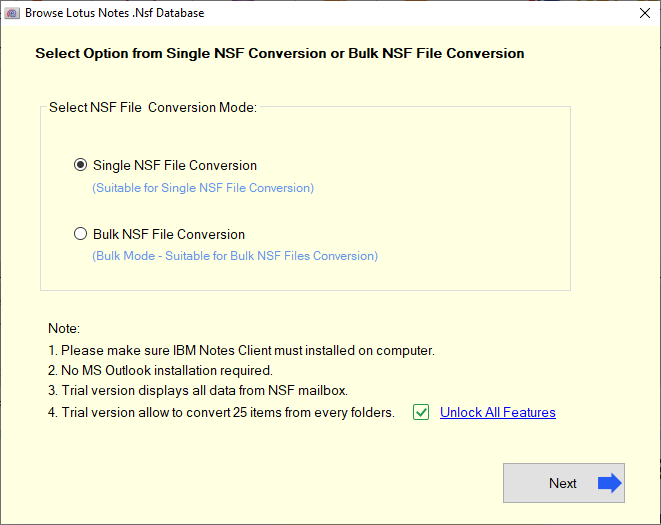
Select Single/Bulk NSF files

Select Single NSF file

Batch Export Lotus Notes NSF to Gmail

Preview Lotus Notes Data from NSF

Import Lotus Notes to Gmail
Frequently Asked Questions (FAQ)
How to Transfer Lotus Notes Email to Gmail Account?
- Launch Lotus Notes to Gmail Migration tool on your windows based computer.
- Select add single or multiple NSF files and extract all data.
- Get preview of email, contacts, and calendars and select required folders from NSF files.
- Hit the Import to Gmail button from top menu bar..
- Enter your Gmail account email id and password in the software.
- Use mail filter and Create a Log file option (As per requirement)..
- Click the Import to Gmail button and start the Lotus Notes to Gmail migration process easily.
Is this software able to migrate multiple Lotus Notes NSF files to Gmail at once?
Is this able to search NSF files from Hard Drive, if a user is unable to add NSF file manually?
Before migration, can I see my emails from Notes NSF files with this software?
Can I export some selective folders from NSF files to Gmail or G-suite account?
Yes, NSF to Gmail migration tool allows to make selection of required folders from NSF files to export them to user's Gmail account.
Where software holds all Lotus Notes data after Importing NSF files to Gmail Account?
For this software offers users to create a new folder to Gmail account. While migration the software directly transfers all user's data from NSF files to this newly created folder.
With this software, is it possible to Export emails of some specific dates from NSF files?
Yes, a user can quickly transfer emails of some required dates from NSF files using its Mail filter by date feature. The software offers to select start and end dates and move emails of selected dates from NSF files to Gmail account easily.
Is this software provides a log file with all steps of migration?
While migration the software also provides and option to create a log file. This files holds all the information of the steps performed by the software for migration.
Can I use this software requires Lotus Notes Application for migration?
Yes, the software only requires Lotus Notes application and dummy profile to perform NSF to Gmail Migration with accuracy.
Is it workable on all windows based-computer?
Yes, this is a windows based software which is supportable on all edition of Windows Operating system. Users can easily use this software on Win-10, 8.1, 8, 7, Vista, XP, and below editions.
Can I try this software for free to check its working and functions?
Yes, for free use the company offers a trial/demo edition of this software. Using this demo edition user can export up to 25 items from each folder of NSF file to Gmail account for free.