Lotus Notes Address Book converter Software
Excellent tool to export/convert Lotus Notes Address Book. Convert Names.nsf, Archive.nsf, or other NSF database files containing contacts. Easily convert NSF files to different formats with every contact and their relevant details.
- Convert NSF files with contacts to PST, vCard, CSV, and MSG.
- Export Contact from NSF with every associated information.
- Supporting NSF files of HCL Notes/ IBM Notes and Lotus Notes.
- Directly open NSF and provide preview of Contact items.

Smart Features of Lotus Notes Contact Converter Tool
Instant Fast Software Delivery via Email

- Quick approach to export Lotus Notes contacts to Outlook PST and more formats.
- Efficiently convert Names.nsf, Archive.nsf, Contacts.nsf, Domino.nsf, or other files.
- Offers different file formats to store Lotus Notes contacts- PST, CSV, vCard, and MSG.
- Open NSF files and view all Lotus Notes contact directly on software’s preview panel.
- Convert multiple NSF files (containing contacts) at once with bulk NSF file conversion facility.
- Export contact with every property- Name, phone number, email address, attachments, etc.
- Allows, choosing contact folders from NSF files and exporting them selectively.
- Migrate NSF with contacts to Cloud email programs like- Gmail/ Yahoo Mail/ Office365 and more.
- Working with NSF files of all HCL Notes, IBM Notes, and Lotus Notes.
- Executable on computer running on Windows 11, 10, 8.1, 8, 7, Vista, XP, or prior version.
Demo Version:- Allows to convert NSF with 25 Lotus Notes contacts from each folder for free.
Best Features of Lotus Notes Address Book Converter Software
Marvelous Lotus Notes Address Book Export Solution
The single programs specially provided for users who want to convert Lotus Notes contact files. Convert NSF files of HCL / IBM or Lotus Notes those containing contacts. Export contacts from NSF to over 4 different file format including PST, MSG, vCard, and CSV.
Perform NSF Contact file conversion with fastest process and easy steps. Convert one as well as many NSF files at one time with no faults or other kind or other kind of issues.
Working Process: - How to Convert Lotus Notes Contact NSF files?


Bulk Convert Notes NSF Files
This Lotus Notes Contact exporter allows converting multiple NSF files at once. Users can add several NSF files into the software with bulk conversion mode. All those selected NSF files with contacts users can convert in a single process rapidly with ease.

Export Contacts to 4 distinct formats
This single software capable to convert NSF files and export Lotus Notes contacts into 4 different files formats. A users can easily export complete Lotus Notes mailbox from NSF to a PST file. For separately saving contacts you can Convert NSF to MSG, CSV, and vCard files.

Open Notes NSF and View Contacts
Software supporting showing contacts and other mailbox items that available inside NSF files. Software has preview panel, where it loads and shows Lotus Notes data from NSF files. Easily users can see every Lotus Notes contacts with every related information here.

Export Complete Contact details
Efficiently Convert NSF file that has Lotus Notes address book with all contact information. Each contact export from NSF with all relevant details- including- Name, profile image, phone number, email address, attachments, and other elements.

Folder Selection & Exporting
Software allows users to easily select contact folders from NSF files and export contacts. Make selection of contact folders from single or multiple NSF files that you inserted in the software. Selecting folder will enables users to export contacts from NSF files specifically.
Migrate NSF to Cloud Mail Apps
Migrate Lotus Notes mailbox with address book from your NSF files to any cloud email platform. Safely perform NSF file Migration with contacts to web email programs such as- Gmail, Yahoo Mail, Office365, Outlook.com, or IMAP-based services.

Supporting all Notes NSF files
This software to convert or export Lotus Notes contacts supports all NSF database files including- Names.nsf, Archive.nsf, Contacts.nsf, Domino.nsf, or others. Easily convert any NSF file that holding contacts generated from HCL Notes, IBM Notes, Lotus Notes, or Domino server.

Easy & Modern User Interface
Available with a modern and easy interface for user convenience. Accessing this software for the conversion process is easy for all types of individuals. Just clicking some button in this software's screen users can easily convert NSF files and export Lotus Notes contacts.

Fully Windows Compatible
Specially created for Windows based machines. Users who using Windows O/s in their computer can easily install and execute this software for Lotus Notes contact conversion. Easily run the software on Windows 11, 10, 8.1, 8, 7, XP, Vista, and older versions.

Free NSF Contact Conversion
This software for Lotus Notes NSF Contact conversion is also available with demo edition facility. Every user can download this free demo for testing the software before the purchase. With demo users can Free Convert NSF with 25 contacts from each folder to all available conversion formats.
eSoftTools Lotus Notes Address Book Converter

First Screen of Lotus Notes Address Book Converter Software

Open Lotus Notes NSF files

NSF Contacts Export to PST/ MSG/ CSV and MSG
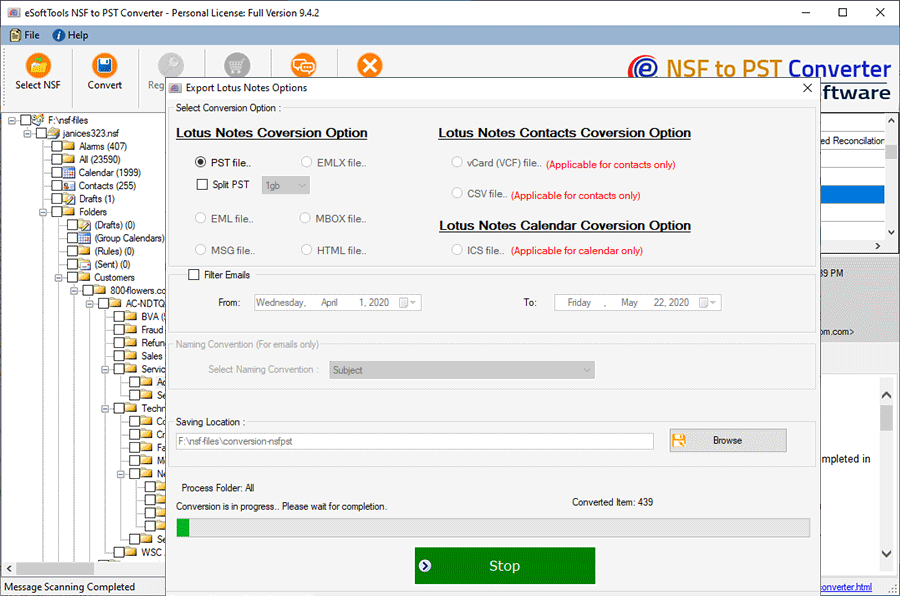
Lotus Notes Address Book Conversion
Software Comparison
| Software Features | Trial Version | Full Version |
|---|---|---|
| Lotus Notes Address Book Conversion | ||
| Convert NSF to PST | ||
| Convert NSF to vCard | ||
| Convert NSF to CSV | ||
| Selective Folder Export | ||
| Saving resultant files to user-defined location | ||
| Unlimited NSF File Conversion | Export 25 items from each contact folder of Lotus Notes NSF file | |
| Download Now | BuyNow |
Software Specification
Trial Limitations
Free Convert Lotus Notes NSF file with upto 25 contact items from each folder to every available conversion format.
Software Info
Version
v12.5
NSF (HCL/ IBM/ Lotus Notes and Domino Server).
License
Single User, Corporate, Technician, & Enterprise
Language Supported
English, German, Italian, French, Spanish
System Requirements
Processor
Intel® Pentium Class
Operating System
Windows
Hard Disk Space
50 MB of free hard disk space
RAM
Minimum 512 MB is required
Software Delivery
Electronic
YES
Mode
Delivery by E-mail
Supported Windows OS
Works with all windows O/S editions 11, 10, 8.1, 8, 7, below editions
Frequently Asked Questions (FAQ)
How To Export Lotus Notes Address Book to Outlook PST?
- Download eSoftTools Lotus Notes Address Book Converter Software.
- Press Select NSF button and choose single or bulk file conversion method.
- Add NSF files after choosing the conversion mode & press Start Scanning button.
- Open NSF file and get a preview of Lotus Notes mailbox and contact items.
- Choose contact folders from folder pane and press Convert button.
- Select a conversion format from options- PST/ MSG/ vCard or CSV.
- Press Browse button and select the place for saving new contact files.
- Lastly, hit on Convert to start exporting Lotus Notes Address book.
Check complete process of Lotus Notes Contact Export, by visiting here:- How to Convert Lotus Notes NSF files?.
Will this software allow me to convert several NSF files with only contacts at once?
In which file types this software allows exporting Lotus Notes address book/ contacts?
Does this software enable users to export contacts from NSF files in their original format?
Can I use this software to convert Names.nsf files and Archive.nsf?
Is this software able to create a single vCard with complete NSF file contacts?
Will this software allow me to convert NSF files of Domino Server?
Can this software allow converting NSF files that I generated from the latest version of HCL Notes?
Is this software available with demo facility to test its functions before purchase?
A free demo version of this eSoftTools Lotus Notes Address Book Converter tool is available. This demo version allows users to convert NSF files with 25 items from each folder.
This will help users to test the functioning of the software and get a quick analysis of how this software works without spending money.