Firstly, download and install eSoftTools Thunderbird Duplicate Remover Software on your windows computer.
Launch the software and press the Add File/Folder button.

Step-2)
Choose a mode of adding THunderbird email files for de-duplication job: -
- Select MBOX File: - Add a Thunderbird MBOX/mail file from a known location.
- Select MBOX Folder: - Import all thunderbird emails files from a folder and their inner sub-folders.
- Auto-Load Thunderbird Profile: - in one click, import email files from Thunderbird default storage location.
Insert the email files with your chosen option and press the Next button.

From the imported Thunderbird emails files, load mail folders.
Open each folder by clicking on it via mouse and check their internal emails.

Click on each email to view it in the preview panel and check for duplicate emails.
Pick the folders having duplicate emails and press the Remove Duplicates button.

Step-5)
Select and customize the necessary settings as per your preferences for the de-duplication process in the new screen opened by the software.
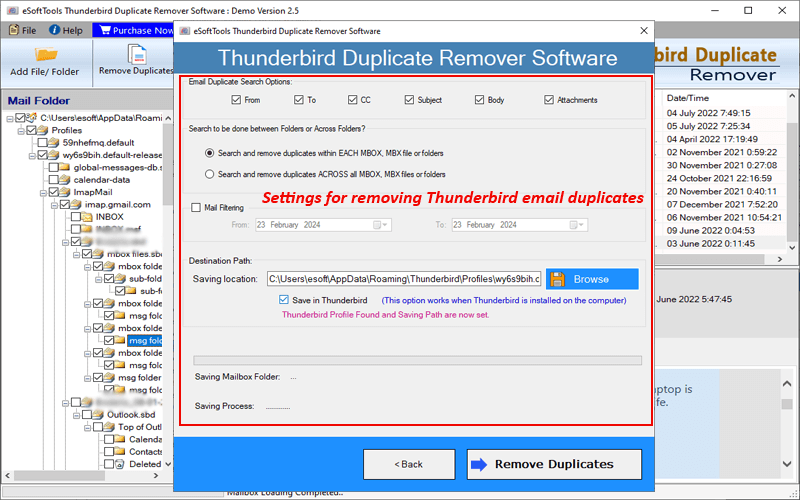
Select and use these options to delete duplicate emails from Thunderbird Mail files: -
- Email Duplicate Search options : - Select email fields- To, Cc, From, Subject, Body and Attachments and search for email duplicates with specified criteria. (Select anyone or entire)
Find and delete email duplicates within the mail file or from all folders (Choose anyone option)
- Search and remove Duplicate within each file: - The software searches for email duplicates in each file one after another with the search criteria specified by users.
- Search and Delete Duplicate across the folders: - Scans all selected folders and subfolders simultaneously to find Thunderbird email duplicates.
- Mail Filtering (optional): - Find duplicates only from emails you generated or received in a specific date range. Select this option and choose a Start and an End date.
- Choose a mode of storing resultant file after de-duplication (Select Anyone)
- Manual Saving Location Selection: - Hit on the Browse button and select any location from your computer to save the resultant files.
- Save in Thunderbird: - Select "Save in Thunderbird" option & directly import the resultant files to Thunderbird profile's "Local Folders" path.
Step-7)
Press Remove Duplicates button and begin the process of removing email duplicates from Selected Thunderbird Email files.
