Hetzner Email Backup & Migration Software
Ultimate solution with smart functions for email backup and transfer of emails from Hetzner to different email platforms. Create secure local email backups in over 9 different file types. Also, easily migrate emails to other webmail platforms. Powerful tool for a smooth and hassle-free process without any data loss.
- Download emails from email account hosted on Hetzner.
- Transfer emails from Hetzner to Gmail, Office 365, and other.
- Option to choose specific folders to selectively migrate emails.
- Ensure data security during both email backup & migration.
- Simple interface with step-by-step guidance for easy setup & execution.
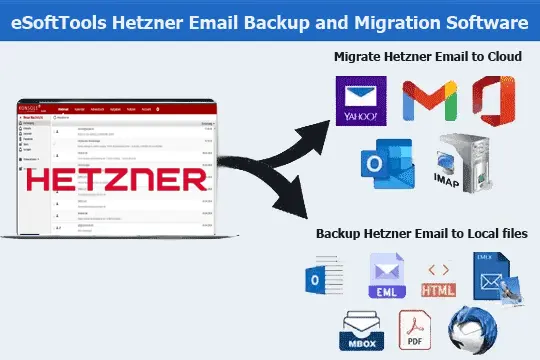
Available Features in Hetzner Email Backup & Migration Software

Instant Fast Software Delivery via Email

- Versatile Backup/Export Options: Export Hetzner emails in 9+ formats, including PST, MBOX, EML, EMLX, MSG, PDF, HTML, HTML, and Thunderbird.
- Effortless Email Migration: Migrate Hetzner email data to platforms like Gmail, Office 365, Yahoo, or any IMAP-supported service.
- Export individual emails into separate files in formats like - EML, PDF, HTML, MHTML, or MSG.
- Import Hetzner email data directly into email profiles you using in Thunderbird effortlessly.
- Export Hetzner emails to MBOX with options to save emails from all folders in Single MBOX or each folder in Separate MBOX.
- Selective Folder Backup: Choose only the relevant folders from Hetzner mailbox for export.
- Date-Specific Transfers: Filter emails from a specific date range to move only relevant messages.
- Receive your software activation details via email immediately after purchase for quick setup.
- Ensure email integrity by keeping every email detail intact, guaranteeing data loss-free transfer.
- Local Storage Control: Choose your preferred location on your computer to save email backups.
- User-Friendly Design: Offers intuitive interface that's easy to navigate for users of all skill levels.
- Extensive Windows Support: Compatible with Win - 11, 10, 8.1, 7, and even older versions.
Free Trial : Allowing you to back up or migrate up to 25 emails per folder before purchase.
Smart Functions for Hetzner Email Backup and Migration
Effortless Backup & Migration for Hetzner Emails
Best solution to streamline email backup and migration from Hetzner email accounts: -
- Local Backup of Hetzner Emails: - Store Hetzner account email data on your local system. Hetzner email backup and migration software offers the facility to export emails in various widely used formats, including PST, MBOX, EML, EMLX, MSG, PDF, HTML, MHTML, and Thunderbird. Choose the format that suits your needs for easy access or storage.
- Email Migration to Cloud Platforms: - Migrate emails from Hetzner to leading cloud services like Gmail, Office 365, Yahoo Mail, or any other IMAP-based platform (including - custom domain accounts). This software ensures secure, fast, and error-free migration. Plus, it maintains integrity of your emails with attachments and other elements throughout the process.
Learn More >> How to Backup & Migrate Hetzner Emails?
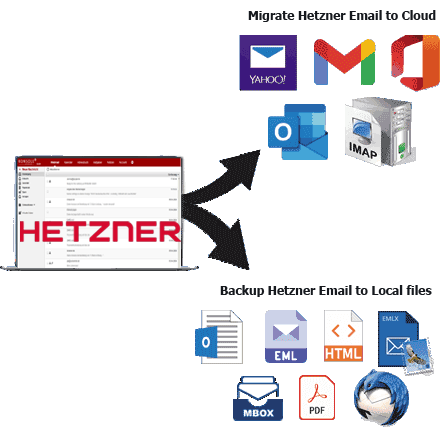
Backup Hetzner Emails in PST Format
Safely store emails received from your Hetzner accounts by exporting them to PST files, compatible with Microsoft Outlook. This function helps combine emails from multiple folders into a single PST. Also, keeping the original folder hierarchy and metadata completely intact throughout the process.
Export / Save One Email to Each File
Improve email organization by saving each email message as a separate file. The software supports formats such as EML, HTML, PDF, EMLX, MHTML and MSG, allowing users to store each email separately. Ideal for users who want easy access, sharing and sorting of individual messages.

Backup Emails to MBOX Options
- Save in Single MBOX: - Merge all selected mail folders and import/save all emails into one MBOX file.
- Save in Separate MBOX: - Save each mail folder as a separate MBOX file for easy organization.
Store Hetzner email data in MBOX files and create backups easily with 2 different options: -

Move Hetzner Emails into Thunderbird
Import Hetzner emails to Thunderbird instantly, without any technical setup. This software automatically detects the Thunderbird profile on your system and transfers your selected Hetzner email folders directly to it.

Targeted Folder Backup & Migration
Export only the folders you need from your Hetzner mailbox for backup or migration. This selective export function saves you from transferring unnecessary data, saving both time and storage while also giving you precise control over your email management.

Maintain Email Structure & Metadata
Ensure 100% data integrity during backup or migration. All details—senders, recipients (To, CC, BCC), subject lines, message content, timestamps, and attachments—remain exactly as they were in the original Hetzner mailbox emails.

Backup/Migrate Emails by Date Range
Streamline your backup or migration by filtering emails based on specific time frames. Whether you need emails from last week, last year, or a specific period, this feature helps you easily specify the exact period and efficiently export only the most relevant email communications.

Define Naming Rules for Email Exports
Stay organized by applying custom naming patterns when exporting email files. You can label files using the date, sender's name, subject, or a combination of these parameters. This makes it easier to identify and manage the exported data later.

Move Emails to Custom Cloud Folders
When migrating emails to a cloud platform such as Gmail, Office 365, or other IMAP-based services, you can send emails to a custom-created folder. This allows for better separation between migrated emails and existing mailbox content.

Manually Choose Backup File Location
Choose exactly where your backup files will be saved—whether it's on your local drive, external storage, or a shared network folder. This flexible storage option ensures that your backups are kept in a secure and accessible location of your choice.

Simplified Interface for All Users
The software is designed for both beginners and professionals, and offers a clean and intuitive interface. With guided steps and well-defined options, anyone can perform a full backup or migration of Hetzner emails without any advanced technical knowledge.

Works on All Windows Versions
Fully compatible with Windows 11, 10, 8.1, 8, 7, Vista, XP and other older versions. No matter which version of Windows you use, this software performs consistently well and provides a smooth and error-free experience.

Migrate/Backup Hetzner Emails Free
Download the free trial version and test all the main features of the software with a limit of 25 emails per folder. This allows you to evaluate the performance and capabilities of the tool before purchasing the full version.
eSoftTools Hetzner Email Backup & Migration Software

Hetzner Email Backup/ Migration software

Hetzner Email Account Login

Choose required Hetzner Email account mail folders

Download InMotion Hosting Email to different formats

Download Hetzner Email to Local drive

Import Hetzner Email to cloud apps

Migrate Hetzner Email to Office365

Migrate Hetzner Email to Gmail
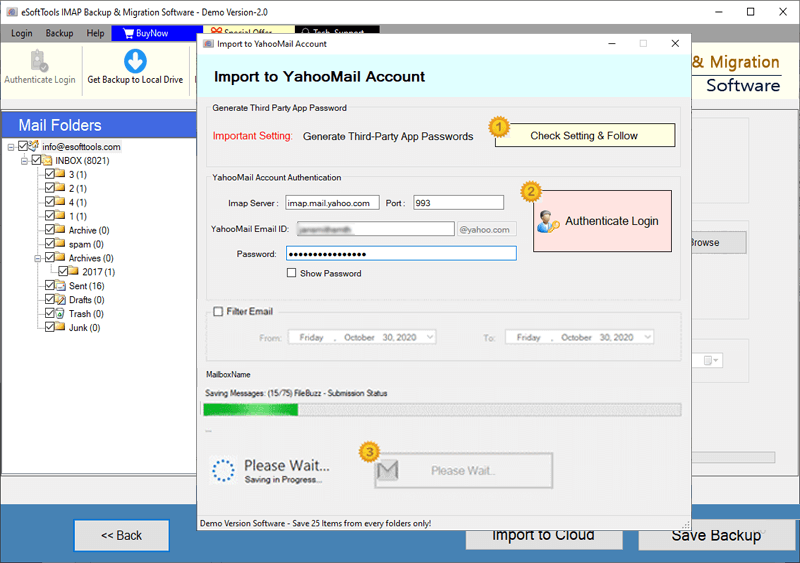
Hetzner Email export to Yahoo account

Export Hetzner Email to Outlook.com/ Hotmail

Migrate emails from Hetzner Email to other imap mail app
Software Comparison
| Software Features | Trial Version | Full Version |
|---|---|---|
| Backup & Migrate Emails from Hetzner Email Accounts | ||
| Export Emails to Multiple Formats (PST, MBOX, PDF, EML, HTML, and More) | ||
| Transfer Hetzner Emails to Gmail, Office 365, Yahoo, and IMAP Services | ||
| Save Each Email Folder as a Separate MBOX File | ||
| Consolidate All Folders into a Single MBOX Archive | ||
| Seamlessly Import Emails into Thunderbird Mail Client | ||
| Filter Emails by Date Range for Precise Backup | ||
| Customize Output File Names for Better Organization | ||
| Complete Hetzner Email Backup with No Limitations | Demo version allows backup/migration of up to 25 emails per folder | |
| Download Now | Buy Now |
Software Specification
Trial Limitations
Try all the features of Hetzner email backup and migration software with a free trial. Backup or migrate up to 25 emails per folder.
Software Info
Version
v6.0
Hetzner email
License
Personal, Corporate, Technician
Language Supported
English, German, Italian, French, Spanish
System Requirements
Processor
Intel® Pentium Class
Operating System
Windows
Hard Disk Space
50 MB of free hard disk space
RAM
Minimum 512 MB is required
Software Delivery
Electronic
YES
Mode
Delivery by E-mail
Supported Windows OS
Works with all windows O/S editions 11, 10, 8.1, 8, 7, XP, Vista, & below editions
Frequently Asked Questions (FAQ)
How to Export Emails from Hetzner to Computer using Hetzner Email Backup Software?
- Download and install eSoftTools Hetzner Email Backup Software in your Windows system.
- Launch the application and enter your Hetzner email credentials, including - email address, password, IMAP server address (e.g., mail.yourdomain.com), and port number (993).
- Click Login to establish a secure connection with your Hetzner mailbox.
- After successful login, the software will display all available email folders from your account.
- Select folders having necessary emails you wish to export in available backup option.
- Choose from a wide range of export formats such as - PST, MBOX, EML, MSG, PDF, HTML, MHTML, EMLX, or Thunderbird according to your requirements.
- Configure settings including date filters, file naming conventions, and specify destination folder on your computer to save the exported data.
- Once all preferences are set, click Start Backup to begin export job of your Hetzner emails.
For a comprehensive guide, visit here : How to Export Hetzner Emails to Computer?
How to Migrate Hetzner Emails to Cloud Platforms like Gmail, Yahoo Mail, Office 365 & more?
- Download and install eSoftTools Hetzner Email Migration Software on your Windows computer.
- Launch the program and enter your Hetzner email account credentials, including email address, password, IMAP server (e.g., mail.yourdomain.com), and port number (usually 993).
- Click Login button to securely connect to your Hetzner mailbox and load all available email folders.
- Choose specific folders or select the entire mailbox to migrate based on your needs.
- Click the Import to Cloud option and select your target platform, such as Gmail, Office 365, Yahoo Mail, or any other IMAP-compatible email service.
- Enter the login details for your destination email account, including email address, password, IMAP server, and port number.
- Customize the migration by applying filters like date range and provide a custom folder name.
- Hit the Import/Convert button to start the transfer of your selected Hetzner emails to chosen cloud service.
For detailed instructions, check full guide here : - How to Migrate Hetzner Emails to Cloud Platform?
Can I export my Hetzner emails in formats that work outside of email clients?
Does this tool support migrating Hetzner emails to my company's custom IMAP mail server?
Will each of my emails be stored in its own file if I need to?
Absolutely. You can save each Hetzner email as a separate file in formats like EML, MSG, PDF, EMLX, MHTML, or HTML, making it easy to organize, find, and share specific messages.
Can I back up only certain folders, such as invoices or client projects, from my Hetzner mailbox?
I use Thunderbird - can this tool transfer emails directly into it without manual import?
What happens after I purchase the software - do I have to wait for activation?
What are the limitations of the free demo version of Hetzner Email Backup/Migration Tool?
The free demo lets you backup or migrates up to 25 emails per folder, allowing you to experience all the features. So, you can test the software thoroughly before deciding to purchase the full version.