Entourage RGE Converter software
Automated software to convert Entourage RGE files with mail folders. Export emails from RGE files to multiple conversion formats and cloud apps. Safely complete the Entourage Email conversion/migration with few easy steps.
- Convert single or multiple MBOX from RGE files at once.
- Migrate/Convert RGE mails into 10+ export options.
- Open Entourage RGE MBOX files and Preview Emails.
- Mail filtering option to export email date-wise.
- Unlimited Email export from RGE files with zero errors.


What is Entourage RGE File?
RGE stands for "Entourage Database File" which Entourage Mail uses to store data of users' email profiles. Users generate RGE files from Entourage Mail on a Mac based machine with the export option. This file is used by users to create an archive of their email profiles/mailboxes. It supports storing mail folders, contacts, calendars, notes, projects, and other items.
Solution to convert RGE files on Windows PC
RGE files are not directly convertible, but there is a workaround. Users simply need to extract the RGE files and transfer mail folders with MBOX files from them to Windows computer..Read More...
Those MBOX files safely convert with the eSoftTools Entourage MBOX Converter software. With this smart option convert Entourage MBOX files without any hesitation. Convert a single or convert several MBOX files of Entourage MBOX files at one time.
Entourage RGE Converter Software - Smart Features
Instant Fast Software Delivery via Email

- Convert RGE files and export all mail folders to different file types with ease.
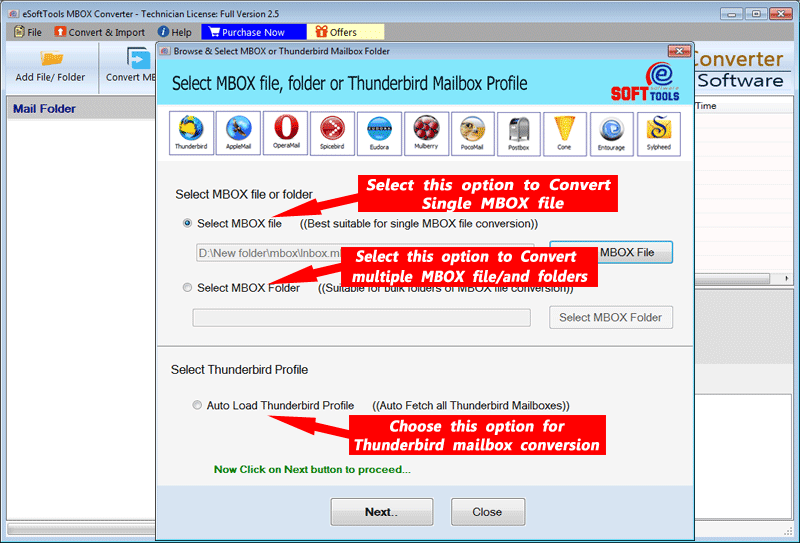
- Load RGE MBOX files with 2 different options Select MBOX file & Select MBOX folder.
- View emails from MBOX files with complete details before the conversion process.
- Choose folders/sub-folders from RGE files and export data from them selectively.
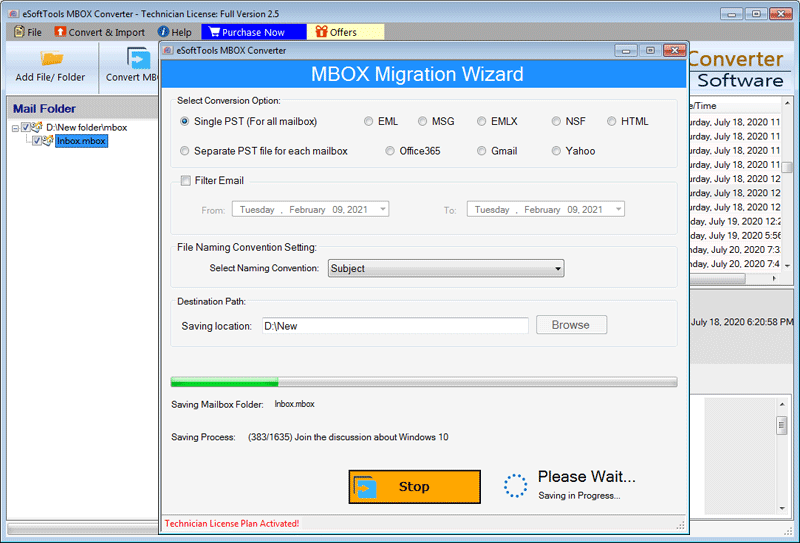
- Convert MBOX files into 10 different conversion formats- PST, EML, EMLX, MSG, HTML, etc.
- Directly RGE file's mail/MBOX folders to Cloud apps like- Gmail, Yahoo Mail, Office365, and more.
- Select the date of emails and export specific emails with a date-wise mail filtering option.
- Choose the desired location from the computer to store the resulting files during conversion.
- Complete the conversion without getting a single bit of data loss or alteration issues.
- Auto-loading Thunderbird email files and conversion to all available export options.
- Convert MBOX files of all sizes and all types including- MBOX/MBX/MBS/MSF or others.
- Smart graphical interface to perform conversion in easy steps without prior experience.
- Execute the tool on PCs running on any version of Windows O/S (Windows 11).
Demo Edition:- Convert RGE MBOX file with up to 25 Emails to each export option free of cost.
Entourage RGE Converter Software - Features with Details
Best Automated Entourage RGE File Conversion tool
The safest way to export emails from RGE files of Entourage email client. Export MBOX from RGE files and convert RGE MBOX into several smart export options. Perform different task with RGE MBOX files through this single tool.
- Convert RGE MBOX to 10+ file types:- Export emails from RGE MBOX files and preserve in more than 10 convertible file types. Convert into PST, EML, EMLX, MSG, HTML, MHTML, NSF, Zimbra, and Thunderbird.
- Migrate RGE MBOX to Cloud mail: - Upload emails from RGE Mail folders to any cloud-based email app with a simple process. Export emails to IMAP mail apps like- Gmail, Yahoo Mail, Office365, Outlook, and more.
Working process >> How to Convert Entourage RGE email files?


Load RGE MBOX with 2 options
Into the software load RGE mail files with two different file selection modes: -
- Select MBOX file:- from a specific location add an RGE MBOX file.
- Select MBOX folder: - choose a folder containing multiple MBOX files (including sub-folders).

Open & Read MBOX Emails
Directly open MBOX files of Entourage mail inside the software to read their inner emails. View emails in their original form with all their associated details. Load mail folders from MBOX and view every email one by one. Each email read with complete information including- date, subject, message body, attachments, etc.

Select and Export Chosen Folders
At one time, load multiple folders/MBOX files and get the ability to perform the selection of required folders. Select the needed folders from the list of MBOX folders from preview panel. With this selection, export/convert emails from only chosen MBOX mail folders.

Mail Filtering by Their Date
It is possible to filter emails through the mail filter option and export specific emails from MBOX files. Select start and end date of emails and extract only emails of selected dates. With an instant process, export every needed email with advanced email filter option.

Saving Location Self-Select
Choose a location on your hard drive where you want to save all your resulting files. Before the conversion process, select this saving location and the new files user will get on this path as the output.

Conversion without modification
All mail folders and emails export with their original data without getting any single changes. Emails export with all their linked details including- TO, BCC, CC, From, Subject, Message Content, Attachments etc.

Convert Thunderbird Emails
Also, able to convert/export thunderbird emails to Outlook and other conversion formats. Provides a special option to add Thunderbird profile's mail folders automatically in single click. Smoothly convert all or specific Thunderbird emails with ease.

Support of all MBOX file types
Convert MBOX files of all kind including- MBOX, MSF, MBS, MBX, and others with this single tool. Perform conversion of MBOX files which is exported from Entourage RGE files as well as the convert MBOX files those are created from any other email program.

Intuitive Graphical Interface
Without prior knowledge, users can use the software to smoothly perform the RGE MBOX Conversion. Graphical interface of this software is simple and easy and any kind of users can easily operate it to export/converter Entourage email files.

Windows O/S Compatibility
Designed to work on Windows installed machines for RGE file conversion. Entourage RGE MBOX files convert with ease using your windows computer. Easily run this program on Windows 11, 10, 8.1, 8, 7, XP, Vista, and older version.

Free RGE Email Conversion
Try this software for free to convert Entourage email files. Convert Mail files with their 25 email items without spending a single penny. With this demo variant, test all the software function before poaching its paid license.