If you are trying to access EML files in Microsoft Outlook and don’t know where to start, you are not alone. Outlook does not directly support EML files for bulk management, so the best way is to convert your EML files to PST format.
To make this process easy and risk-free, we have reviewed and listed the top 5 EML to PST converter software of 2025. Whether you are a professional user or an individual looking to migrate personal email data, these tools are safe, fast, and extremely user-friendly. Let’s see.
What is EML to PST Converter Software?
Outlook does not natively support bulk import of EML files, so users have to convert EML to PST files of MS Outlook. This allows them to import a large number of EML files and emails into a single PST and then import that PST file directly into Outlook.
The EML to PST Converter software is the tool that makes this task easy and safe. It easily converts email files from .eml format (used by clients like Thunderbird, Windows Live Mail, etc.) to .pst format for Microsoft Outlook.
It helps businesses migrating to Outlook, and provides fast, secure and error-free email transfer.
Top 5 EML to PST Converter Software of 2025
For the performance, accuracy, and advanced functionality in EML to PST conversion, the following tools are emerging as the top solutions in 2025. Although these tools are available under different brand names, each tool offers the same powerful features, and professional-level email migration experience.
1. eSoftTools EML to PST Converter
A trusted name in the field of email file conversion, eSoftTools EML to PST Converter software offers advanced features optimized to migrate high-volume EML files instantly. Its fast processing, accurate results, and user-friendly interface make it a top choice in 2025.
Key Features:
- Convert EML to PST, MSG, MBOX, EMLX, HTML, and more.
- Direct migration to cloud platforms (Office 365, Gmail, IMAP)
- Add and convert unlimited EML/EMLX files at once
- Preview emails from EML content before conversion
- Apply mail filters by Date, To, From fields.
- Save PST files to a custom location on Windows
- Naming convention for structured email saving
Ideal For:
Professionals handling bulk email exports with a need for speed, flexibility, and accuracy.

2. SysInspire EML to PST Converter
Known for its seamless workflow, SysInspire EML to PST Converter software allows fast conversions with zero dependency on Outlook. It supports multiple file types and cloud migration options—making it perfect for users with no prior technical expertise.
Key Features:
- Convert EML to PST, MBOX, MSG, NSF, HTML, and more
- No need for Microsoft Outlook installation
- Bulk file insert and conversion
- Cloud export : Office 365, Gmail, Yahoo, etc.
- Email preview panel with full metadata display
- Maintains formatting and folder hierarchy
Ideal For:
Non-technical users and IT admins looking for a straightforward, multi-format conversion tool.

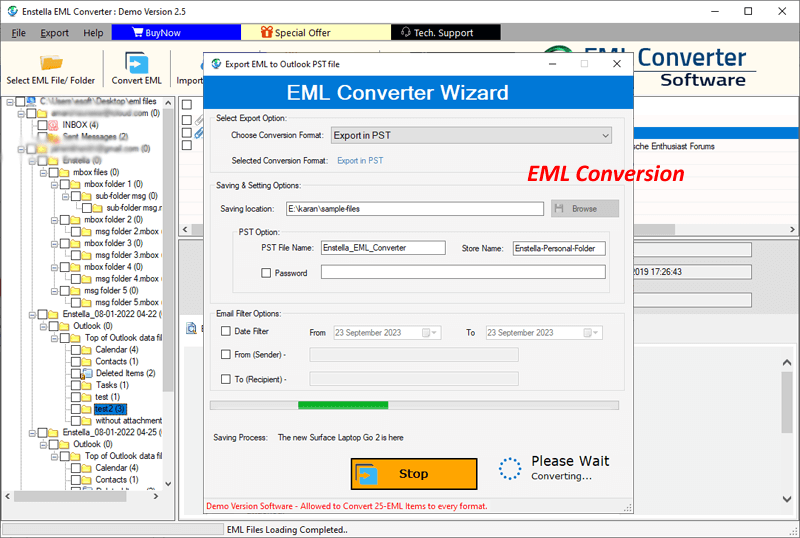
3. Enstella EML to PST Converter
Enstella’s EML to PST Converter focuses on providing professional-level conversions with a simple and clean interface. It supports various input modes and file formats while ensuring complete protection of email structure and metadata.
Key Features:
- Supports dual input modes: Select file or folder
- Converts EML to PST, MSG, HTML, MBOX, NSF, Zimbra (TGZ), etc.
- Export directly to cloud (Gmail, Office 365, and IMAP accounts)
- Built-in preview pane for viewing emails and attachments
- Compatible with Windows 11, 10, 8.1, 8, 7, and earlier
- User-defined save location for PST output
Ideal For:
IT teams and corporate users needing multiple export options with secure performance.
4. Regzion EML to PST Converter
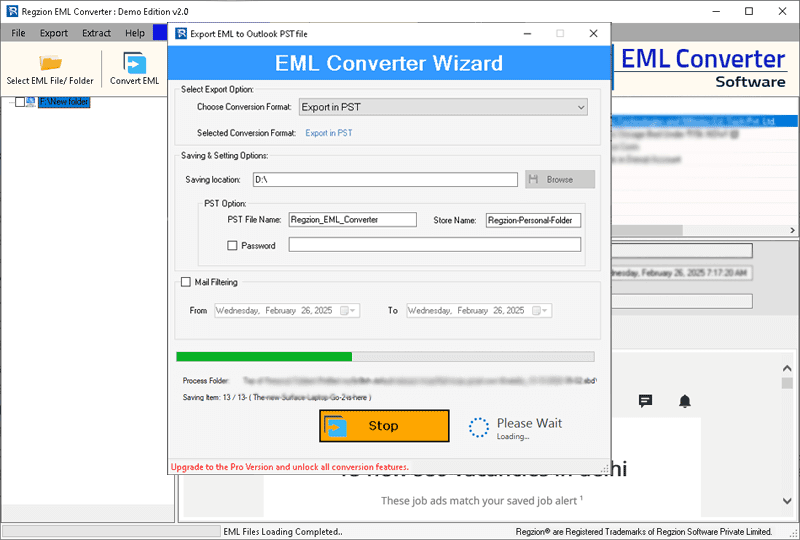
Fast, modern and suitable for beginners, Regzion’s EML to PST Converter is designed for users who need quick results with minimal effort. Its speed, accuracy and intuitive design make it ideal for everyday email migration tasks.
Key Features:
- Convert EML to PST, EMLX, MSG, and HTML
- Export to cloud services (Office 365, Gmail, IMAP)
- Triple preview modes: EML body, attachments, headers
- Advanced email filter by date, sender, or recipient
- Maintains original folder and subfolder structures
- Simple graphical interface with step-by-step process
Ideal For:
Home users, small businesses as well as large enterprises looking for a fast, no-fuss migration tool.
5. SoftMails EML Converter
A powerful and secure tool, Softmails EML Converter is designed to handle both small and enterprise-level migrations. With no dependency on Outlook and support for multiple formats, it is a complete solution for users migrating to Microsoft Outlook.
Key Features:
- Convert EML to PST, MSG, MBOX, NSF, HTML, and more
- Preserve email attributes, formatting, and hierarchy
- Outlook-independent conversion
- Export emails with attachments
- Clean interface for all user levels
- Preview emails before conversion
Ideal For:
Enterprises as well individuals managing email migrations across multiple email clients or formats.

Final Thoughts
If you are planning to migrate from an EML-based email client to Microsoft Outlook, it is extremely important to choose the right EML to PST converter. All five tools listed above are:
- Easy to use
- Highly reliable
- Compatible with Windows OS
- Supportive of cloud migration
- Built to preserve your data integrity
Choose the one that best suits your workflow, technical environment, and email volume requirements.
Frequently Asked Questions (FAQs)
Answer: It is a specialized tool that converts EML files (generated from apps like Thunderbird or Windows Live Mail) to PST files used by Microsoft Outlook.
Answer: Yes, all the listed tools perform EML to PST conversion without Outlook installed on your system.
Answer: Yes. Each software offers a demo version that allows users to convert a limited number of emails (usually 25 per folder) for free.
Answer: Yes, all these tools are compatible with Windows 11, 10, 8.1, 8, 7 and even older versions.
Answer: Absolutely. You can manually select specific files or apply filters (date range, sender, recipient) before conversion.
Answer: Yes. These tools support various output formats like MSG, MBOX, HTML, NSF and also allow migration to cloud services like Office 365, Gmail, and IMAP.

