OST to MSG Converter Software
Advanced technology for Outlook OST to MSG file conversion. Smoothly convert OST to MSG files with Outlook items using this professional software. Get user-friendly interface and advanced functions for smooth operation of conversion.
- Convert OST to MSG in batch mode (multiple files at a time).
- Perform Conversion with inaccessible OST files.
- Export all Outlook Mailbox Items from OST to MSG files.
- Save each Outlook item as a separate MSG file with complete information.

OST to MSG Converter Software - Key Features

Instant Fast Software Delivery via Email

- Superlative software solution for direct Outlook OST to MSG File conversion.
- Convert OST to MSG file format with all Outlook items- Email, Contacts, Calendar & others.
- Assists in preserving each OST file's Outlook item as separate MSG file.
- Supports to recover Outlook items from corrupt/ encrypted & orphaned Offline OST files.
- Open OST Files and shows available Outlook items from OST files before conversion.
- Enables extracting Outlook items from selective/chosen folders of OST files to MSG files.
- Each Outlook item exports while retaining its originality, properties, and formatting.
- Offers to convert OST to more available options - PST, EML, MBOX, vCard, Zimbra, and more.
- Facility to directly upload Outlook data from OST files to Cloud email services.
- Perform conversions instantly without the need for the MS Outlook application.
- Capable of working with OST files of Outlook 2021, 2019, 2016, 2013, and earlier versions.
- Easy access to all software functions with easy and smart graphical interface.
- Executable on computers running Windows 11, 10, 8.1, 8, 7, Vista, XP, & other editions.
Demo Edition:- Fastest Free OST to MSG Conversion with 25 items from every folder.
OST to MSG Converter Tool - All Features
Speedy Solution to Convert OST to MSG Outlook files
Best OST to MSG converter tool to extract Outlook items from OST files and save as MSG files. Convert OST files with emails, contacts, calendar, tasks, and other items. Save every Outlook item separately to MSG files (each item saves in separate MSG file).
Allows converting OST files of any condition - corrupted/ orphaned/ encrypted as well as healthy. Complete conversion of multiple OST files simultaneously and get many more smart options inside this single tool.
Working Steps >> How to Convert OST to MSG Outlook files?


Convert OST to MSG in Bulk Mode
Software enables the conversion of multiple OST files in a single process. The available bulk file conversion mode permits users to import multiple OST files and convert them in a single go. Users can add any number of OST files and convert them all at once safely without any issues.

Conversion with all Outlook Items
Extract any Outlook items from OST files and save them as separate MSG files. Convert OST to MSG with Outlook emails, contacts, calendars, tasks, notes, journals or other items. Save each item to MSG files in its original format with all linked items and information.

OST Convert to 10+ More Formats
Get the facility to convert OST not only to MSG but also to various other file formats. Apart from MSG, there are more than 10 other file format options in which users convert OST. Export/Change OST to PST, EML, EMLX, HTML, MHTML, MBOX, Zimbra, MBOX, vCard, ICS, CSV, and Thunderbird.
Upload Outlook OST to Cloud Mail
Not only conversion but also upload Outlook items from your OST files to multiple cloud email services. Migrate OST files to cloud email platforms like Gmail, Yahoo Mail, Office365, and Outlook.com. Also, transfer data from OST to other webmail programs with OST to IMAP migration feature.

Open OST and Read Outlook Items
Supports to work as a free OST file viewer software to open OST files without Outlook. Easily add OST files inside the software and get a preview of each Outlook item available inside OST. View all folders and items from any OST file in its original form before beginning conversion.

Export Items of Specific OST folders
Enables selecting folders containing required items to export from OST files. Has preview panel where it shows the available data of OST files and on its right side, it shows a list of internal folders of OST files. From this list, users can choose folders from which they want to export Outlook items.

Every Outlook Edition Supported
Has the ability to recover and convert OST files of all MS Outlook versions. Easily convert OST files generated from Outlook 2021, 2019, 2016, 2013, 2010, 2007, 2003, 2000 and any other older version. Convert OST files without facing any Outlook version or size restriction issue.

User-Friendly Graphical Interface
Software is easy to operate and all types of people (technical and non-technical) can easily access and use all its functions. Without any prior experience, you can use the software and perform the conversion easily by just applying a few simple clicking steps.

All Windows Editions Compatibility
Specially designed for Windows users to perform OST to MSG conversion. Users can use this tool on their computer that is running on any version of Windows O/S - 11, 10, 8.1, 8, 7, XP, Vista, or earlier versions. This software will work equally on all versions.

Free OST to MSG Conversion
Converting OST files to MSG and other available conversion formats is free with the demo version. Just take the help of the free OST to MSG converter demo version and convert OST file up to 25 items per folder. Use this demo version and test all software functions for free before purchasing a paid license.
eSoftTools OST to MSG Converter Software
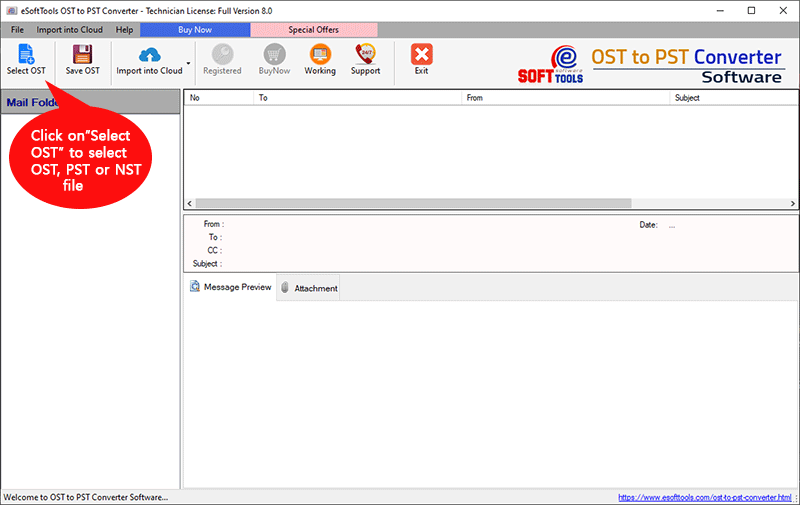
eSoftTools OST to MSG Conversion Software first screen

Add Outlook OST files
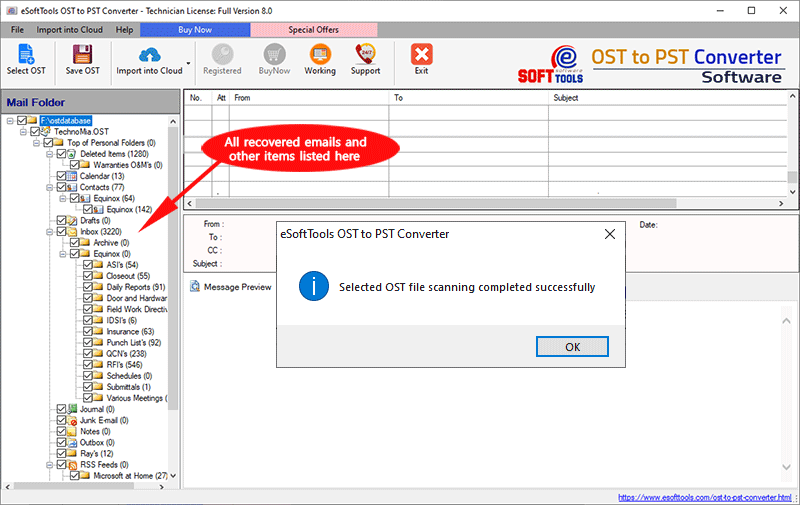
Outlook OST Mailbox scanning
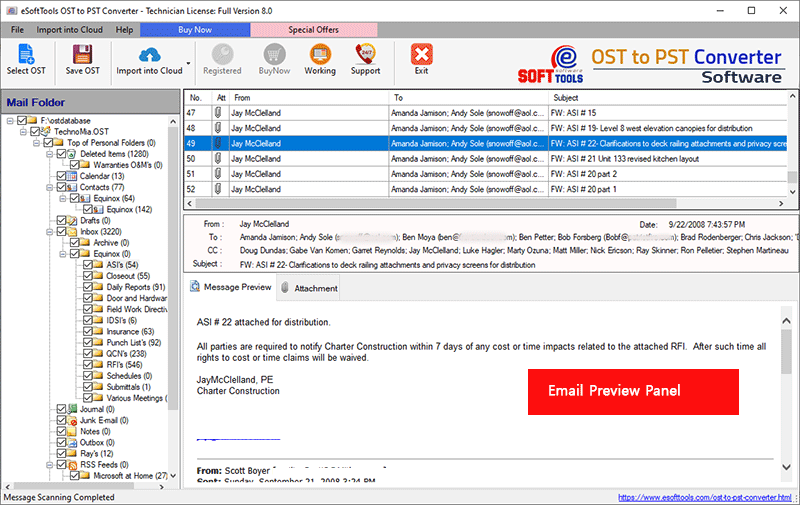
View Outlook Contacts from OST files

Outlook OST to MSG file conversion process
Software Comparison
| Software Features | Trial Version | Full Version |
|---|---|---|
| Convert OST to MSG files | ||
| Export Outlook Items from OST with every details | ||
| Convert OST to PST, and other available export options | ||
| Outlook OST Item preview | ||
| Unlimited OST File Conversion | Convert OST to MSG with 25 items from each chosen folder | |
| Download Now | BuyNow |
Software Specification
Trial Limitations
Quick Free OST to MSG File Conversion with 25 items from every folder
Software Info
Version
v12.2
MS Outlook all editions (upto 2021)
License
Personal, Corporate, Technician
Language Supported
English, German, Italian, French, Spanish
System Requirements
Processor
Intel® Pentium Class
Operating System
Windows
Hard Disk Space
50 MB of free hard disk space
RAM
Minimum 512 MB is required
Software Delivery
Electronic
YES
Mode
Delivery by E-mail
Supported Windows OS
Works with all windows O/S editions 11, 10, 8.1, 8, 7, XP, Vista, & below editions
Frequently Asked Questions (FAQ)
How to Convert Outlook OST to MSG files with OST to MSG Converter software?
- Press Select OST button and choose a conversion mode.
- Select Single OST File Conversion or Bulk OST File Conversion.
- Add OST with selected conversion mode and click on Start Scanning.
- Load Outlook mailbox folders and items from OST files.
- Choose folders from those you want to export from OST.
- Press Save OST button and select Export to MSG conversion option.
- Apply other settings of mail filter, naming convention, & saving location.
- Finally, press Convert button and export Outlook OST items to MSG files.
See complete steps: - How to Convert Outlook OST to MSG files?