How to Export & Convert Live Mail Contact to Outlook?
Safely convert Windows Live Mail contact.edb files to Outlook PST, MSG, vCard and CSV file format.
Download this smartest eSoftTools Windows Live Mail Contact Converter software. Using this tool easily contact Live Mail contact.edb files. With this single software, export Live Mail Contacts to existing Outlook Profile, New PST file, Outlook MSG, CSV, and vCard files.
Step-1)
Download & Launch eSoftTools Live Mail Contact Converter Software on a Windows computer.
Download & Launch eSoftTools Live Mail Contact Converter Software on a Windows computer.
- Select Live Mail Contact EDB file: - Click on Browse or Search button & add a WLM contact.edb file manually.
- Select default location of Live Mail Contact EDB File: - Use this option to automatically load all WLM contact file from its default storage location.
Choose a mode of adding Live Mail contact file and add them: -
Press the "Next" button after adding WLM Contact files.

Step-2)
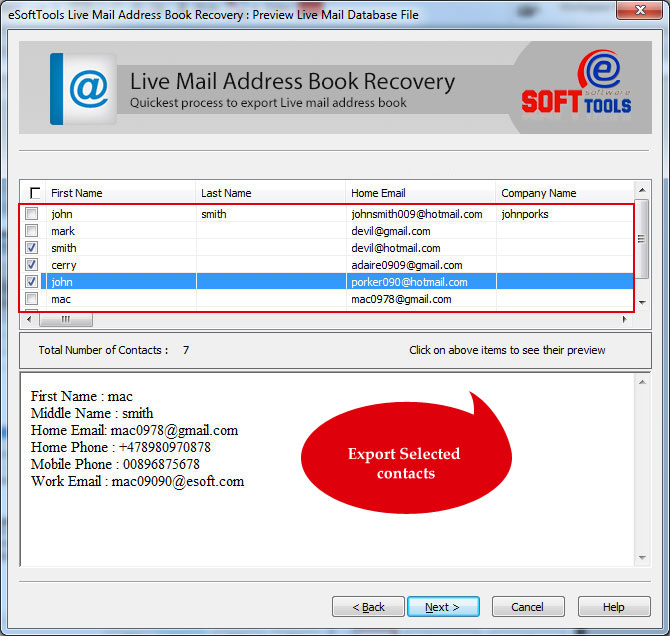
Load contacts from the imported WLM Contact files and get a preview of each contact with all their linked information.
See Live Mail Contacts and make selection of contact that you want to export.
After selection of contact, click on the Next button.
Step-3)
Select Export All Items or Export Selected Items and choose a conversion format in which you want to export Live Mail contacts: -
Select Export All Items or Export Selected Items and choose a conversion format in which you want to export Live Mail contacts: -
- Export to New PST file: - Export and Save Live Mail contacts to a new MS Outlook PST file (Unicode).
- Export to Default Outlook Profile: - Transfer Live Mail contacts to Outlook existing profiles.
- Export to Separate Outlook *.msg file: - Save each contact to separate Outlook MSG file.
- Export to vCard(*.vcf) file: - Transfer contacts from Live Mail Contact.edb to vCard (VCF) file.
- Export to .CSV file: - Save Live Mail contact in Comma separated values (CSV files) for MS Excel.
After all selections, click on Browse choose a saving location to store the resulting files.

Step-4)
Lastly, press the Next button and start converting or exporting Live Mail contact to Outlook PST or your other desired format.
Lastly, press the Next button and start converting or exporting Live Mail contact to Outlook PST or your other desired format.
