Mailbox.org Email Backup & Migration Software
Safest solution with smart functions for email migration from Mailbox.org account. Extract emails from Mailbox.com account mail folders and save locally or migrate to different email service. Flawless email export with fast process and without the need for technical skills.
- Download emails from mailbox.org account and save locally.
- Offers 10 distinct file types to export/save emails as local files.
- Direct Mailbox.org email transfer to other web email platform.
- Supports folder-wise email exporting - export chosen folders.
- Complete email migration and backup with minimal efforts.

Key Features of Mailbox.org Email Backup and Migrator Program

Instant Fast Software Delivery via Email

- Powerful solution to migrate and backup Mailbox.org account's emails with smart process.
- Download emails in the form of PST, EML, EMLX, MSG, HTML, Thunderbird, MHTML, MBOX, & PDF.
- Backup Mailbox.org Email to PST file (Unicode) for importing in any edition of MS Outlook.
- Archive Mailbox.org mail folders to MBOX files in 2 modes - Single MBOX & Separate MBOX.
- Saving each email as individual files with backup format- EML, EMLX, MSG, HTML, MHTML, & PDF.
- Direct import Mailbox.org emails/mail folders to Thunderbird configured email profiles in one click.
- Smoothly migrate emails from Mailbox.org to Office365, Gmail, Yahoo Mail, and IMAP Account.
- Add a new folder with your preferred name on the webmail platform to import/store emails.
- Allows making Mailbox.org mail folders selection and export emails from only selected.
- Maintains each email in its original form at both source and destination during export operations.
- Save email with all properties- To, From, BCC, CC, Subject, Message Content, Attachment, etc.
- Email date filter option that allows users to specify emails to export based on sent/received dates.
- Naming convention to give name to new files basis of email “Date”, “Subject”, and “From” attributes.
- Enable users to manually choose a path form their local drive for storing downloaded backup files.
- Available with graphical interface for easy execution of email backup/migration with simple clicks.
- Executable on computer running on Windows O/S (any edition) - 11, 10, 8.1, 8, 7, XP, Vista, and older.
Available Free Demo : Backup or Migrate 25 emails from each chosen Mailbox.org mail folder free.
Mailbox.org Email Exporter - Features with Details
Error-free Mailbox.org Email Export Solution
Great utility with smart functions to download as well as shift emails from Mailbox.org account's mail folders: -
- Save Mailbox.org Emails to Local Drive: - Download emails from chosen single as well as multiple Mailbox.org mail folders. Extract and preserve emails in saving formats- PST, EML, EMLX, MSG, HTML, MHTML, Single MBOX, Separate MBOX, PDF files. Plus, be able to direct import Mailbox.org emails into Thunderbird profile.
- Migrate Mailbox.org Emails to Webmail/Cloud: - Shift mail folders (single, multiple or all) from Mailbox.org to different email services. Move mail folder directly to Office365, Gmail, Yahoo mail, & IMAP based other email services.
Know More >> How to Backup or Migrate Mailbox.org Emails?


Import & Save Emails in Outlook PST
Take Email Backup from Mailbox.org account to Outlook PST files. Save single, multiple and all folders of Mailbox.org account mailboxes to a single PST file. Get new PST file in Unicode format for using in any older to newest edition of MS Outlook. Plus, get the ability for splitting large resulting PST file into smaller sized PST files.

Saving Each Email as Individual File
Extract emails from mail folders of Mailbox.org account and save each email as a separate file to your local drive. Preserve email as individual with complete relevant information- Attachment, Message, and metadata. Function available with 6 different file types including - EML, EMLX, MSG, HTML, MHTML, and PDF.

Save Mailbox.org Emails in MBOX
- Single MBOX: - Extract emails from multiple mail folders and preserve all in a single MBOX file.
- Separate MBOX: - Extract mail folder and save each as separate MBOX file.
Export emails from mail folders of Mailbox.org account into MBOX files:

Import Email into Thunderbird Profiles
Special option is available to import emails directly into Thunderbird email client. When users select this option the software automatically detects whether Thunderbird email client is available or not. Also, it automatically gets the storage location of the configured email profile and imports all the selected email folders from Mailbox.org account.

Backup & Migrate Selected Folders
Enables users to select only the folders from which they specifically want to export emails. Allows to avoid exporting emails from unnecessary mail folders and speeds up the export process. Users can easily select single folder, multiple folders as well as mailbox with entire folders for export.

Preserve Email in Original Format
Completes email backup and migration by keeping all emails in original format. Never deletes or changes even a single email from source account of Mailbox.org. After migration or backup users will get resulting emails with original formatting and all properties - TO, BCC, CC, Subject, From, Date, Attachments, Message Body with complete styles, hyperlinks, images and other elements.

Date-Wise Email Filter and Export
Available date based email filter function will extract only the required emails and exclude unwanted emails from export. Specify the date range by selecting the start and end date of the period in which you sent or received specific emails. Speed up the export by selecting only the emails of the required dates for export.

9+ Naming Convention Formats
Within the software users will get naming convention feature to assign name to newly created files. It appears when users select different email saving formats like- EML, EMLX, MSG, HTML, PDF and MHTML. It includes 9+ formats that are used to name the new files based on the emails from, subject and date fields. Choose any one format and provide name to new files based on selected format.
Input New folder in Webmail Account
During email migration from a Mailbox.org account to an IMAP or cloud email program, users will be able to insert a new folder in their destination email account. All mail folders will be imported into this folder by the software. Also, users can name this folder as per their choice.

Select Backup Files Saving Location
During the email backup process it is possible for the user to select his desired location to store the resultant files on his local drive/external drive or network drive. Choose any location from your computer and store all the backup files there easily.

Simple to Use Software with Smart GUI
Complete GUI based software to perform backup and migration operations easily by both technical and non-technical persons. The software is very easy to operate even without any prior technical skill knowledge or experience.

Working on all Windows O/S Editions
Available to work exclusively on computers running on Windows operating system. It is easy to download, install and use on any old to new version of Windows O/S - 11, 10, 8.1, 8, 7, XP, Vista and other versions.

Free Mailbox.org Backup & Migration
Testing software before making purchase is also possible with free demo of Mailbox.org email backup and migration software. Easily download this free demo and check all software functions. Be able to backup and migrate 25 items from each folder at no charges. After getting a satisfactory results, you can then upgrade to its paid version.
eSoftTools Mailbox.org email Backup & Migration Software

Mailbox.org email Backup/ Migration software

Mailbox.org email Account Login

Choose required Mailbox.org email account mail folders

Download Mailbox.org email to different formats

Download Mailbox.org email to Local drive

Import Mailbox.org email to cloud apps

Migrate Mailbox.org email to Office365

Migrate Mailbox.org Emails to Gmail
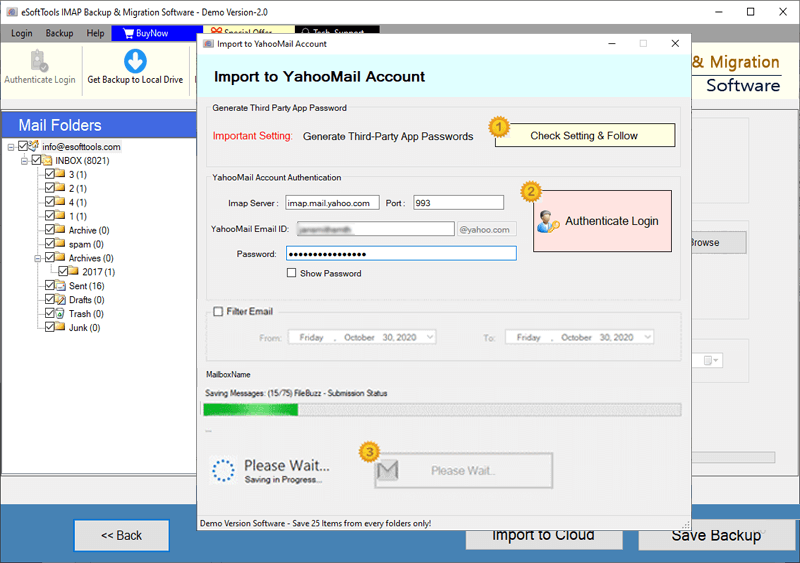
Mailbox.org Emails export to Yahoo account

Export Mailbox.org account emails to Outlook.com/ Hotmail

Migrate emails from Mailbox.org email to other imap mail app
Software Comparison
| Software Features | Trial Version | Full Version |
|---|---|---|
| Backup and Migrate Emails from Mailbox.org | ||
| Save Emails locally in PST, EML, MSG, PDF, MBOX, and Other Formats | ||
| Migrate Mailbox.org Emails to Gmail, Office 365, Yahoo Mail & Any IMAP-Compatible Account | ||
| Save Each Mail Folder as Separate MBOX | ||
| All Mailbox.org Mail Folders into Single MBOX File | ||
| Import Mailbox.org Emails directly into Thunderbird (Auto-Detection Enabled) | ||
| Date-Based Email Filters for Specific Email Export | ||
| File Naming Convention Options | ||
| Complete Mailbox.org Email Backup & Migration Support | Exports up to 25 emails per folder with free demo | |
| Download Now | Buy Now |
Software Specification
Trial Limitations
Available free edition of Mailbox.org Email Backup and Migration software, enables users can backup and migrate 25 emails from each selected folder with zero charges.
Software Info
Version
v6.0
Mailbox.org
License
Personal, Corporate, Technician
Language Supported
English, German, Italian, French, Spanish
System Requirements
Processor
Intel® Pentium Class
Operating System
Windows
Hard Disk Space
50 MB of free hard disk space
RAM
Minimum 512 MB is required
Software Delivery
Electronic
YES
Mode
Delivery by E-mail
Supported Windows OS
Works with all windows O/S editions 11, 10, 8.1, 8, 7, XP, Vista, & below editions
Frequently Asked Questions (FAQ)
How to Take Email Backup from Mailbox.org Account to Computer in Windows?
- Get the exe file of software for Mialbox.org Backup and perform its installation on a Windows PC.
- Launch the Mailbox.org backup software in your computer and select IMAP Server as source.
- Input the login details of Mailbox.org email account (Email Address, Password, Port, & Hostname).
- Click on Login button and start loading all the mail folders and get a preview of all folders.
- Choose folder those needed for email export and select saving option/format (PST, EML, EMLX, MSG, HTML, MHTML, MBOX (Single or Separate), PDF, Thunderbird).
- Select destination saving path and apply date filter settings (if needed).
- Click on Save Backup and download emails from Mailbox.org account as your selected file format.
For a detailed guide, visit here: How to Download Emails from Mailbox.org Emails to Computer?
How to Migrate Emails from Mailbox.org to Gmail or other Web email services?
- Start by downloading and installing Mailbox.org Migration software on your windows computer.
- From the list of source email programs select IMAP Server option.
- Add login credentials of Mailbox.org email account- Email Address, Password, Hostname, and Port number.
- Press Login button, authenticate your account, and start loading mail folders from mailbox.org account.
- Choose the mail folders those you want to migrate and click on Import to Cloud button.
- Select the destination email platform in which your want to import Mailbox.org (Gmail, Yahoo Mail, Office365, or IMAP (for unlisted email programs)).
- Insert login details of your destination email account – email address, password, port and hostname.
- Authenticate login of your destination account and start import Mailbox.org emails smoothly.
View Complete Steps with screenshots: - How to Transfer emails from Mailbox.org to Another Web Email Platform?
What file types does this software support for saving extracted Mailbox.org emails?
Does this software work to transfer my emails to a web email service like Proton Mail and others?
Can this software migrate emails from multiple folders of a Mailbox.org account at one time?
Yes, users can easily select one, multiple or even entire folders from Mailbox.org account and export emails all the selected folders at once.
Besides this software, what else do I need for Mailbox.org email backup and migration?
Is there a function available to move some specific emails from a Mailbox.org account?
What version of Windows operating system do I need on my machine to run this software?
What functions will I get in free demo version of Mailbox.org email backup and migration tool?
A free demo version of the software is available, allowing users to test all software functions for free. Users can download and migrate up to 25 emails from each selected mail folder of Mailbox.org account.