Download and Run this windows based eSoftTools MBOX Duplicate Remover Software.
Firstly, press the Add File/Folder button.

Step-2)
Select a mode for importing MBOX files from the available 2 options: -
- Select MBOX File: - Add an MBOX file from a specific location.
- Select MBOX Folder: - Select a folder and load all MBOX files from it at once.
- Auto-Load Thunderbird Profile: - Load all Thunderbird Profile mail folders in one click.
Add MBOX mail file with selected option and click on Next.

Load all the selected mail files/folders in the software
Click on each folder to open them and see their inner emails.

Click on each email and view them with all their email properties and check the duplicates of emails.
View emails and make selection of the folders holding dplicate emails and press Remove Duplicates button.

Step-5)
Apply the necessary settings in the newly opened screen of the software to remove email duplicates.
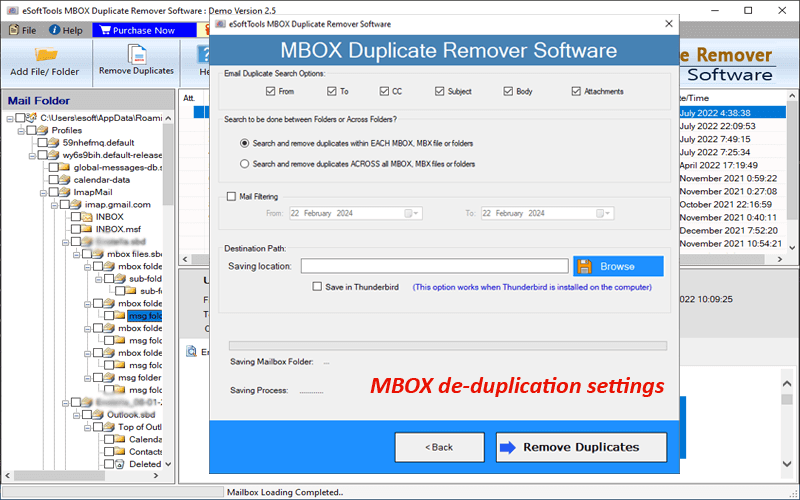
Settings to erase email duplicates from MBOX files with MBOX Duplicate Remover tool: -
- Email Duplicate Search options: - To, Cc, From, Subject, Body and Attachments Select the email fields for which you want to find email duplicates from MBOX files.
Find email duplicates from inside MBOX file or from all selected folders
- Search and remove Duplicate within each MBOX file: - One by one the software will find duplicate emails from each selected MBOX file.
- Search and Delete Duplicate across the folders: - This search operation scans all selected folders and subfolders simultaneously to find email duplicates.
- Mail Filtering: - Select a start and end date to find and remove email duplicates between the specified date range.
- Select file saving mode for storing resultant files
- File Saving Location: - Manually choose the path to store the resulting MBOX files (without duplicates).
- Save in Thunderbird: - Delete email duplicates and save the resulting files/folders to a "Local Folders" path in the Thunderbird profile.
Step-7)
After applying the necessary settings, press the Remove Duplicates button and start removing email duplicates from MBOX files.
