How to Extract Attachments & Email Address from Thunderbird?
With Thunderbird Attachment Extractor software, Extract Attachments & Email Addresses from Thunderbird emails easily.
Most powerful and straight-forward solution, "eSoftTools THunderbird Attachment Extractor Software" to extract atachments from thunderbird mails. Auto-load THunderbird mail file/folder and extract attachments from multiple files with single process. Extract entire or specific type attachments from Thunderbird files in simple clicks.
Press "Add File/Folder" button, from software's first screen

- Select MBOX File:- Choose and add a single Thunderbird MBOX/MSF file in the software manually
- Select MBOX Folder:- Add a folder containing multiple Thunderbird mail files in the software
- Auto-Load Thunderbird Profile:- Auto-fetch Thunderbird mail files/folders from its default storage location.
Select and add Thunderbird profile folders and hit the "Next" button.


Choose all requird Thunderbird mail folders from preview panel of the software and then follow the steps described below to extract Thunderbird attachments & email address:-

- Extract Attachment Folder-Wise:- Generate separate folder for each Thunderbird folder to save extracted atachments
- Extract Attachment Message-Wise:- Create separate folder for each Thunderbird mail and save extracted attachments message-wise
Use any one of these options and make selection of other required option.
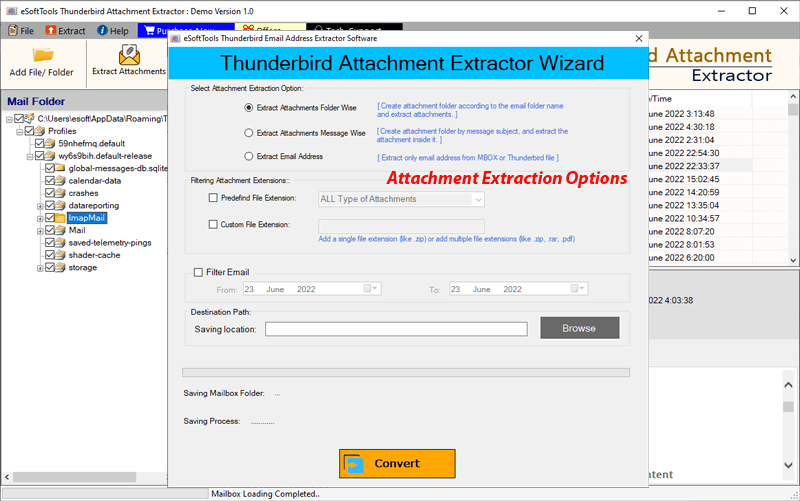
- Attachment filter:- To Extract some specific type attachments select file types/extensions with two different options.
- Predefined File Extension:- Choose your required file type from list of multiple attachments extensions.
- Custom File Extension:- Input file extensions of attachments manually for extraction from Thunderbird emails
(Users can also input two or more extension in a single process)
. - Mail filter:- Use this option and select a start and end date of emails to extract attachments from Thunderbird emails of some specific dates.
- Saving Location:- Choose a location from your drive to save all extracted attachments.
Other Important Settings/options-


- Select Email Filter Criteria:- Make selection of email address field from the options- All, TO, BCC, CC.
- Filter Mail:- Choose a Start and End Date of thunderbird emails to extract email addressess from emails of some specific dates.


