CSV to vCard Converter Software
Windows-based software solution for users who want to export contact data from CSV to vCard (.vcf) files. Export contacts from Excel CSV with all relevant details. Also, get advanced features to make the contact export process smooth and effort-free.
- Effortlessly Convert CSV to vCard/VCF files with Contacts.
- Save CSV Contacts in vCard in 2 Modes - Single vCard or Separate vCard.
- Stores CSV Contacts in 3 vCard variants - 2.1, 3.0, or 4.0.
- Allows naming resulting vCard files with different options.
- Directly Open CSV files for Contacts preview before conversion.

CSV to vCard Converter Software - Features Overview

Instant Fast Software Delivery via Email

- Fastest CSV to vCard File Conversion - Swiftly Transfer Contacts from CSV to vCard/VCF files.
- Perform CSV File conversion to vCard with contact using 2 different options: -
- Create a Single vCard for All Contacts: - Stores all export CSV contacts in single vCard file.
- Create Separate vCard for Each Contact: - Save each CSV contact in their individual vCard file.
- Directly open CSV files - provides a clear contact preview with all linked property from CSV (Displays same as rows and columns in Excel).
- Shows total number of sheets and total number contact records from selected sheet from CSV file.
- Sheet selection from CSV to export contacts (Extract contacts from one sheet at a time).
- Auto as well as manual contacts fields mapping from CSV header and vCard contacts fields.
- Single software that allows converting CSV to 3 different vCard versions - 2.1, 3.0, & 4.0.
- Allows naming VCF files with contact's first name, last name, full name, email address, mobile number, and also offers naming by auto-numbering.
- Remove Duplicacy function to filter similar contacts by first name, last name, and email address.
- Available 2 different Modes for saving resulting vCard files -
- Manual Saving Location Select: - Save new/resulting vCard files to any place on your drive.
- Auto save to source path of CSV: - Selecting this option will save new vCard file to location where you have inserted CSV files for conversion.
- Never makes any changes to CSV files and never loses a single contact.
- Supports all CSV files generated from any software - MS Excel, MS Outlook, Google Contact, Text-editors, or others.
- Completely user-friendly software and can be operated by users even without prior knowledge.
- Specially designed software for Windows O/S - 11, 10, 8.1, 8, 7, XP, Vista, and older.
Free Demo Available : Convert CSV to vCard files and Export 5 Contacts (Per sheet) at a time.
CSV to vCard Contact Conversion Tool - Complete Feature's Details
Smartest Approach to Convert CSV to vCard/VCF
Most reliable utility to convert CSV files containing contacts to vCard (.vcf) files. Efficiently export contacts available in CSV (comma-separated values) stored in rows and columns. Save CSV contacts to vCard 2.1, 3.0 and 4.0 files to get full access on all vCard supported devices and programs.
- Create A Single vCard for All Contacts: - Get all CSV file's contacts in one vCard file.
- Create Separate vCard for Each Contact: - Get separate vCard file for each CSV contact.
Export CSV Contacts to vCard in 2 modes: -
Learn More >> How to Convert CSV to vCard/VCF Contact files?

Displays Contacts from CSV
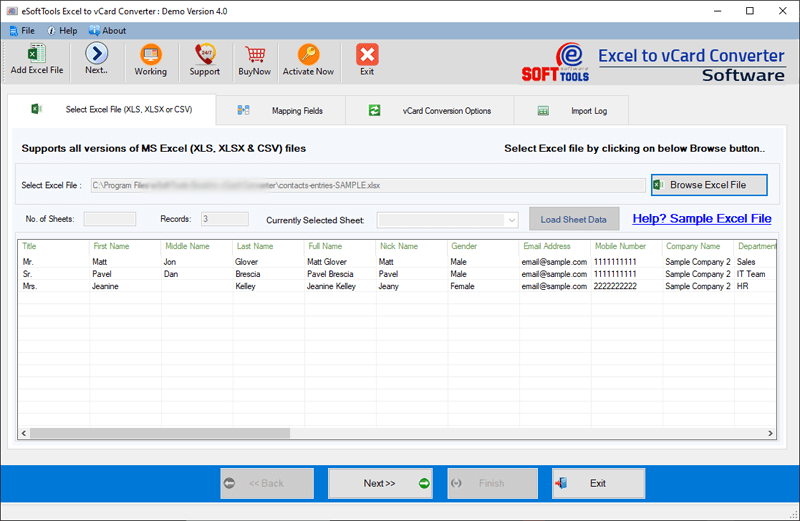
Software opens CSV files directly and displays data in a spreadsheet-style interface, much like Excel. A header row shows contact attributes (one in each column), and each row below displays the corresponding contact details.
Select Sheet to Export Contacts
Displays total number of sheets available in CSV file and lets users choose one of them for export. From only selected sheet of CSV, the software will export contacts to vCard (VCF) format. Also, shows total number of contact records from selected sheet and provides preview of contacts from it.
Contact Fields Mapping Feature
Maps contact fields from CSV file and sorts them into vCard files. Detects similar and equivalent contact properties from CSV header columns and vCard fields and applies them automatically. Also, allows users to manually customize contact fields as per their preference for saving them in new vCard files.
Multiple Options for vCard File Naming
Name new vCard files with various naming options - First Name, Last Name, Full Name, Email Address, Mobile Number and auto-numbering (0.vcf, 1.vcf, 2.vcf). This naming feature is available to save each CSV contact in Separate vCard. For all contacts in one vCard file saving, the software automatically give name to new VCF file as "allcontacts.vcf".
Remove Duplicacy While Export
To prevent exporting duplicate contacts from CSV files to vCard this software offers Remove Duplicay feature. Find duplicates by first name, last name, and email address and stop them from exporting from CSV to vCard.

2 Modes for Saving New vCard files
- Manual Specify saving location: - Choose any location from your drive to save new vCard file.
- Auto-Save to Source Path: - Automatically save new vCard files to the location where you added the CSV file from.
Provides facility to save new vCard file in 2 different ways: -
No Contact Modifications and Loss
No contact information will be lost from the CSV files, and no contact details will be missed from being copied to new vCard files. Each contact will be copied from the CSV to the new vCard files with all associated attributes intact.

Smart Interface for Use with Ease
A software that offers clear graphical interface to easily perform the operation of CSV to vCard/VCF file conversion with contact data. Home users to professional both can easily use the software without using any highly advanced technical skills.

Support for All Windows O/S Editions
CSV to vCard converter tool works on every version of the Windows operating system. Users having computers with any version of Windows O/S (10, 8.1, 8, 7, Vista, XP and older) can easily use this software without no issues.

CSV to vCard Conversion Free Demo
This software is available to everyone worldwide, with a free demo version to try it out before purchasing it. Without spending a single penny, you can perform free CSV to vCard conversion with up to 5 contacts (per attempt).
Mapping Excel/CSV Contact Header and vCard Fields
Available Contact Fields
- Anniversary
- Assistant Name
- Assistant Telephone Number
- Birthday
- Business2 Telephone Number
- Business Address
- Business Country
- Business Post Code
- Business Post Office Box
- Business State
- Business Street
- Business Fax Number
- Business Home Page
- Business Telephone Number
- Call Back Telephone Number
- Car Telephone Number
- Company Name
- Department
- Email-1
- Email-1 Display Name
- Email-2
- Email-2 Display Name
- Email-3
- Email-3 Display Name
- First Name
- Full Name
- Gender
- Hobby
- Home2 Telephone Number
- Home Address
- Home City
- Home Country
- Home Postal Code
- Home Post Office Box
- Home State
- Home Street
- Home Fax Number
- Home Telephone Number
- Initials
- ISDN Number
- Job Title
- Journal
- Language
- Last Name
- Mailing Address
- Mailing City
- Mailing Country
- Mailing Postal Code
- Mailing Post Office Box
- Mailing State
- Mailing Street
- Manager Name
- Middle Name
- Mobile Telephone Number
- Nick Name
- Office Location
- Organizational ID Number
- Other Address
- Other City
- Other Country
- Other Postal Code
- Other Post Office Box
- Other State
- Other Street
- Other Fax Number
- Other Telephone Number
- Pager Number
- personal home page
- Primary Telephone Number
- Profession
- Radio Telephone Number
- Spouse
- Suffix
- Telex Number
- Title
- TTYTDD Telephone Number
eSoftTools CSV to vCard Converter Software
eSoftTools CSV to vCard Converter software

Insert CSV file containing contacts

Preview contacts from csv

Auto-Mapping contact fields

Manualy change contact fields for mapping

CSV to vCard Contact Conversion settings

CSV to vCard/VCF Contact file Conversion
Software Comparison
| Software Features | Trial Version | Full Version |
|---|---|---|
| Convert CSV file with contact to vCard/VCF | ||
| Save COntact to single or separate vCard | ||
| Open CSV file and Preview contact records | ||
| Contact field mapping (auto/manual) | ||
| CSV Conversion to vCard 2.1/ 3.0/ 4.0 | ||
| File Naming (Fisrt Name, Last Name, Full Name, Email Address, Mobile Number, or Auto-Numbering) | ||
| Saving in Destination Path | ||
| Convert CSV to vCard with Unlimited Contacts | Free Version allows to convert CSV to vCard with only 5 contact | |
| Download Now | Buy Now |
Software Specification
Trial Limitations
Free CSV to vCard Converter demo allows to export 5 contact from CSV file to vCard with zero charges.
Software Info
Version
v5.0
CSV
License
Personal, Corporate, Technician
Language Supported
English, German, Italian, French, Spanish
System Requirements
Processor
Intel® Pentium Class
Operating System
Windows
Hard Disk Space
50 MB of free hard disk space
RAM
Minimum 512 MB is required
Software Delivery
Electronic
YES
Mode
Delivery by E-mail
Supported Windows OS
Works with all windows O/S editions 11, 10, 8.1, 8, 7, XP, Vista, & below editions
Frequently Asked Questions (FAQ)
How to Convert CSV to vCard with Contacts using CSV to vCard Converter Software?
- Download eSoftTools CSV to vCard Converter Software for Windows O/S.
- Install this software in your machine, launch it and click on Browse Excel File button.
- Navigate to your CSV file location and select it, then click on Open to load CSV file.
- Select a sheet from CSV file and get preview of contacts list from it.
- Software auto-map contact fields of CSV headers and vCard, (you can manually change them).
- Apply export settings for contact export from CSV to vCard as: -
- vCard Version: - choose a vCard file from options 2.1, 3.0, or 4.0. (Get new vCard files in your chosen version)
- Export vCard file as: - Select vCard file option as - Create a Single vCard for all contact or create separate vCard for each contact.
- File Naming: - select any one option for assigning name to new vCard file. Give name to new vCard as contact first name, last name, full name, mobile number, email address, or auto-numbering.
- Destination Path: - Manually specify any place from your PC to store new vCard files or select option to save vCard to CSV's source location.
- Remove Duplicacy: - Filter duplicates and prevent copying. Select by first name, last name, or email address.
- Finally, click on Next button and start the process to Convert CSV to vCard files with contacts.
Check complete process with screenshots, here: How to Convert CSV to vCard/VCF files?
I have over 1000 contacts in a CSV file, just in one spreadsheet. Will this software allow me to export them all at once to a vCard?
Yes, you can convert a CSV file with one spreadsheet at a time. The software will export all the contacts from the selected sheet of CSV file at once.
What is the contact field mapping function in this software? Is it possible to specify these manually?
On which vCard file version does this software save the exported CSV file contacts?
Does this software support saving all contacts into one vCard file?
Yes, you can save all contacts in one vCard file as well as save each contact in a separate vCard file. Both operations are possible.
What is the file naming function inside this software for CSV to vCard conversion?
As a result of the CSV to vCard conversion, where do I find the new VCF file on my machine?
It this software creates any kind of changes to CSV files for conversion process?
Will a computer with an older version of Windows O/S be able to run this software?
Yes, all new and old version users of Windows O/S can easily run this software without any problem. Run it on Windows 11, 10, 8.1, 8, 7, XP, Vista or even older versions.
What functions are available in free edition of CSV to vCard Conversion tool?
A free version is available that allows users to convert CSV files with up to 5 contacts to vCard files for free. Moreover, this software demo enables users to check out all the available functions of the software without spending money.